
Перейти к основному содержанию
Присоединяйся к сообществу ремонтников - Создай аккаунт

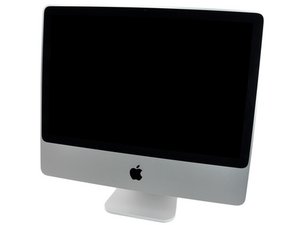
Модель A1225 / Начало 2009 г. / процессор Core 2 Duo с тактовой частотой 2,66, 2,93 или 3,06 ГГц

iMac dead. used as a monitor lcd panel

Hello , First sorry for my English . I use google translator to help me :(

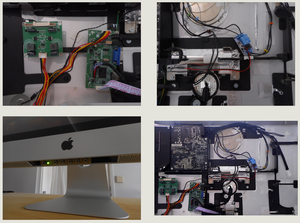
I have everything you need (or so I think) to use my imac lcd panel (panel LM240WU2 ( SL) ( B4 ) ) as a monitor for other pc

http://i62.tinypic.com/112e876.jpg

http://i61.tinypic.com/2mwxct2.jpg

also I connect the cable from the inverter to the lcd

this http://i59.tinypic.com/f10dts.jpg to http://i57.tinypic.com/f2itxd.jpg

Connect the power cord from the iMac ( white ) energy to the panel. and I connect the power adapter to the board vga 12V 2A

but does not work , connect via a PC to give vga video signal and does not work

do I wrong ?

Изображение
Изображение
Изображение
Изображение
Изображение
Изображение
Изображение
Изображение
Изображение
Изображение
Изображение

Help please :(

Отвечено! Посмотреть ответ У меня та же проблема

Это хороший вопрос?

Счет 5
Добавить комментарий

19 Ответов

Выбранное решение

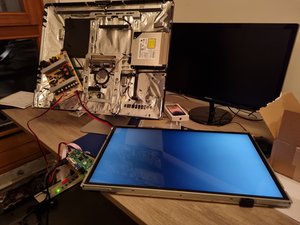
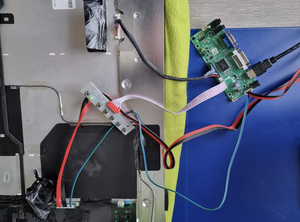
See https://pbase.com/brucemac/2019octdispla... for my successful conversion from a 24” iMac (Early 2009) to a monitor. The inverter board is built into this display, but you’ll need 24Vdc to drive it - Thus, you’ll need a power supply. (unless you can figure out how to make the original PSU work…)

Update (12/01/2020)

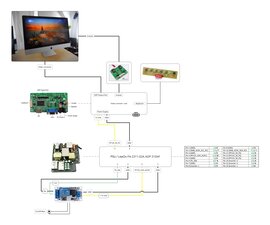
I’ve added a diagram of the boards & cable routing to the display:

https://pbase.com/image/171252938

Help that hopes!!

Был ли этот ответ полезен?

Счет 4

14 Комментариев:

I'd very like to know where did you manage to find your 24Vdc PSU unit ? can't find one of those.. i've all the board and things ready in a box for years now !

из

I found mine on ebay. Search for "5V/12V/24V Universal LCD/LED Power Supply Power Board for LCD " on your favorite search engine, and you'll find plenty.

I bought the light colored one, as you see, though there are several that are dark/black.

This is the one I purchased:

https://www.ebay.com/itm/5V-12V-24V-Univ...

из

The original Apple Delta ADP-250AF B Power Supply can be used with the aftermarket video board.

To drive the backlight, all that is needed is the 24V from the original supply, and the gray & white wire from the aftermarket video board. The gray & white are properly wired in the connector for the backlight; the other end of the 24V connector (the 4 red/4 black) are not used, where the original cable from the PS to the backlight supplies the 24v. Pins 1-5 are 24V, 6-10 is GND, and 11 is P_DIM, 12 is BL_ON (Back Light ON). Thus, the gray & white can be spliced into the factory harness - White to 12 and Gray to 13. (See my pics on the link posted above for detailed pinouts)

When power is plugged into the Delta PS, 24V is always on, as is 12V on pin 5 of the large connector. Thus, the PS can drive both the video card and backlight. The original MB enables other pins such as the 12V on 9, 10, 11 on the large conn (3 to gnd), they are not needed.

I haven't tested this first hand, I expect it would work.

из

This post contains the pin-outs of the Delta PS, and what pins are shorted to enable the 3 12V pins on the large connector:

Power Supply pin (voltage, start other?))

I tested the outputs, and indeed, they work as outlined.

из

Im currently doing this and I don't understand how to use the original PSU to drive the backlight? the 24v pin cable coming from the power supply connected to the 4 red and then the ground connector connected to the 4 black cables does nothing? the Psu can power the monitor board/video board with the 12v but I don't understand how to power the inverter

из

Показать ещё 9 комментариев

Добавить комментарий

Hi,

You can use iMac's PSU to power LCD board controler (see here) but you have to add a bistable relay to enable imac's PSU (see here)

Изображение

Schema

Bye,

Был ли этот ответ полезен?

Счет 3

5 Комментариев:

Hey

First of all Thank you for this good Schema.

I want to build a really similar project soon (only difference is my screen is a "lm240wu2 sl b1") and I am currently sitting here next to my disassembled iMac :D

I understand your schematics but am wondering why the bistable relay is needed? Just to switch on the PSU?

Hopefully I am still able to use the pin layout with a slightly different controller board.

Also would you be able to provide a link or name to your controller board?

Thanks a lot in advance :)

из

Yes the bistable relay is useful to prevent electric shock

из

Do you use the original power supply without a fan? Is that ok?

из

I used the original power supply without fan.

из

I just transformed an iMac 27" into external monitor (HDMI). I will publish sooner, all photos and schematics (PSU electric wire).https://i.postimg.cc/c43SYzRB/DSCN4205.j...

из

Добавить комментарий

Doc, yes it all is connected properly. You did not tell us if you have power on the LCD driver and if the power LED (on the menu bar)comes on. You need a minimum of 12 Volt on that. Also, you hopefully ensured with the person you bought the inverter/LCD driver board from, that it works for your panel. They have to be very specifically wired for your LCD. Just to verify, you should also tell us how you connect the LCD driver board to the PC, and what type of PC you are using. You must use a VGA cable to connect from your computers video card to the LCD driver board

Был ли этот ответ полезен?

Счет 2
Добавить комментарий

You need an inverter mate

Был ли этот ответ полезен?

Счет 2
Добавить комментарий

how do you power your backlight for you lcd ? Because i'm working on a Modification, and so far, i've found that you'll need to bring 24v to the backlight (wich seems connected to your old mac PSU), but if i'm correct, the 24v is powered only after Power On ;)...

Or maybe your board arrived with an AC adaptater wich does at the same time 24 / 12 V ?

Был ли этот ответ полезен?

Счет 1

5 Комментариев:

That voltage is usually supplied by a boost converter and the LED driver on those boards.

из

I have the same problem, does not fit the light lcd, even connecting it to the PSU Mac .

Sure there something I'm not doing well, but is not it ...

из

I am currently working on a project like this one. My LCD is turning on but it’s not displaying things correctly and the inverter has a humming sound. Can anyone help?

из

Any luck? Did the display work before the conversion?

из

you have to connect from LCD Displayboard controler, 2 wires BL_On and P_DIM to LCD power Connect (12 and 13 pins)

из

Добавить комментарий

So 250 and 240 are not the same… I retook all the measures and made a connection based on your diagram (with my specifications). It works… once :-(

When I tried to double check, it went back to a dull screen without changing anything. The BL_ON on CN5 wasn't plugged to anything. Could my card be bugged ?

Where does the BL_ON from CN5 is supposed to be connected ? I tried the 3 and 11 wired of the CN102 but it didn't change a thing…

Here is my diagram

Изображение

Был ли этот ответ полезен?

Счет 1
Добавить комментарий
Изображение

I have unfortunately similar problem. Bought driver based on code on backpanel. Installed everything. lcd has backlight but no image if I duplicate screen from laptop.

Updaten (05/08/23)

Изображение

Why is there no image?

Был ли этот ответ полезен?

Счет 0

10 Комментариев:

@jos8008 you made sure you have the right adapter (LVDS cable) for your monitor? Have you tried a different (other than your laptop) video input source?

из

Check P-DIM wire from controler to screen.

из

Check also from source (mac), the display mode (copy or extended)

из

Thanks for all the comments. I bought a kit to including cables based on the code on the lcd panel. Connected to two different laptops directly and via docking station. All similar outcome: led is green, panel backlight is on, but no image. Maybe screen setting is just too dark? Any advise is welcome, thanks!

из

Hi, I checked all cables, all seem ok to me. I used duplicated screen and extended, but all no image. Led light is green and screen is recognized by my laptop. I can arrange the 2nd screen on my laptop, but I can’t see any image. Any ideas?

из

Показать ещё 5 комментариев

Добавить комментарий

Good afternoon! Why did you put two ground outlets, one (the original one that came with the iMac) and another on the new PSU when in the original configuration there is only one. Thank you. Best regards

Был ли этот ответ полезен?

Счет 0

1 Комментарий:

@marosa32, to whom are you directing your question? Several of us has presented our successful conversions.

In my case (bmac18234), I brought the ground in from the line and attached it to the metal frame. From there, I added a ground jumper from the frame to one of the mounting points on the power supply, as that supply's power input connector contained only the line and neutral, despite having a 3 positions.

из

Добавить комментарий

Hi,

You can use 27" iMac's PSU (LiteOn PA-2311-02A ADP-310AF) to power LCD video controler and inverter.

Изображение
Изображение

Был ли этот ответ полезен?

Счет 0

2 Комментариев:

Cool! Good information, and applicable to me! I use a 2017 iMac (Retina 5K, i5 Intel, Radeon Pro 575 4 Gb, 16Gb, 1Tb Fusion drive) as my daily driver, and also have an M2 MacBook air. I've often thought that when the iMac needs replaced, that I would convert it to a monitor and drive it with whatever Mac I have at the time.

Do you have part numbers/descriptions of the needed boards? I see the following:

LED Backlight board

Video Controller card

Keyboard (which probably comes with the VCC

Board with blue components (power relay?)

из

Yes, look at label at back of your LCD, you will find "THE special" video controller (included : LED Backlight board and Keyboard) on Amazon or Aliexpress for YOUR LCD (ex : for my 27" iMac's LCD -> LM270WQ1-SDA2).

The Board with blue components is used to enable PSU of IMAC to video controller (ex : Hailege 12V One-button bisstable self-locking relay module)

из

Добавить комментарий

Hello,

I have an imac a1225 with the Apple ADP‑240AF B powerboard. I wonder if 250AF B and 240AF B power boards have the same pins schematic. I tried to connect it to my video controller card but I get a faded/dull image.

My connection between CN5 to CN102 is has followed :

CN5 >>>> CN102

1 GND >>>> Pin 1

2GND >>>> Pin 7

3ADJ >>>> Pin 11

4BL_ON >>>> Pin 5

512V >>>> Pin 8

612V >>>> Pin 9

I also connect the pin 4 (PS_ON) with a ground pin so my screen starts when I turn the switch of my multi plug.

I tried to invert Pin11 and pin5 but get a black screen.

There is something I am doing wrong but cannot find what.

If actually 240AF B and 250 AFB are the same, then my connection are wrong, I guess.

But I would like to be sure before screwing everything up !

Any help would be super appreciate ! Thanks

Изображение
Изображение

Был ли этот ответ полезен?

Счет 0
Добавить комментарий

There are two links so:

  • BL_ON -> BL_ON
  • P-DIM or ADJ from PSU to video controler -> P_DIM

There is also a "12Volts" jumper on video controller to enable links
or
it misses 24 volts connections (imac 24" needs 5 links).

On PSU 250AF-B

1 GND -> Pin 1
2 GND -> Pin 7
3 ADJ - > Pin 8
4 BL_ON -> Pin 2
5 12V -> Pin 9
6 12V -> Pin 10

PS_ON needs 12 volts to enable PSU (from 'bistable switch") and after, video controler.

Изображение

Был ли этот ответ полезен?

Счет 0
Добавить комментарий

Merci !

Do you know if this will apply to the 240AF-B model ?

When you say "There is also a "12Volts" jumper on video controller to enable links"

does it means I need to physically change something on the video controller ?

Only jumpers I see on the card is here, I suppose…

Изображение

Был ли этот ответ полезен?

Счет 0
Добавить комментарий

yes, this jumper enables 12volts but there is no red wired connection

Изображение

Do you see this schema on your PSU ?

On PSU 250AF-B

1 GND -> Pin 1
2 GND -> Pin 7
3 ADJ - > Pin 8
4 BL_ON -> Pin 2
5 12V -> Pin 9
6 12V -> Pin 10

Был ли этот ответ полезен?

Счет 0
Добавить комментарий

Hum… Red wire was on the board when I received it. It is connected to the LVDS plug…

If I don't use a bistable switch I just need to connect like this ?

1 GND -> Pin 1

2 GND -> Pin 7

3 ADJ - > Pin 8

4 BL_ON -> Pin 2

5 12V -> Pin 9

6 12V -> Pin 10

What do you mean by "Do you see this schema on your PSU ?"

Был ли этот ответ полезен?

Счет 0
Добавить комментарий

no, it won't work because PSU needs a connection to pin 1 and 3 to enable it.

Изображение

Был ли этот ответ полезен?

Счет 0
Добавить комментарий

Do you have this schema on your PSU ? (with pins)

Изображение

Был ли этот ответ полезен?

Счет 0
Добавить комментарий

I take the measure on each pins and I get this

Изображение

Do you mean I need to connect pin 3 to a ground pin to make it start without bistable switch ?

The fact that we both speak french and try to deal with it in english make me smile :-)

Был ли этот ответ полезен?

Счет 0

2 Комментариев:

et oui on est français et on a perdu la coupe du monde contre l'espagne.

из

ah ! ah! Oui mais on a perdu contre les champions du monde !

из

Добавить комментарий

The PSU 240AF-B et 250AF-B are different : I don't find P-DIM pin

BL-ON pin is not similar (pin 5 / pin 2)

PS_ON too (pin 3 / pin 4)

P-DIM ? (pin 11 / pin 8)

Изображение

By default, connect without "Bistable switch", pin 1 and 4 (GND <-> PS_ON)

Изображение

PSU explanation

Был ли этот ответ полезен?

Счет 0

4 Комментариев:

I confirm that connecting pin 4 and ground automatically switch the screen on. The diagram of the Molex is made by gemini from the measures I took with my voltmeter. so nothing official here… there might be errors. MAybe the reason why there is no P_DIM.

из

yes, P_DIM allows screen to "dimm" (Le local dimming est une technique qui améliore l'aspect noir de votre téléviseur. Les parties sombres de l'écran deviennent très sombres avec cette technique)

https://www.badcaps.net/forum/troublesho...

из

May be connections are same than PSU 250AF-B ?

из

Yes. I am gonna try it with the 250AF-B connections and see what will happen.

из

Добавить комментарий

BL_ON from CN5 should be connected to pin 5

P_DIM from CN5 should be connected to pin 11

and for bistable switch : connect pin 8 (12V) to 12volts input of this switch

Был ли этот ответ полезен?

Счет 0
Добавить комментарий

Добавьте свой ответ

Doc буду вечно благодарен.
Статистика просмотров:

За последние 24 часов: 9

За последние 7 дней: 21

За последние 30 дней: 95

За все время: 9,575