Этот перевод был сделан машиной и пока не проверен человеком. Говорите на этом языке? Просмотрите его.

Замена дисплея в сборе Asus ZenBook UX303U

Последнее обновление 11 авг 2026 г.
Просмотров: 9,6 тыс.
Просмотр статистики:
- За последние 24 часа:
- 3
- За последние 7 дней:
- 21
- За последние 30 дней:
- 96
- За все время:
- 9 559
Комментарии: 17
10 комментариев к шагам, 7 комментариев к инструкции.
Перейти к комментариям инструкцииЗавершено: 8 9
8 пользователей отметили эту инстркукцию как "завершенное". Вы будете следующим?
9 пользователей отметили эту инструкцию как "завершенное". В том числе и Вы — отличная работа!
Избранные: 0 1
Никто не добавил эту инструкцию в избранное (и не подписался на нее). Будете ли Вы первым?
1 человек поставил лайк на эту инструкцию (и подписался на нее) — и это Вы!
Введение
Перейти к шагу 1 ↓В этом руководстве показано, как заменить дисплей в сборе на ноутбуке Asus ZenBook UX303U.
Выберете то, что Вам нужно
Инструменты


-
-
-
Снимите две круглые резиновые ножки у края ноутбука со стороны петель.
 Спросите у FixBot
-
-
-
Выкрутите одиннадцать винтов Phillips №00 длиной 4 мм из задней панели.
-
-
-
С помощью пластикового инструмента для открывания подденьте и снимите заднюю панель ноутбука.
-
-
-
-
-
-
Отсоедините кабель, соединяющий узел экрана с материнской платой.
-
-
-
Открутите три винта Phillips #00 длиной 4 мм в петле, чтобы ослабить вентилятор материнской платы.
-
Приподнимите петлю.
-
-
-
Открутите три винта Phillips #00, фиксирующие петлю на плате ввода-вывода.
-
-
-
Приподнимите всю нижнюю сборку и снимите ее с петель, удерживающих ее на месте.
-
-


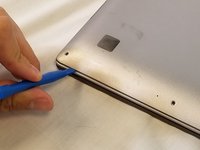
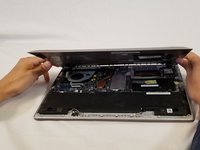


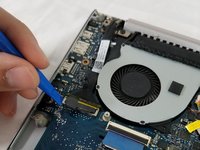
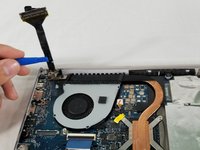


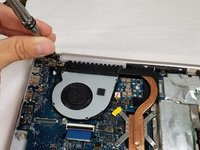
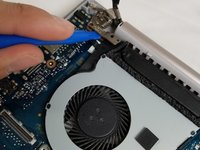
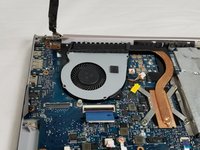


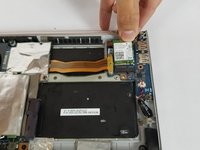
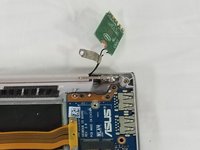


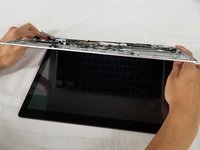
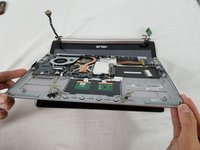
Для сборки устройства выполните эти действия в обратном порядке.
Отменить: Я не выполнил это руководство.
8 человек успешно провели ремонт по этому руководству.

Команду

USF Tampa, Team S3-G5, Nance Spring 2018 Участник USF Tampa, Team S3-G5, Nance Spring 2018
USFT-NANCE-S18S3G5
3 членов
Автор 60 руководств
7 Комментарии к руководству
If anyone knows of a good, reliable source to buy a replacement screen assembly let me know, please. I have a 303U with the 1800 screen and I accidentally sat something heavy enough on top of the laptop to crack the screen on the right-third of the screen. I can’t use half of the touch screen and it’s fairly obvious depending on the color/brightness of the content I’m looking at. Would like to be able to replace this and these steps are pretty easy for me to follow so I’m confident I can have a newish looking laptop again if I can find a replacement screen.
Hi ! Did you manage to find one? I’m trying to do the same thing :)
The bottom of the pictured device may feature Phillips #00 screws, but I also have this laptop and the screws around the edge of the bottom panel are Torx T5s on my device.
It seems that the hinge assembly on one side is broken on my UX303U, on the screen side of the hinge. Do I need to replace the whole screen assembly? The laptop works perfectly otherwise.
Same here, asus ux303u screen side hinge is stuffed. But I think it may actually be the plastic screen cover itself where the hinge attaches, not just the hinge.
