Введение
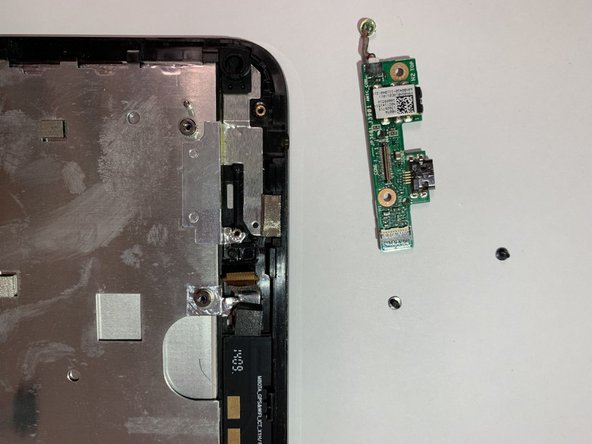
This is a step-by-step guide to replacing the DC board in your Asus VivoTab Note 8. The DC board in the Asus VivoTab Note 8 allows you to hear audio straight from the device, and if not in proper shape, may lack quality. This guide will help you replace it if it is broken or damaged, and there are no soldering or special skills required.
Выберете то, что вам нужно
-
-
Remove the pen and memory card if you have them; they may get in the way when you are opening the device.
-
Pry open the edges of the cover using the plastic opening tool. The memory card slot is very useful for getting started.
-
-
-
Move the opening tool along the edges of the tablet and push up wherever you can. You may need to open up all of the sides to take the panel off.
-
Pull apart the sides of the casing by hand.
-
-
-
Unplug the battery from the motherboard.
-
Lodge something (a fingernail works fine) under the connecting piece and apply a force straight up and perpendicular to the back of the device.
-
-
-
-
Remove the screws from the black plastic restraint restricting the motherboard's movement using a Phillips #000 screwdriver.
-
Gently remove the black plastic restraint from the motherboard.
-
-
-
Remove the six screws holding the motherboard in place using a Phillips #000 screwdriver.
-
-
-
Gently pull out the remaining ribbons and cords still plugged into the motherboard.
-
Remove the motherboard from the device.
-


To reassemble your device, follow these instructions in reverse order.
To reassemble your device, follow these instructions in reverse order.



Команда

University of North Texas, Team 2-7, Raign Spring 2023 Участник University of North Texas, Team 2-7, Raign Spring 2023
UNT-RAIGN-S23S2G7
2 членов
Автор 6 руководств
