Перейти к основному содержанию
Присоединяйся к сообществу ремонтников - Создай аккаунт

Canon PowerShot A460 Motherboard Replacement

Выберете то, что вам нужно

  1. Canon PowerShot A460 Motherboard Replacement, Battery: шаг 1, изображение 1 из 1
    • Slide the switch on the battery cover labeled "CARD/BATT. OPEN." to the right.

    • While still holding the switch, pull the cover down, allowing it to release and open.

    Спросите у FixBot

    Добавить комментарий

  2. Canon PowerShot A460 Motherboard Replacement: шаг 2, изображение 1 из 1
    • Tilt the camera slightly to allow the batteries to fall out.

    Спросите у FixBot

    Добавить комментарий

  3. Canon PowerShot A460 Motherboard Replacement: шаг 3, изображение 1 из 1
    • Press on and release the memory card to eject it.

    Спросите у FixBot

    Добавить комментарий

  4. Canon PowerShot A460 Motherboard Replacement, Front Casing: шаг 4, изображение 1 из 1
    • Unscrew the 5mm Phillips #00 screw from the bottom of the camera.

    • Make sure to keep the different size screws organized to make reassembling the camera simpler.

    Спросите у FixBot

    Добавить комментарий

  5. Canon PowerShot A460 Motherboard Replacement: шаг 5, изображение 1 из 1
    • Unscrew the three 2mm Phillips #00 screws that are located on the bottom of the camera.

    Спросите у FixBot

    Добавить комментарий

  6. Canon PowerShot A460 Motherboard Replacement: шаг 6, изображение 1 из 1
    • Remove the 4mm Phillips #00 screw that is located on the left side of the camera, if the display screen is facing you.

    Спросите у FixBot

    Добавить комментарий

  7. Canon PowerShot A460 Motherboard Replacement: шаг 7, изображение 1 из 1
    • Take out the 4mm Phillips #00 screw under the rubber flap on the right end of the camera.

    Спросите у FixBot

    Добавить комментарий

  8. Canon PowerShot A460 Motherboard Replacement: шаг 8, изображение 1 из 2 Canon PowerShot A460 Motherboard Replacement: шаг 8, изображение 2 из 2
    • Remove the second battery cover on the bottom of camera.

    • Take the silver battery out of the camera.

    Спросите у FixBot

    Добавить комментарий

  9. Canon PowerShot A460 Motherboard Replacement: шаг 9, изображение 1 из 3 Canon PowerShot A460 Motherboard Replacement: шаг 9, изображение 2 из 3 Canon PowerShot A460 Motherboard Replacement: шаг 9, изображение 3 из 3
    • Remove the 4mm Phillips #00 screw on the inside of the flap that hides the battery and memory card slots.

    • Remove the light grey, plastic piece.

    • Remove the plastic portion of the battery flap cover. The metal piece will remain attached.

    Спросите у FixBot

    Добавить комментарий

  10. Canon PowerShot A460 Motherboard Replacement: шаг 10, изображение 1 из 3 Canon PowerShot A460 Motherboard Replacement: шаг 10, изображение 2 из 3 Canon PowerShot A460 Motherboard Replacement: шаг 10, изображение 3 из 3
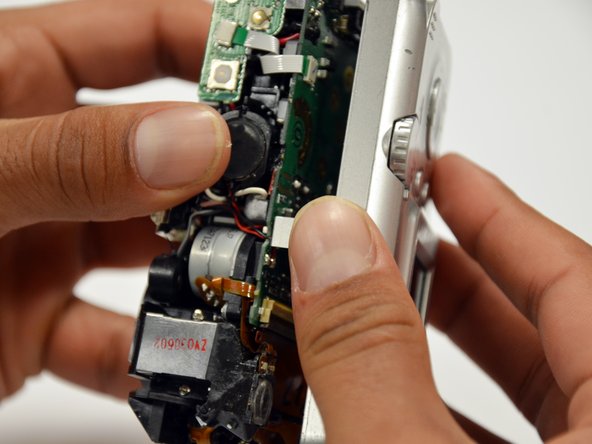
    • Slightly pull on each side of the camera. It should loosen up and come apart.

    • If it does not pull apart right away, use a little more force.

    • Do not give up!

    Спросите у FixBot

    Добавить комментарий

  11. Canon PowerShot A460 Motherboard Replacement, Back Casing: шаг 11, изображение 1 из 1
    • Remove the back case of the camera by pulling from the top.

    • Be careful when pulling off the case. There is a delicate gold ribbon connecting the bottom of the camera to the back case.

    Спросите у FixBot

    Добавить комментарий

  12. Canon PowerShot A460 Motherboard Replacement, LCD Screen: шаг 12, изображение 1 из 1
    • Remove the 4mm Phillips #00 screw from above the ribbon.

    Спросите у FixBot

    Добавить комментарий

  13. Canon PowerShot A460 Motherboard Replacement: шаг 13, изображение 1 из 1
    • Gently peel off the blue tape on the top of the LCD screen.

    Спросите у FixBot

    Добавить комментарий

  14. Canon PowerShot A460 Motherboard Replacement: шаг 14, изображение 1 из 1
    • Remove the 4mm Phillips #00 screw previously concealed by the blue tape.

    Спросите у FixBot

    Добавить комментарий

  15. Canon PowerShot A460 Motherboard Replacement: шаг 15, изображение 1 из 1
    • Gently lift the LCD screen off of the front casing by pulling up a tab on the side of the camera.

    Спросите у FixBot

    Добавить комментарий

  16. Canon PowerShot A460 Motherboard Replacement: шаг 16, изображение 1 из 1
    • Using a spudger, lift the grey tabs to allow the ribbon to slide out.

    Спросите у FixBot

    Добавить комментарий

  17. Canon PowerShot A460 Motherboard Replacement: шаг 17, изображение 1 из 1
    • Since the tabs have been lifted, the ribbon should now slide out out easily.

    • Be careful not to distort the ribbon in any way.

    Спросите у FixBot

    Добавить комментарий

  18. Canon PowerShot A460 Motherboard Replacement, Motherboard: шаг 18, изображение 1 из 1
    • Remove the 5mm Phillips #00 screw located above the small black piece on the right side of the mother board.

    Спросите у FixBot

    Добавить комментарий

  19. Canon PowerShot A460 Motherboard Replacement: шаг 19, изображение 1 из 2 Canon PowerShot A460 Motherboard Replacement: шаг 19, изображение 2 из 2
    • Remove the 4mm Phillips #00 screw at the bottom of the black piece.

    • Detach the black piece that the screws previously held in place.

    Спросите у FixBot

    Добавить комментарий

  20. Canon PowerShot A460 Motherboard Replacement: шаг 20, изображение 1 из 1
    • Remove the 5mm Phillips #00 screw in the middle of the motherboard.

    Спросите у FixBot

    Добавить комментарий

  21. Canon PowerShot A460 Motherboard Replacement: шаг 21, изображение 1 из 1
    • Remove the 5mm Phillips #00 screw that holds the metal piece to the bottom of the camera .

    Спросите у FixBot

    Добавить комментарий

  22. Canon PowerShot A460 Motherboard Replacement: шаг 22, изображение 1 из 1
    • Remove the 5mm Phillips #00 screw that is located on the top of camera.

    Спросите у FixBot

    Добавить комментарий

  23. Canon PowerShot A460 Motherboard Replacement: шаг 23, изображение 1 из 1
    • Remove the 2mm Phillips #00 screw that is located on the far left of the motherboard.

    • Be careful not to damage the multiple adjacent orange ribbons.

    Спросите у FixBot

    Добавить комментарий

  24. Canon PowerShot A460 Motherboard Replacement: шаг 24, изображение 1 из 1
    • Remove the 5mm Phillips #00 screw near the bottom left of the motherboard.

    Спросите у FixBot

    Добавить комментарий

  25. Canon PowerShot A460 Motherboard Replacement: шаг 25, изображение 1 из 2 Canon PowerShot A460 Motherboard Replacement: шаг 25, изображение 2 из 2
    • Using a spudger, unlock the locking mechanism that holds the lower orange ribbon in place.

    • Once unlocked, slide out the ribbon.

    Спросите у FixBot

    Добавить комментарий

  26. Canon PowerShot A460 Motherboard Replacement: шаг 26, изображение 1 из 1
    • Using a spudger, unlock the locking mechanism that holds the upper orange ribbon in place.

    • Once unlocked, slide out the ribbon.

    Спросите у FixBot

    Добавить комментарий

  27. Canon PowerShot A460 Motherboard Replacement: шаг 27, изображение 1 из 1
    • All that is required is to unsolder the few remaining wires. Then, the motherboard will be ready to be replaced!

    Спросите у FixBot

    Добавить комментарий

Заключение

To reassemble your device, follow these instructions in reverse order.

Отменить: Я не выполнил это руководство.

2 человек успешно провели ремонт по этому руководству.

Tanner Coleman

Участник с: 01/18/13

61 Репутация

Автор 2 руководств

Команда

Cal Poly, Team 19-42, Regan Winter 2013 Участник Cal Poly, Team 19-42, Regan Winter 2013

CPSU-REGAN-W13S19G42

4 членов

Автор 12 руководств

0 Комментарии к руководству

Добавить комментарий

Статистика просмотров:

За последние 24 часов: 2

За последние 7 дней: 5

За последние 30 дней: 56

За всё время: 2,249