Перейти к основному содержанию
Присоединяйся к сообществу ремонтников - Создай аккаунт

Car and Truck Battery Replacement

Выберете то, что вам нужно

    1. Car and Truck Battery Replacement, How to Disconnect a Car or Truck Battery: шаг 1, изображение 1 из 3 Car and Truck Battery Replacement, How to Disconnect a Car or Truck Battery: шаг 1, изображение 2 из 3 Car and Truck Battery Replacement, How to Disconnect a Car or Truck Battery: шаг 1, изображение 3 из 3
      • Before you begin, switch the ignition off and remove the key.

      • Make sure the transmission is in Park (or first gear if you have a manual gearbox) and that the parking brake is engaged.

      • Put on work gloves and safety goggles if you have them available.

      • In addition to being dirty, the battery contains corrosive agents and may release flammable gases.

      • Gloves can also help protect you from an unpleasant shock if you accidentally mishandle the battery.

      Спросите у FixBot

      Добавить комментарий

    2. Car and Truck Battery Replacement, Open the hood (bonnet): шаг 2, изображение 1 из 3 Car and Truck Battery Replacement, Open the hood (bonnet): шаг 2, изображение 2 из 3 Car and Truck Battery Replacement, Open the hood (bonnet): шаг 2, изображение 3 из 3
      • Most motor vehicle batteries are located in the engine bay, under the hood (a.k.a. bonnet). If your battery is located elsewhere, skip to Step 5.

      • If you're not sure, simply continue reading.

      • Pull the hood release lever. It's usually located inside the car, near the steering wheel.

      Спросите у FixBot

      Добавить комментарий

    3. Car and Truck Battery Replacement: шаг 3, изображение 1 из 3 Car and Truck Battery Replacement: шаг 3, изображение 2 из 3 Car and Truck Battery Replacement: шаг 3, изображение 3 из 3
      • Raise the hood by simultaneously lifting and pressing up on the hood latch release (usually located beneath the front edge of the hood, near the center or center-right).

      Спросите у FixBot

      Добавить комментарий

    4. Car and Truck Battery Replacement: шаг 4, изображение 1 из 3 Car and Truck Battery Replacement: шаг 4, изображение 2 из 3 Car and Truck Battery Replacement: шаг 4, изображение 3 из 3
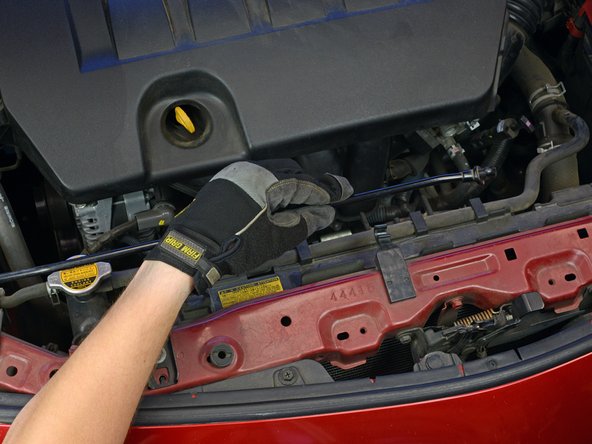
      • At this point, depending on the vehicle, your hood may raise and support itself automatically.

      • If not, use one hand to hold the hood open temporarily while securing the hood with the prop rod:

      • Lift one end of the prop rod up or out to release it from the front area of the engine bay.

      • Swing the end of the prop rod up and slide it into the cutout on the underside of the hood.

      • Make sure the hood is well secured before you let go with your other hand, or it may fall and injure you.

      Спросите у FixBot

      Добавить комментарий

    5. Car and Truck Battery Replacement: шаг 5, изображение 1 из 3 Car and Truck Battery Replacement: шаг 5, изображение 2 из 3 Car and Truck Battery Replacement: шаг 5, изображение 3 из 3
      • Locate the battery. It's normally rectangular and roughly 8-14" across.

      • The battery may be easy to spot, or it may lie under a plastic cover—usually marked with positive (+) and/or negative (-) symbols.

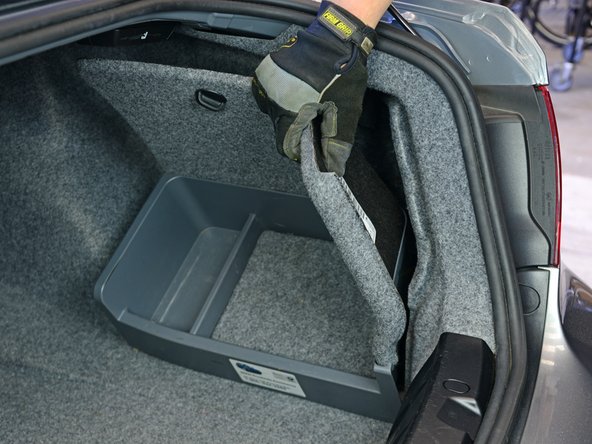
      • On some models, the battery may be located in the trunk—usually under or behind the trunk lining. Look around or consult your owner's manual.

      Спросите у FixBot

      Добавить комментарий

    6. Car and Truck Battery Replacement: шаг 6, изображение 1 из 3 Car and Truck Battery Replacement: шаг 6, изображение 2 из 3 Car and Truck Battery Replacement: шаг 6, изображение 3 из 3
      • Using a correctly sized wrench or socket, loosen the nut/bolt securing the cable on the negative battery terminal.

      • Always disconnect the negative cable first (before removing the positive cable).

      • The negative terminal may be marked with a minus (-) symbol, or it may be unmarked. The positive terminal is almost always marked with a plus (+) symbol, often in red.

      • If the nut or bolt spins without loosening, it may be necessary to counter-hold the opposite side with a second wrench or socket.

      Спросите у FixBot

      Добавить комментарий

    7. Car and Truck Battery Replacement: шаг 7, изображение 1 из 2 Car and Truck Battery Replacement: шаг 7, изображение 2 из 2
      • Remove the cable from the negative battery terminal.

      • When connecting the battery, it is advised to roughen up the battery terminals and clean the cable clamp beforehand.

      • Upon reconnecting the battery, make sure to seal the pole connections with an appropriate terminal grease or terminal spray.

      Спросите у FixBot

      Добавить комментарий

    8. Car and Truck Battery Replacement: шаг 8, изображение 1 из 2 Car and Truck Battery Replacement: шаг 8, изображение 2 из 2
      • Prevent the cable from making accidental contact with the terminal by pushing it aside and/or wrapping the cable clamp with a dry rag.

      Спросите у FixBot

      Добавить комментарий

    1. Car and Truck Battery Replacement, Battery: шаг 9, изображение 1 из 2 Car and Truck Battery Replacement, Battery: шаг 9, изображение 2 из 2
      • Remove the insulating cover from the positive battery terminal (if one is present).

      Спросите у FixBot

      Добавить комментарий

    2. Car and Truck Battery Replacement: шаг 10, изображение 1 из 2 Car and Truck Battery Replacement: шаг 10, изображение 2 из 2
      • Using a correctly sized wrench or socket, loosen the nut/bolt securing the cable on the positive battery terminal.

      • If the nut or bolt spins without loosening, it may be necessary to counter-hold the opposite side with a second wrench or socket.

      Спросите у FixBot

      Добавить комментарий

    3. Car and Truck Battery Replacement: шаг 11, изображение 1 из 2 Car and Truck Battery Replacement: шаг 11, изображение 2 из 2
      • Remove the cable from the positive battery terminal.

      • During reassembly, be sure to reconnect and tighten the positive cable clamp first (before the negative cable clamp).

      Спросите у FixBot

      Добавить комментарий

    4. Car and Truck Battery Replacement: шаг 12, изображение 1 из 1
      • Remove any bolts securing the battery.

      Спросите у FixBot

      Добавить комментарий

    5. Car and Truck Battery Replacement: шаг 13, изображение 1 из 1
      • Remove any bars or brackets securing the battery.

      Спросите у FixBot

      Добавить комментарий

    6. Car and Truck Battery Replacement: шаг 14, изображение 1 из 2 Car and Truck Battery Replacement: шаг 14, изображение 2 из 2
      • Remove the battery.

      • A typical car battery can weigh 50 pounds or more, so lift carefully and get help if needed. Do not drop the battery, as this can release dangerous chemicals.

      • If your battery cable clamps look dirty and/or corroded, clean them up with a wire brush and a mixture of water and baking soda before installing your new battery.

      • To prevent corrosion in the future, coat the new battery's terminals with a little dielectric grease or petroleum jelly.

      • Don't throw the old battery in the trash. Many auto parts stores and service stations will accept old batteries for free safe disposal.

      Спросите у FixBot

      Добавить комментарий

Заключение

To reassemble your device, follow these instructions in reverse order.

Отменить: Я не выполнил это руководство.

36 человек успешно провели ремонт по этому руководству.

Jeff Suovanen

Участник с: 08/06/13

454 654 Репутация

Автор 259 руководств

Команда

iFixit Участник iFixit

Staff

123 членов

Автор 86 246 руководств

4 Комментарии к руководству

You should not just tell people to follow the directions in reverse order for reassembly. There are some steps most mechanics will want you to perform (e.g. applying a compound to the terminals to prevent corrosion) in addition to simply reattaching the cables.

shamino - Ответить Поделиться

As with most guides on iFixit, reassembly tips are included on the applicable step where appropriate.

Jeff Suovanen - Ответить Поделиться

good for car batery replacement

CanadaVisitorVisa - Ответить Поделиться

If a battery has water around it and has no power should I charge it.

Siyaoliver Hwetz - Ответить Поделиться

Добавить комментарий

Статистика просмотров:

За последние 24 часов: 31

За последние 7 дней: 142

За последние 30 дней: 607

За всё время: 26,200