
Dell XPS 720 H2C Sound Card Replacement

G B и
Последнее обновление 27 дек 2021 г.
Просмотров: 2,2 тыс.
Просмотр статистики:
- За последние 24 часа:
- 4
- За последние 7 дней:
- 19
- За последние 30 дней:
- 79
- За все время:
- 2 197
Комментарии: 1
1 комментариев на шаге.
Завершено: 1 2
1 пользователь отметил эту инструкцию как "завершенное". Вы будете следующим?
2 пользователей отметили эту инструкцию как "завершенное". В том числе и Вы — отличная работа!
Избранные: 2 3
2 эта инструкция понравилась многим пользователям (и они подписались на нее). Вы будете следующим?
3 эта инструкция понравилось многим пользователям (и они подписались на нее), в том числе и Вам!
Ненаглядные фото
Будьте героем экшена! Изображения в этой инструкции должны более наглядно демонстрировать, как нужно выполнять то или иное действие.
Нужны более качественные фото
Более качественные фотографии улучшат это руководство. Помогайте, делая снимки, редактируя или загружая новые!
Введение
Перейти к шагу 1 ↓The sound card is responsible for most of the audio functions on a computer. This guide will help users remove and replace the sound card in the Dell XPS 720 H2C.
-
-
-
Remove the cover panel on the side of the computer by pulling out the latch on the back panel and pulling the panel downwards towards the ground.
 Спросите у FixBot
-
-
-
-
-
Before handling the inside of the computer, ensure that all wires are disconnected from the audio ports along the back panel.
-
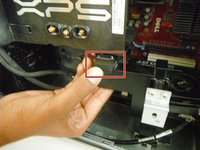
The sound card is located towards the bottom of the computer, near the righthand side (see red outline).
-
-
-
-
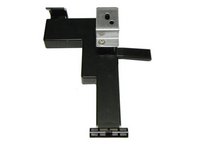
To remove the support below the processor: press down on the latch at the top of the support, then pull the support outwards, towards yourself.
-
-
-
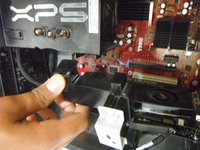
To unplug the wire that connects the sound card to the motherboard: grasp the wire tightly and pull it outwards, towards yourself.
-
-
-
To release the sound card from the motherboard casing: find the blue tab that is the third from the bottom (fifth from the top), and press down and to the right on the tab.
-
-
-
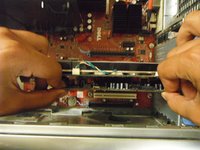
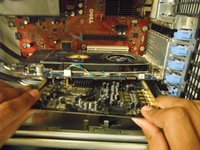
To remove the sound card from the motherboard: gently grasp the sound card and pull directly outward, towards yourself.
-
-




To reassemble your device, follow these instructions in reverse order.
Отменить: Я не выполнил это руководство.
Еще один человек закончил это руководство.

