Перейти к основному содержанию

Disassembling Soundmates V2 Case

Выберете то, что вам нужно

  1. Disassembling Soundmates V2 Case, Soundmates V2 Case: шаг 1, изображение 1 из 2 Disassembling Soundmates V2 Case, Soundmates V2 Case: шаг 1, изображение 2 из 2
    • Flip open the cover and insert a thin flathead screwdriver in the seam by the hinge

    • Rotate the screwdriver just enough to create a gap between the two halves of the case

    • If this doesn't work very well, try the other side

    • Insert a spudger or another flathead bit into the new gap

    • This may cause some cosmetic damage

  2. Disassembling Soundmates V2 Case: шаг 2, изображение 1 из 3 Disassembling Soundmates V2 Case: шаг 2, изображение 2 из 3 Disassembling Soundmates V2 Case: шаг 2, изображение 3 из 3
    • Once you've created a small gap, the lid should come off fairly easily

    • Run the spudger around the case until the two halves separate

    • If the top half doesn't come straight up and out, it may break off the charging port, like it did with mine. Go slowly and use caution

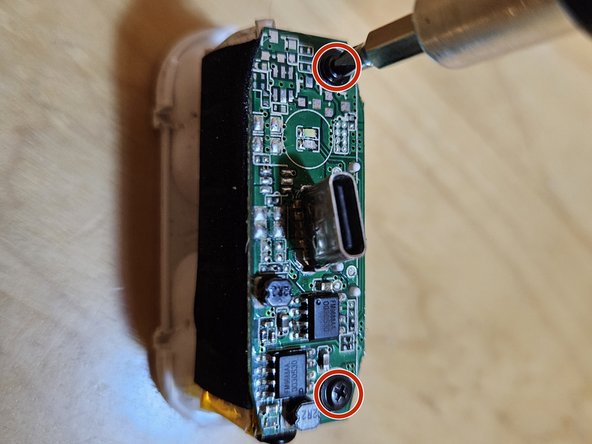
  3. Disassembling Soundmates V2 Case: шаг 3, изображение 1 из 1
    • Remove the two Philips #00 screws securing the board

  4. Disassembling Soundmates V2 Case: шаг 4, изображение 1 из 1
    • Gently lift the circuitboard off. Not too high; it's still wired to the battery

    • Now just pull off the battery; it's only held down by a sticky foam pad

  5. Disassembling Soundmates V2 Case: шаг 5, изображение 1 из 1
    • Done! Hope you didn't break anything like I did.

Заключение

To reassemble your device, follow these instructions in reverse order.

Еще один человек закончил это руководство.

darth mango

Участник с: 03/13/23

3 487 Репутация

Автор 3 руководств

0 Комментарии к руководству

Добавить комментарий

Статистика просмотров:

За последние 24 часов: 1

За последние 7 дней: 11

За последние 30 дней: 47

За всё время: 838