Перейти к основному содержанию

Display

Абсолютно необходимое руководство
Это руководство только для предварительной подготовки! Этот гайд является частью другой процедуры и не предназначен для самостоятельного использования.

Выберете то, что вам нужно

  1. Display, key removal: шаг 1, изображение 1 из 3 Display, key removal: шаг 1, изображение 2 из 3 Display, key removal: шаг 1, изображение 3 из 3
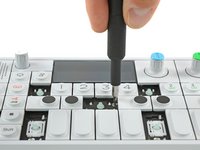
    • To get to the screws beneath the keyboard you need to take some keys off. You can use either an opening tool or an opening pick. The first picture shows how it should look like with all the necessary keys off (12 in total).

    • The four longer keys from the fingerboard are to be handled from the left side to get them off.

    • The eight smaller keys need to be levered from the bottom up.

  2. Display, removing scissors mechanisms: шаг 2, изображение 1 из 2 Display, removing scissors mechanisms: шаг 2, изображение 2 из 2
    • The scissor mechanism of the eight small keys are obstructing the underlying screws.

    • By using again an opening tool or opening pick these can be snapped off easily.

    • When reassembling be sure to place them in with the correct side facing upwards.

  3. Display, unscrew keyboard: шаг 3, изображение 1 из 3 Display, unscrew keyboard: шаг 3, изображение 2 из 3 Display, unscrew keyboard: шаг 3, изображение 3 из 3
    • Loosen those 12 screws with a Phillips #00 screwdriver.

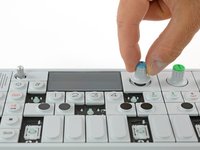
    • Then just pull off the four rotary knobs and the volume knob.

    • Now it is possible to slightly lift the keyboard and set it back.

  4. Display, unplug and remove keyboard: шаг 4, изображение 1 из 1
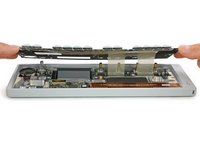
    • Unlock the flex cables by pushing the two black nibs on both sides of each connector.

    • Now you can pull the flex cables out and remove the keyboard completely.

  5. Display, remove display: шаг 5, изображение 1 из 3 Display, remove display: шаг 5, изображение 2 из 3 Display, remove display: шаг 5, изображение 3 из 3
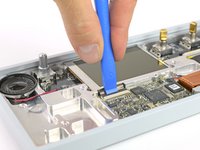
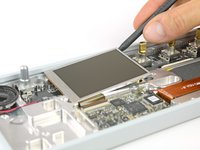
    • Open the display cable connector by using a plastic opening tool to flip the latch upwards.

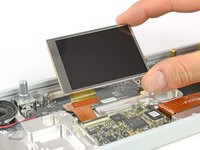
    • The display is held in place with a mild adhesive. A spudger helps you to get it free.

    • Now you can unplug the cable and take out the whole display.

Заключение

To reassemble your device, follow these instructions in reverse order.

Tobias Isakeit

Участник с: 03/31/14

129 763 Репутация

Автор 189 руководств

Команда

Tobias Isakeit - Repairability Engineer Участник Tobias Isakeit - Repairability Engineer

Business

1 член

Автор 1 145 руководств

0 Комментарии к руководству

Добавить комментарий

Статистика просмотров:

За последние 24 часов: 0

За последние 7 дней: 2

За последние 30 дней: 3

За всё время: 208