Перейти к основному содержанию

EasySMX ESM-9110 Backplate Replacement

Выберете то, что вам нужно

  1. EasySMX ESM-9110 Backplate Replacement, Handle Covers: шаг 1, изображение 1 из 2 EasySMX ESM-9110 Backplate Replacement, Handle Covers: шаг 1, изображение 2 из 2
    • Use a Phillips #000 screwdriver to remove the two 10 mm screws from the back of controller.

  2. EasySMX ESM-9110 Backplate Replacement: шаг 2, изображение 1 из 1
    • Insert a plastic opening tool into the slit on the side of controller.

    • Wiggle the tool until the cover becomes loose.

    • Repeat this on the other side of Controller.

    • Go slow. Take your time removing the handle covers.

  3. EasySMX ESM-9110 Backplate Replacement: шаг 3, изображение 1 из 1
    • Remove the faceplate.

    • Repeat on the other side of the controller.

  4. EasySMX ESM-9110 Backplate Replacement, Backplate: шаг 4, изображение 1 из 3 EasySMX ESM-9110 Backplate Replacement, Backplate: шаг 4, изображение 2 из 3 EasySMX ESM-9110 Backplate Replacement, Backplate: шаг 4, изображение 3 из 3
    • Use a Phillips #000 screwdriver to remove four 20 mm screws from the controller's faceplate.

    • Use a Phillips #000 screwdriver (a screwdriver bit extension may be needed) to remove the two 20 mm screws from the controllers faceplate.

    • Screw extender should only be used to unscrew two of the six screws. Do not use for all six.

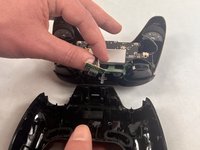
  5. EasySMX ESM-9110 Backplate Replacement: шаг 5, изображение 1 из 1
    • Remove the faceplate of the controller by lifting it directly up from the backplate.

    • Be gentle. The controllers backplate is still attached to the faceplate.

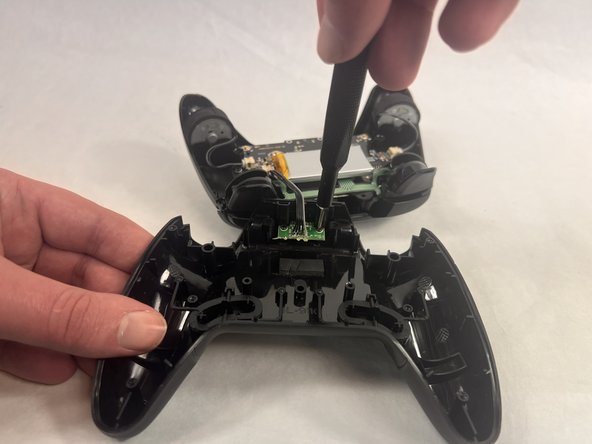
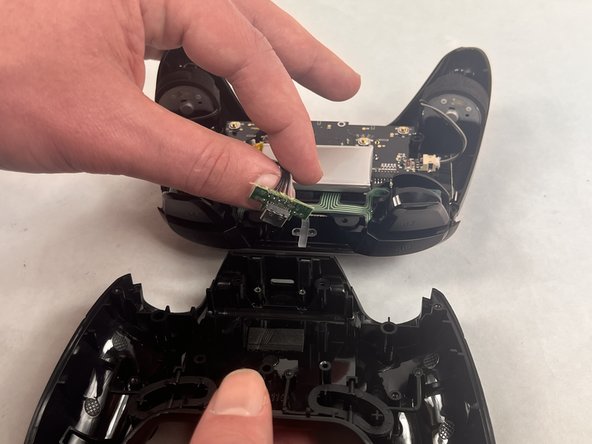
  6. EasySMX ESM-9110 Backplate Replacement: шаг 6, изображение 1 из 3 EasySMX ESM-9110 Backplate Replacement: шаг 6, изображение 2 из 3 EasySMX ESM-9110 Backplate Replacement: шаг 6, изображение 3 из 3
    • Use a Phillips #000 screwdriver to remove the two 10 mm screws from the daughterboard off the backplate.

    • Remove the daughterboard once screws are off.

    • Be gentle when removing the daughterboard. The daughterboard is still attached to the faceplate.

Заключение

To reassemble your device, follow these instructions in reverse order.

Еще один человек закончил это руководство.

Melanie Rodriguez

Участник с: 03/18/24

406 Репутация

Автор 4 руководств

Команда

UMass Dartmouth, Team 2-4, Konn Spring 2024 Участник UMass Dartmouth, Team 2-4, Konn Spring 2024

UMASSD-KONN-S24S2G4

4 членов

Автор 5 руководств

0 Комментарии к руководству

Добавить комментарий

Статистика просмотров:

За последние 24 часов: 0

За последние 7 дней: 2

За последние 30 дней: 27

За всё время: 358