Перейти к основному содержанию

GE Carescape R860 Touch Bezel Assembly Replacement

Медицинское оборудование
Ни iFixit, ни данное руководство по ремонту не одобрены и не связаны с производителем медицинского оборудования.

Выберете то, что вам нужно

  1. GE Carescape R860 Touch Bezel Assembly Replacement, GE Carescape R860 Display Unit Disassembly: шаг 1, изображение 1 из 1
    • Using an opening tool, gently pry the alarm light lens (boxed) from the display unit.

  2. GE Carescape R860 Touch Bezel Assembly Replacement: шаг 2, изображение 1 из 1
    • Loosen the seven screws that hold the rear housing using a Phillips #0 screwdriver.

    • Remove the rear housing.

  3. GE Carescape R860 Touch Bezel Assembly Replacement: шаг 3, изображение 1 из 1
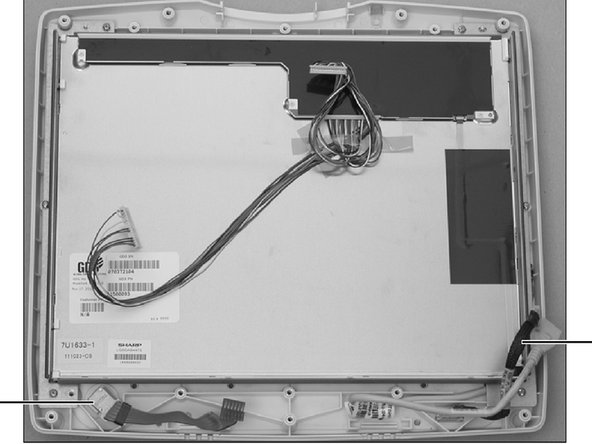
    • Cut the cable tie holding the two cables at the lower right side using scissors.

  4. GE Carescape R860 Touch Bezel Assembly Replacement: шаг 4, изображение 1 из 1
    • Disconnect the touch controller cable.

  5. GE Carescape R860 Touch Bezel Assembly Replacement: шаг 5, изображение 1 из 1
    • Disconnect the Keypad harness at the Carrier Board.

  6. GE Carescape R860 Touch Bezel Assembly Replacement: шаг 6, изображение 1 из 1
    • Disconnect the encoder harness from the Carrier Board.

  7. GE Carescape R860 Touch Bezel Assembly Replacement: шаг 7, изображение 1 из 1
    • Disconnect the speaker harness from the Carrier Board and set the speakers aside.

  8. GE Carescape R860 Touch Bezel Assembly Replacement: шаг 8, изображение 1 из 1
    • Disconnect the alarm light harness from the Carrier Board.

  9. GE Carescape R860 Touch Bezel Assembly Replacement: шаг 9, изображение 1 из 1
    • Loosen (do not remove) the five screws at the top edge of the shield just enough to raise it and slide the shield away with a Phillips #0 screwdriver.

  10. GE Carescape R860 Touch Bezel Assembly Replacement: шаг 10, изображение 1 из 1
    • Loosen the four screws along each side of the shield with a Phillips #0 screwdriver.

  11. GE Carescape R860 Touch Bezel Assembly Replacement: шаг 11, изображение 1 из 1
    • Remove the four screws at the bottom edge of the shield with a Phillips #0 screwdriver.

  12. GE Carescape R860 Touch Bezel Assembly Replacement: шаг 12, изображение 1 из 1
    • Slide the shield down to disengage the touch controller harness connector.

  13. GE Carescape R860 Touch Bezel Assembly Replacement, Touch Bezel Assembly: шаг 13, изображение 1 из 1
    • Remove rear housing and shield (refer to “Display Unit Disassembly”).

  14. GE Carescape R860 Touch Bezel Assembly Replacement: шаг 14, изображение 1 из 1
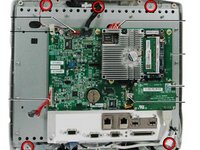
    • Disconnect the Blower fan cable (A); remove the p-clip (B) holding the harness to the Carrier board.

  15. GE Carescape R860 Touch Bezel Assembly Replacement: шаг 15, изображение 1 из 1
    • Disconnect the Carrier board to LCD LVDS harness (22) - two connectors.

  16. GE Carescape R860 Touch Bezel Assembly Replacement: шаг 16, изображение 1 из 1
    • Remove five LCD shield mounting screws (circled). Do not loosen any screws that are dabbed with sealing compound.

  17. GE Carescape R860 Touch Bezel Assembly Replacement: шаг 17, изображение 1 из 2 GE Carescape R860 Touch Bezel Assembly Replacement: шаг 17, изображение 2 из 2
    • Remove the LCD shield and Carrier board assembly from the LCD Touch Bezel assembly.

  18. GE Carescape R860 Touch Bezel Assembly Replacement: шаг 18, изображение 1 из 1
    • Transfer the Carrier Board to Keypad harness (23) and the Encoder assembly (15) to the new LCD Touch Bezel assembly.

Заключение

To reassemble your device, follow these instructions in reverse order.

Seth Deming

Участник с: 04/09/20

133 Репутация

1 руководство автора

Команда

Cal Poly, Team S7-G9, Paton Spring 2020 Участник Cal Poly, Team S7-G9, Paton Spring 2020

CPSU-PATON-S20S7G9

3 членов

Автор 4 руководств

0 Комментарии к руководству

Добавить комментарий

Статистика просмотров:

За последние 24 часов: 0

За последние 7 дней: 0

За последние 30 дней: 3

За всё время: 270