Перейти к основному содержанию

Google Pixel 9a Battery Connection

Абсолютно необходимое руководство
Это руководство только для предварительной подготовки! Этот гайд является частью другой процедуры и не предназначен для самостоятельного использования.

Выберете то, что вам нужно

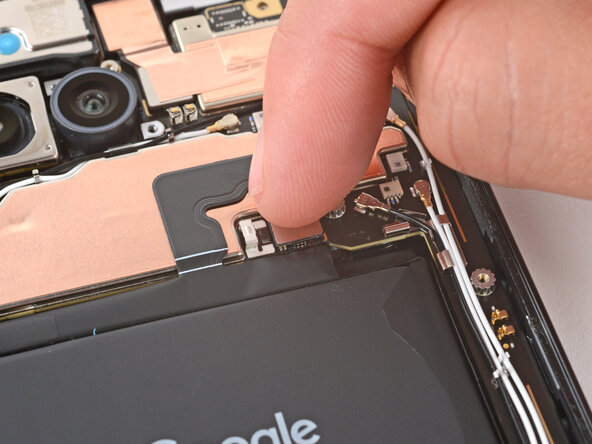
  1. Google Pixel 9a Battery Connection, Connect the battery press connector: шаг 1, изображение 1 из 2 Google Pixel 9a Battery Connection, Connect the battery press connector: шаг 1, изображение 2 из 2
    • Use your finger to align the battery press connector over its socket and press down to connect it.

    • Don't try to force the connector into place. If you're having trouble, reposition it and try again.

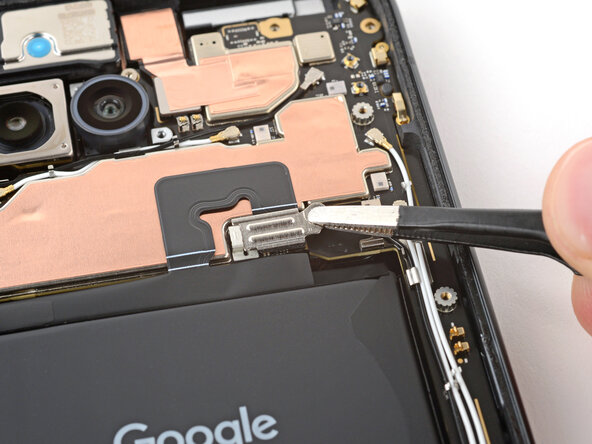
  2. Google Pixel 9a Battery Connection, Install the battery connector cover: шаг 2, изображение 1 из 3 Google Pixel 9a Battery Connection, Install the battery connector cover: шаг 2, изображение 2 из 3 Google Pixel 9a Battery Connection, Install the battery connector cover: шаг 2, изображение 3 из 3
    • Use tweezers to hook the left edge of the battery connector cover into place, then lay the cover down flat.

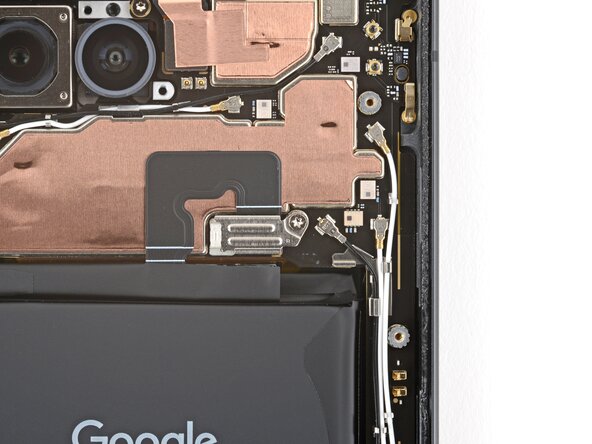
  3. Google Pixel 9a Battery Connection: шаг 3, изображение 1 из 2 Google Pixel 9a Battery Connection: шаг 3, изображение 2 из 2
    • Use a 3IP Torx Plus screwdriver to install the 1.7 mm‑long screw securing the battery connector cover.

Финишная прямая

Spencer Day

Участник с: 09/14/22

155 377 Репутация

Автор 1 033 руководств

Команда

iFixit Участник iFixit

Staff

123 членов

Автор 23 788 руководств

0 Комментарии к руководству

Добавить комментарий

Статистика просмотров:

За последние 24 часов: 0

За последние 7 дней: 0

За последние 30 дней: 1

За всё время: 51