Перейти к основному содержанию

HP Stream 8 Button Board Replacement

Выберете то, что вам нужно

  1. HP Stream 8 Button Board Replacement, Button Board: шаг 1, изображение 1 из 1
    • Use your nail to pry up the back cover of the device.

  2. HP Stream 8 Button Board Replacement: шаг 2, изображение 1 из 1
    • Fully remove the back cover.

  3. HP Stream 8 Button Board Replacement: шаг 3, изображение 1 из 3 HP Stream 8 Button Board Replacement: шаг 3, изображение 2 из 3 HP Stream 8 Button Board Replacement: шаг 3, изображение 3 из 3
    • Remove the 10 3mm screws using the Phillips #00 screwdriver.

  4. HP Stream 8 Button Board Replacement: шаг 4, изображение 1 из 2 HP Stream 8 Button Board Replacement: шаг 4, изображение 2 из 2
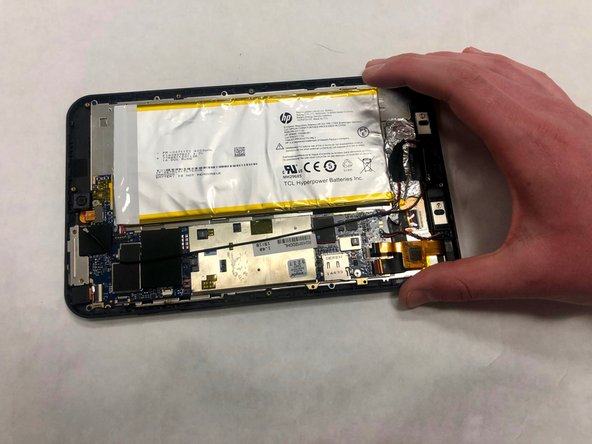
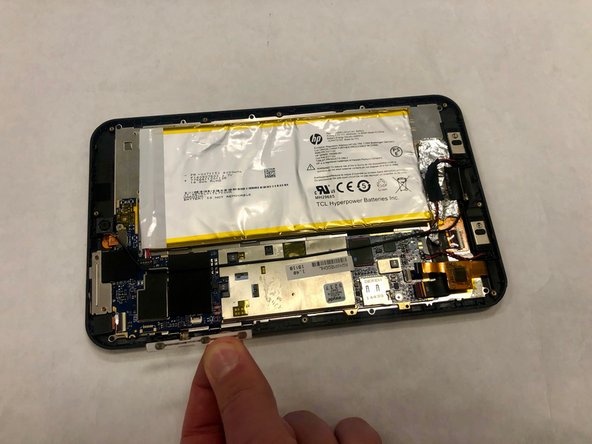
    • Pry up the inside cover the same way as you did with the back cover and fully remove it.

  5. HP Stream 8 Button Board Replacement: шаг 5, изображение 1 из 2 HP Stream 8 Button Board Replacement: шаг 5, изображение 2 из 2
    • Disconnect the button board from the motherboard and remove it.

Заключение

To reassemble your device, follow these instructions in reverse order.

Ashley Eimers

Участник с: 04/01/19

265 Репутация

Автор 2 руководств

Команда

IUPUI, Team S1-G3, Harley Spring 2019 Участник IUPUI, Team S1-G3, Harley Spring 2019

IUPUI-HARLEY-S19S1G3

3 членов

Автор 2 руководств

0 Комментарии к руководству

Добавить комментарий

Статистика просмотров:

За последние 24 часов: 0

За последние 7 дней: 0

За последние 30 дней: 3

За всё время: 274