Перейти к основному содержанию
Присоединяйся к сообществу ремонтников - Создай аккаунт

HTC Desire X LCD + TouchScreen Replacement

Просмотров: 22 тыс.

Просмотр статистики:

За последние 24 часа:
1
За последние 7 дней:
12
За последние 30 дней:
80
За все время:
22 304
Комментарии: 3

2 комментариев к шагам, 1 комментарий к инструкции.

Перейти к комментариям инструкции
Завершено: 13

13 пользователей отметили эту инстркукцию как "завершенное". Вы будете следующим?

Избранные: 26

26 эта инструкция понравилась многим пользователям (и они подписались на нее). Вы будете следующим?

Необходимое время: 40 минут
Сложность: Умеренно
Руководство, предоставленное сообществом

Это руководство было создано членом нашего сообщества. Сотрудники iFixit не имеют к нему отношения.

HTC Desire X LCD + TouchScreen Replacement

Выберете то, что Вам нужно

Запчасти

Инструменты

    1. HTC Desire X LCD + TouchScreen Replacement, LCD + TouchScreen: шаг 1, изображение 1 из 1
      • Here is the Desire X, with the touchscreen damaged, but working. I have tried to replace only the touch, but I broke the LCD... It´s very very hard to separate...

      Спросите у FixBot

      Добавить комментарий

    2. HTC Desire X LCD + TouchScreen Replacement: шаг 2, изображение 1 из 3 HTC Desire X LCD + TouchScreen Replacement: шаг 2, изображение 2 из 3 HTC Desire X LCD + TouchScreen Replacement: шаг 2, изображение 3 из 3
      • Once the back cover and battery are removed, its time to dissasembly. First unscrew the 5 torx #5 from back side.

      • Then, with a flat screwdriver, push and open the back cover, from side to side.

      Спросите у FixBot

      Добавить комментарий

    3. HTC Desire X LCD + TouchScreen Replacement: шаг 3, изображение 1 из 3 HTC Desire X LCD + TouchScreen Replacement: шаг 3, изображение 2 из 3 HTC Desire X LCD + TouchScreen Replacement: шаг 3, изображение 3 из 3
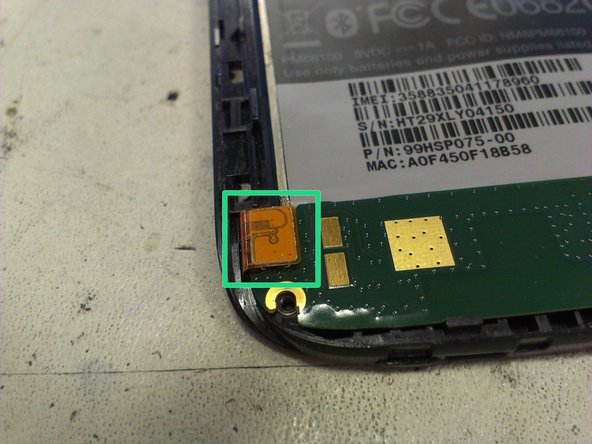
      • Now, on the main board, we have to remove the screw near the camera.

      • Release the connector on the bottom

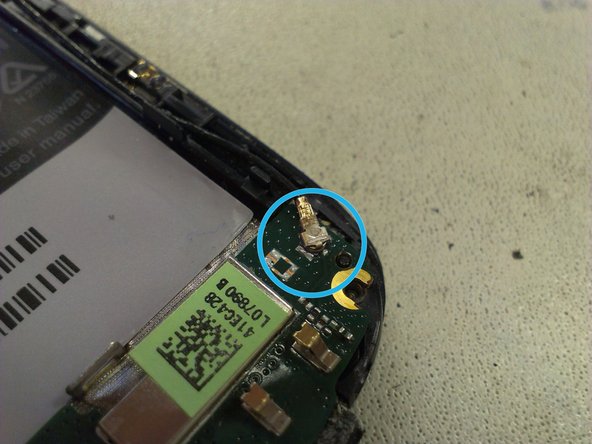
      • Finally, remove the antenna connector.

      Спросите у FixBot

      Добавить комментарий

    4. HTC Desire X LCD + TouchScreen Replacement: шаг 4, изображение 1 из 2 HTC Desire X LCD + TouchScreen Replacement: шаг 4, изображение 2 из 2
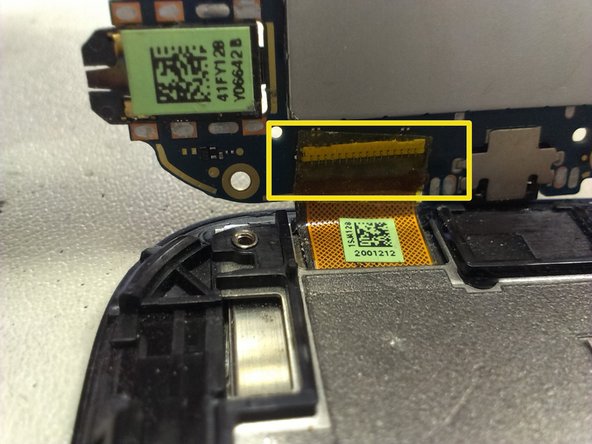
      • Once the bottom connector is loosed, you can take away the sound board and separate the flat cable from underneath.

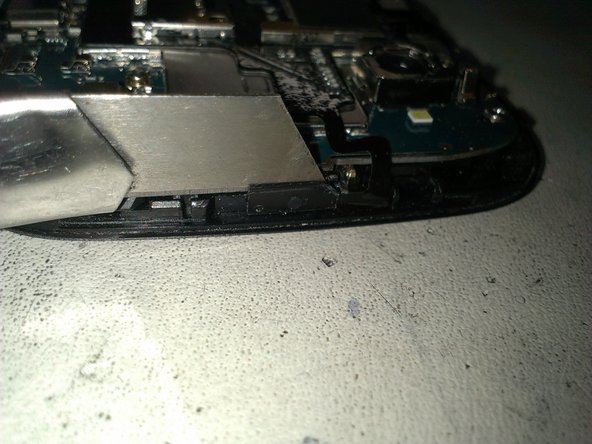
      • Next, the power button has to be removed. It is a bit sticky, so you may want to use a cutter or knife to separate. Long nails also work.

      Спросите у FixBot

      Добавить комментарий

    5. HTC Desire X LCD + TouchScreen Replacement: шаг 5, изображение 1 из 3 HTC Desire X LCD + TouchScreen Replacement: шаг 5, изображение 2 из 3 HTC Desire X LCD + TouchScreen Replacement: шаг 5, изображение 3 из 3
      Инструмент, используемый на этом этапе:
      Tweezers
      $4.99
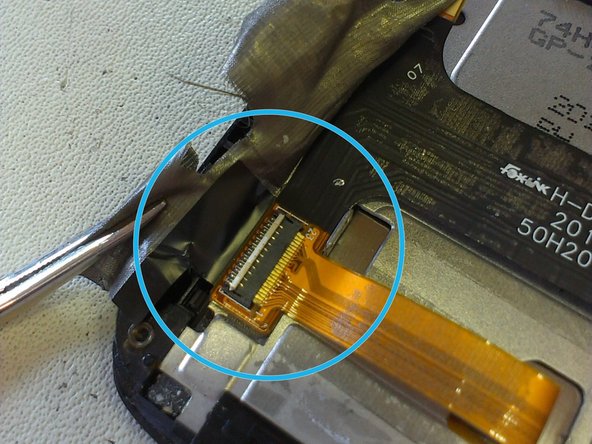
      • Now, its time to release the vibrator connector (or vibrator from holder - easier), and then release the lower connector on the main board ( see pic 2). Remove the black tape first, and then use some tweezers to pull out the connector.

      • Once its done, lift by one side the main board, and you can see the LCD connector. Open the white tab by lifting it up at the edge, and remove the flat cable.

      Спросите у FixBot

      Добавить комментарий

    6. HTC Desire X LCD + TouchScreen Replacement: шаг 6, изображение 1 из 3 HTC Desire X LCD + TouchScreen Replacement: шаг 6, изображение 2 из 3 HTC Desire X LCD + TouchScreen Replacement: шаг 6, изображение 3 из 3
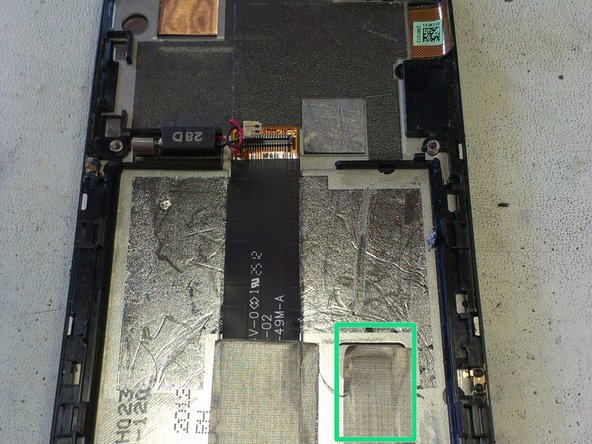
      • Now, its time to remove the product label, and keep it without bend to put back togheter.

      • Then, under the silver ribbon, which is hard to remove, there is another flat connector, which must be disconnected.

      Спросите у FixBot

      Добавить комментарий

    7. HTC Desire X LCD + TouchScreen Replacement: шаг 7, изображение 1 из 2 HTC Desire X LCD + TouchScreen Replacement: шаг 7, изображение 2 из 2
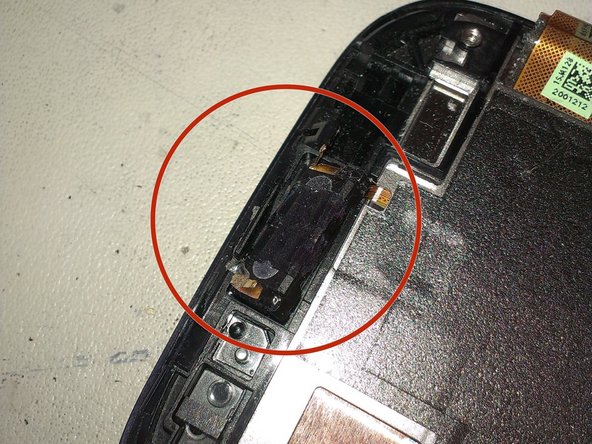
      • The flat cable that goes to main board must be removed, and the flat cable of the touch is loosed.

      • Remove the speaker from the top side of the phone.

      Спросите у FixBot

      Добавить комментарий

    8. HTC Desire X LCD + TouchScreen Replacement: шаг 8, изображение 1 из 2 HTC Desire X LCD + TouchScreen Replacement: шаг 8, изображение 2 из 2
      • To remove the glue from the LCD and touch of the screen, we have to heat all the screen, with special attention to the top and bottom zones. I have one Hot Air Station, but you can do it with a hairdryer. With more time you heat, more easy to remove, but be careful...

      • With a Metal thin blade, insert between bezel and LCD, and bend it to start releasing.

      Спросите у FixBot

      Добавить комментарий

    9. HTC Desire X LCD + TouchScreen Replacement: шаг 9, изображение 1 из 1
      • Finally, the both parts comes apart. At the left, the LCD + touch. At the right, the chassis.

      • Now, to assembly the unit back togheter, follow the steps backwards.

      Спросите у FixBot

      Добавить комментарий

Заключение

To reassemble your device, follow these instructions in reverse order.

Отменить: Я не выполнил это руководство.

13 человек успешно провели ремонт по этому руководству.

Jaime

Участник с: 11/05/13

3 357 Репутация

Автор 4 руководств

1 Комментарий к руководству

Jamie i need HTC DESIRE X circuit diagram. Can you help me regarding this?

Murli Rao - Ответить Поделиться

Добавить комментарий

Статистика просмотров:

За последние 24 часов: 1

За последние 7 дней: 12

За последние 30 дней: 80

За все время: 22,304