Перейти к основному содержанию
Присоединяйся к сообществу ремонтников - Создай аккаунт

HTC EVO Design 4G Charging Port Replacement

Просмотров: 942

Просмотр статистики:

За последние 24 часа:
3
За последние 7 дней:
14
За последние 30 дней:
100
За все время:
942
Комментарии: 0

Никто не оставлял комментариев к этой инструкции. Будете ли Вы первым?

Перейти к комментариям инструкции
Завершено: 0

Никто не отмечал эту инструкцию как "завершенное". Будете ли Вы первым?

Избранные: 1

1 человек поставил лайк на эту инструкцию (и подписался на нее). Вы будете следующим?

Необходимое время: 45 минут - 1 час
Сложность: Сложно
Запчасти и средства модернизации

Шаги в этом руководстве следует разделить и объединить в серию обязательных руководств.

HTC EVO Design 4G Charging Port Replacement

Replacing this component requires intricacy and caution with moving internal parts and circuitry inside the phone to avoid further damage to the other functionalities. Proceed with caution using a soldering iron used to detach the charging port.

Выберете то, что Вам нужно

Инструменты

    1. HTC EVO Design 4G Charging Port Replacement, Screen: шаг 1, изображение 1 из 1
      Инструмент, используемый на этом этапе:
      Tweezers
      $4.99
      • Tools: Phillips #000 Screwdriver, T4 Torx Screwdriver, Safety Pry Tool (Guitar pick), Tweezers

      Спросите у FixBot

      Добавить комментарий

    2. HTC EVO Design 4G Charging Port Replacement, Removing Casing: шаг 2, изображение 1 из 1
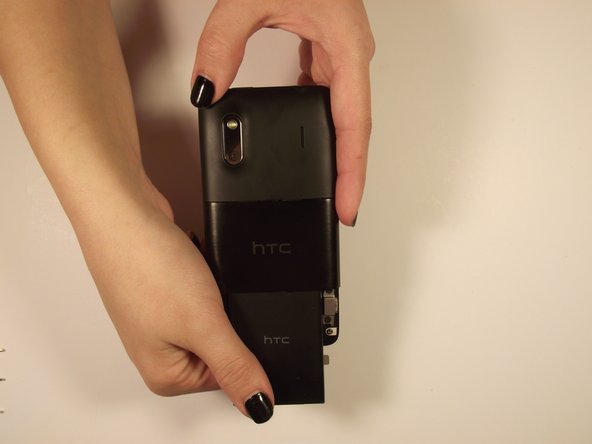
      • Use fingers on either end of the button edges of the phone to pull back cover off. It should slide off.

      Спросите у FixBot

      Добавить комментарий

    3. HTC EVO Design 4G Charging Port Replacement, Removing Battery: шаг 3, изображение 1 из 2 HTC EVO Design 4G Charging Port Replacement, Removing Battery: шаг 3, изображение 2 из 2
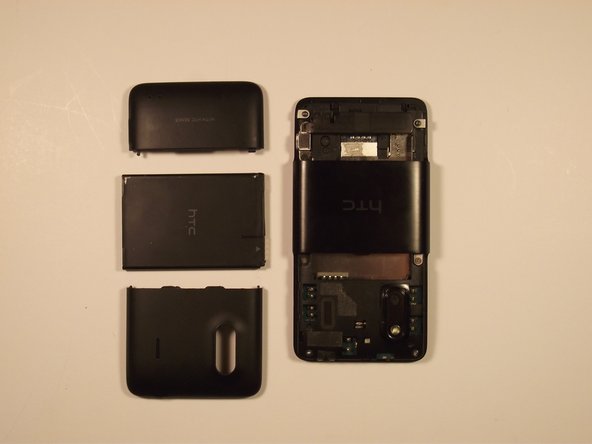
      • When open, pull on “Open” tab and it should rotate towards you

      • Grab the bottom edge of the battery and pull it toward you

      Спросите у FixBot

      Добавить комментарий

    4. HTC EVO Design 4G Charging Port Replacement, Removing Casing: шаг 4, изображение 1 из 2 HTC EVO Design 4G Charging Port Replacement, Removing Casing: шаг 4, изображение 2 из 2
      • On the side of the top casing on the phone there should be a slot. Use your safety pry tool (guitar pick) pry around the perimeter of the casing to remove it

      • Info*: The adhesive tape that you may find will not be necessary for replacement later

      Спросите у FixBot

      Добавить комментарий

    5. HTC EVO Design 4G Charging Port Replacement, Removing Screws: шаг 5, изображение 1 из 2 HTC EVO Design 4G Charging Port Replacement, Removing Screws: шаг 5, изображение 2 из 2
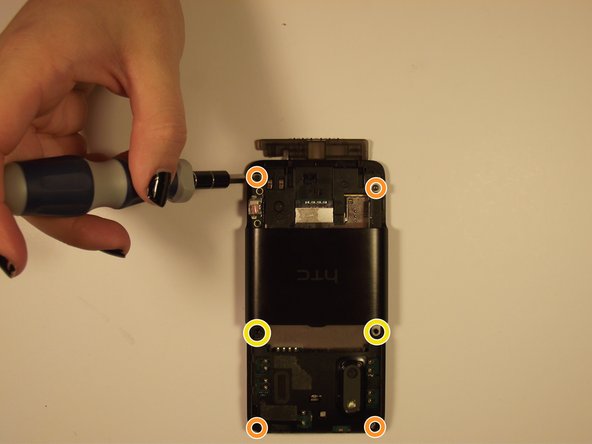
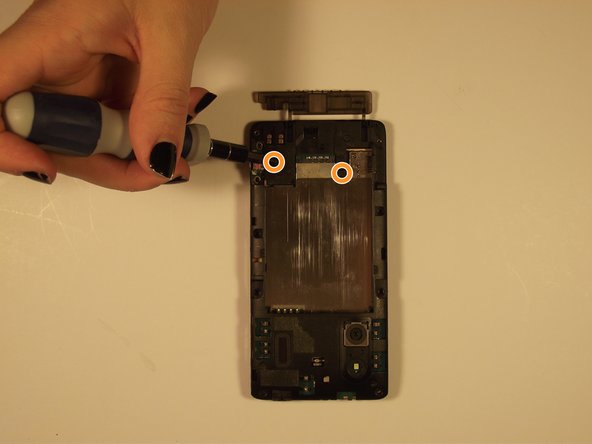
      • Remove the two Phillips screws to release the casing above the port

      • Remove the top and bottom pairs of Torx screws.

      • Remove the middle pair of two Phillips screws.

      Спросите у FixBot

      Добавить комментарий

    6. HTC EVO Design 4G Charging Port Replacement, Removing Casing: шаг 6, изображение 1 из 3 HTC EVO Design 4G Charging Port Replacement, Removing Casing: шаг 6, изображение 2 из 3 HTC EVO Design 4G Charging Port Replacement, Removing Casing: шаг 6, изображение 3 из 3
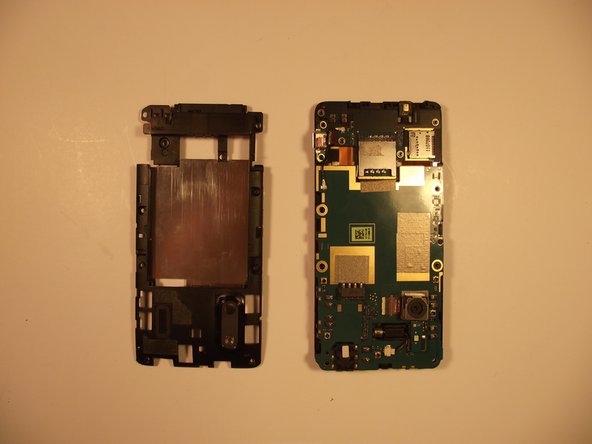
      • To remove the remaining cover, lift the side port, which was previously uncovered, then lift the outer shell from the bottom of the phone and slide it forward

      Спросите у FixBot

      Добавить комментарий

    7. HTC EVO Design 4G Charging Port Replacement, Removing Screws Continued: шаг 7, изображение 1 из 2 HTC EVO Design 4G Charging Port Replacement, Removing Screws Continued: шаг 7, изображение 2 из 2
      • Remove the two revealed screws on the outside (Torx = red, Phillips = orange), and then remove the two phillips on the bottom of the phone

      Спросите у FixBot

      Добавить комментарий

    8. HTC EVO Design 4G Charging Port Replacement, Removing Rear Housing: шаг 8, изображение 1 из 2 HTC EVO Design 4G Charging Port Replacement, Removing Rear Housing: шаг 8, изображение 2 из 2
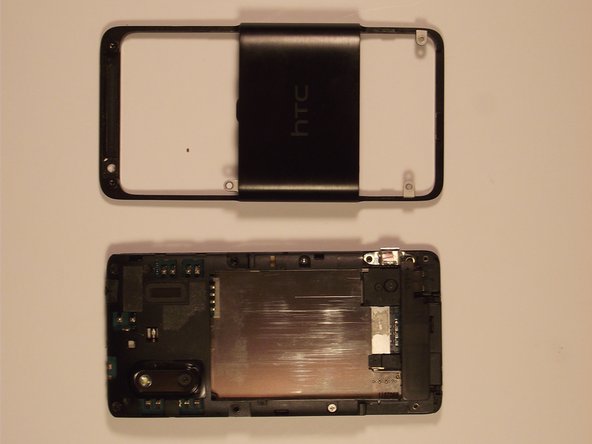
      • Remove the rear housing by prying around the edge with your Safety Pry Tool

      Спросите у FixBot

      Добавить комментарий

    9. HTC EVO Design 4G Charging Port Replacement, Pull the Plug: шаг 9, изображение 1 из 1
      • Unplug the wire connecting the vibrator to the board with your tweezers

      Спросите у FixBot

      Добавить комментарий

    10. HTC EVO Design 4G Charging Port Replacement, Like a Book: шаг 10, изображение 1 из 1
      • Unfold motherboard from the screen (open carefully like a book)

      Спросите у FixBot

      Добавить комментарий

    11. HTC EVO Design 4G Charging Port Replacement, Flex Cables: шаг 11, изображение 1 из 1
      • Disconnect the two aluminum flex cables

      Спросите у FixBot

      Добавить комментарий

    12. HTC EVO Design 4G Charging Port Replacement, Broken Bond: шаг 12, изображение 1 из 1
      • The flex cables should be the only binding and after being removed should leave you with the separate screen

      Спросите у FixBot

      Добавить комментарий

    1. HTC EVO Design 4G Charging Port Replacement, Charging Port: шаг 13, изображение 1 из 2 HTC EVO Design 4G Charging Port Replacement, Charging Port: шаг 13, изображение 2 из 2
      Инструмент, используемый на этом этапе:
      Desoldering Pump
      $3.99
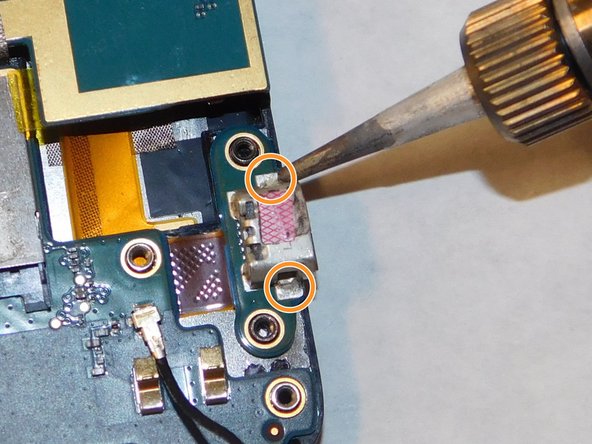
      • Use solder sucker to remove solder from the back of charging port

      • Use solder sucker to remove solder from the front of charging port

      • There are 2 soldering locations from the top view and 4 locations from the bottom view

      • Refer to the How To Solder and Desolder Connections guide if needed.

      • Solder sucker will be very hot

      Спросите у FixBot

      Добавить комментарий

Заключение

To reassemble your device, follow these instructions in reverse order.

Отменить: Я не выполнил это руководство.

Lilian Nguyen

Участник с: 03/02/17

208 Репутация

Автор 2 руководств

Команду

IUPUI, Team S3-G2, Harley Spring 2017 Участник IUPUI, Team S3-G2, Harley Spring 2017

IUPUI-HARLEY-S17S3G2

4 членов

Автор 24 руководств

0 Комментарии к руководству

Добавить комментарий

Статистика просмотров:

За последние 24 часов: 3

За последние 7 дней: 14

За последние 30 дней: 100

За все время: 942