Введение
If your Infant Optics DXR-8 baby monitor's power button is not responding, jammed, or broken, this guide will help you to replace it. Follow the simple steps described here to safely take out the old button and replace it with a new one.
Make sure to turn off the device and unplug it from the charger before you begin.
Выберете то, что вам нужно
-
-
Using the plastic opening tool, remove screen protector from front of monitor.
-
-
-
Remove the six 4mm screws using a Phillips #00 screwdriver.
-
Remove the screen, exposing the circuit board.
-
Turn device over to expose rear circuit board.
-
-
-
-
Insert a new button by placing the small end in the hole to connect the button to the device.
-


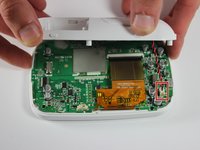
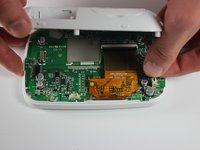
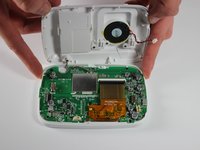


To reassemble your device, follow the instructions in reverse order.
Отменить: Я не выполнил это руководство.
3 человек успешно провели ремонт по этому руководству.



Команда

The Citadel Military College of South Carolina, Team S2-G1, Eggleston Fall 2019 Участник The Citadel Military College of South Carolina, Team S2-G1, Eggleston Fall 2019
CMCSC-EGGLESTON-F19S2G1
3 членов
Автор 3 руководств
2 Комментарии к руководству
Where did you get the replacement switch?
Where can you purchase a new power switch on the circuit board for replacement?
