Перейти к основному содержанию
Присоединяйся к сообществу ремонтников - Создай аккаунт

Kindle Fire HDX 7" Microphone Replacement

Выберете то, что вам нужно

    1. Kindle Fire HDX 7" Microphone Replacement, Speaker Bezel: шаг 1, изображение 1 из 3 Kindle Fire HDX 7" Microphone Replacement, Speaker Bezel: шаг 1, изображение 2 из 3 Kindle Fire HDX 7" Microphone Replacement, Speaker Bezel: шаг 1, изображение 3 из 3
      • Insert an opening pick underneath the speaker bezel, and slide it along the perimeter to separate it from the tablet.

      • The adhesive is strong and may require an iOpener, or heat gun, to soften.

      Спросите у FixBot

      Добавить комментарий

    2. Kindle Fire HDX 7" Microphone Replacement: шаг 2, изображение 1 из 1
      • Remove the speaker bezel.

      Спросите у FixBot

      Добавить комментарий

    1. Kindle Fire HDX 7" Microphone Replacement, Rear Panel: шаг 3, изображение 1 из 1
      • Remove the six pink 3mm T3 Torx screws from the back case.

      Спросите у FixBot

      Добавить комментарий

    2. Kindle Fire HDX 7" Microphone Replacement: шаг 4, изображение 1 из 2 Kindle Fire HDX 7" Microphone Replacement: шаг 4, изображение 2 из 2
      • Wedge opening picks around the perimeter between the display and back case.

      • Work the opening picks around the perimeter until the two halves disengage from each other.

      • Don't completely separate as the display ribbon cable still connects the two.

      Спросите у FixBot

      Добавить комментарий

    3. Kindle Fire HDX 7" Microphone Replacement: шаг 5, изображение 1 из 1
      • Use the flat end of a spudger to pry up and disconnect the rear panel press-fit connector from the motherboard.

      Спросите у FixBot

      Добавить комментарий

      • There may be a glue strip between the battery and the outside case. Gently pry the case open and use the flat end of a spudger to separate the glue strip.

      Спросите у FixBot

      Добавить комментарий

    1. Kindle Fire HDX 7" Microphone Replacement, Microphone: шаг 7, изображение 1 из 2 Kindle Fire HDX 7" Microphone Replacement, Microphone: шаг 7, изображение 2 из 2
      • Pry up the left speaker with the flat end of a spudger and remove.

      Спросите у FixBot

      Добавить комментарий

    2. Kindle Fire HDX 7" Microphone Replacement: шаг 8, изображение 1 из 2 Kindle Fire HDX 7" Microphone Replacement: шаг 8, изображение 2 из 2
      • Pry up the right speaker with the flat end of a spudger and remove.

      Спросите у FixBot

      Добавить комментарий

    3. Kindle Fire HDX 7" Microphone Replacement: шаг 9, изображение 1 из 3 Kindle Fire HDX 7" Microphone Replacement: шаг 9, изображение 2 из 3 Kindle Fire HDX 7" Microphone Replacement: шаг 9, изображение 3 из 3
      Инструмент, используемый на этом этапе:
      Tweezers
      $4.99
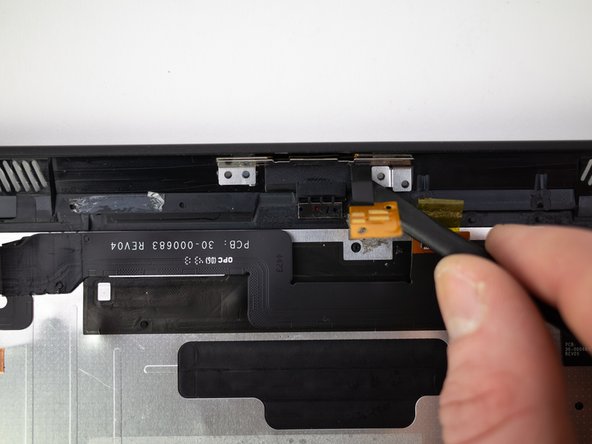
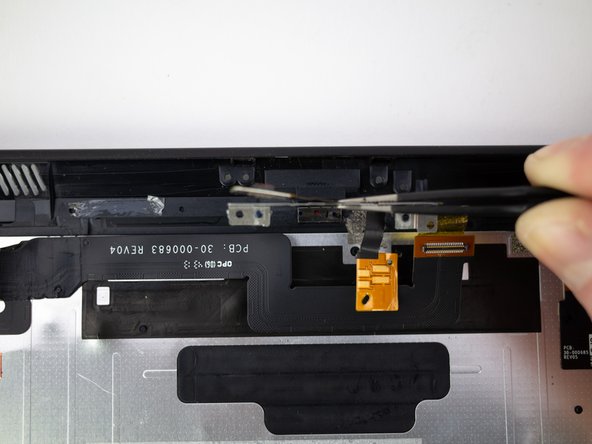
      • Pry up the microphone connector from the rear panel with the flat end of a spudger.

      • Pull up on the microphone with a pair of tweezers to remove.

      Спросите у FixBot

      Добавить комментарий

Заключение

To reassemble your device, follow these instructions in reverse order.

Отменить: Я не выполнил это руководство.

2 человек успешно провели ремонт по этому руководству.

Blake Klein

Участник с: 01/29/17

75 221 Репутация

Автор 50 руководств

0 Комментарии к руководству

Добавить комментарий

Статистика просмотров:

За последние 24 часов: 1

За последние 7 дней: 10

За последние 30 дней: 39

За всё время: 1,113