Перейти к основному содержанию
Присоединяйся к сообществу ремонтников - Создай аккаунт

LG Optimus G Battery Replacement

Выберете то, что вам нужно

    1. LG Optimus G Battery Replacement, Remove the simcard: шаг 1, изображение 1 из 2 LG Optimus G Battery Replacement, Remove the simcard: шаг 1, изображение 2 из 2
      • SIM eject tool

      Спросите у FixBot

      Добавить комментарий

    2. LG Optimus G Battery Replacement, Remove the back cover: шаг 2, изображение 1 из 2 LG Optimus G Battery Replacement, Remove the back cover: шаг 2, изображение 2 из 2
      • Remove the 2 screws holding the back cover using a T5 screwdriver.

      • Use a guitar pick or a plastic opening tool to free the clips on the top and each side of the back cover.

      Спросите у FixBot

      Добавить комментарий

      • Use an opening pick to pry off the rear case.

      Спросите у FixBot

      Добавить комментарий

    3. LG Optimus G Battery Replacement, Removing the battery: шаг 4, изображение 1 из 2 LG Optimus G Battery Replacement, Removing the battery: шаг 4, изображение 2 из 2
      • Remove the tape over the battery, the screws and the antenna connector cord.

      • Be careful removing the golden tape because it is below the antenna connector cord.

      Спросите у FixBot

      Добавить комментарий

    4. LG Optimus G Battery Replacement: шаг 5, изображение 1 из 2 LG Optimus G Battery Replacement: шаг 5, изображение 2 из 2
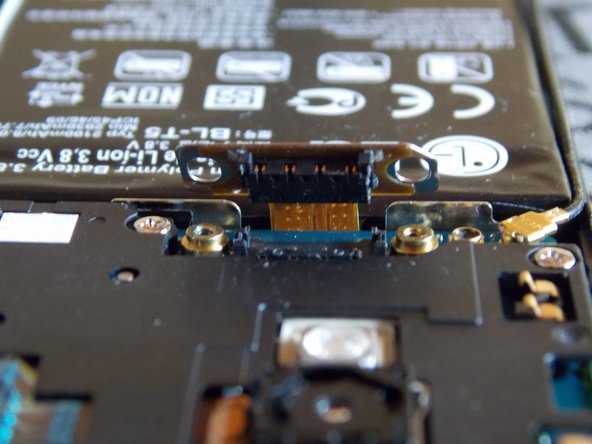
      • Remove the the screws securing the battery cable connector.

      • Disconnect the battery cable.

      Спросите у FixBot

      Добавить комментарий

    5. LG Optimus G Battery Replacement: шаг 6, изображение 1 из 1
      • The battery is held down by some adhesive.

      • Carefully heat the battery to loosen the adhesive holding it to the case.

      Спросите у FixBot

      Добавить комментарий

    6. LG Optimus G Battery Replacement: шаг 7, изображение 1 из 2 LG Optimus G Battery Replacement: шаг 7, изображение 2 из 2
      • Pry the battery up from the case.

      • Be very careful not to puncture the battery when prying. Use blunt plastic tools.

      Спросите у FixBot

      Добавить комментарий

    7. LG Optimus G Battery Replacement: шаг 8, изображение 1 из 3 LG Optimus G Battery Replacement: шаг 8, изображение 2 из 3 LG Optimus G Battery Replacement: шаг 8, изображение 3 из 3
      • The battery is removed.

      • Replace the battery with a new one.

      Спросите у FixBot

      Добавить комментарий

Заключение

To reassemble your device, follow these instructions in reverse order.

Отменить: Я не выполнил это руководство.

7 человек успешно провели ремонт по этому руководству.

Eneider Colina

Участник с: 09/20/13

2 405 Репутация

Автор 9 руководств

5 Комментарии к руководству

“Heat gun”is too vague. So is IR thermometer. What temperature to soften adhesive? How would I know if I was buying the right things?

Deep - Ответить Поделиться

I’m not using a heat gun, it´s a hairdryer; on this case the hairdryer hardly exceeds the 60°C and that is enough to remove the battery. If you want to buy a heat gun you must be careful not to use more than 50 °

Eneider Colina - Ответить Поделиться

Where do you suggest ordering a replacement battery from?

snack le - Ответить Поделиться

you can search it on Amazon and buy directly from LG.

Eneider Colina - Ответить Поделиться

Thank you so much for this wonderful article it helped me replace my battery. I bought my replacement battery from here:-

https://www.phonepartworld.com/LG/LG-Opt...

ricksanchez - Ответить Поделиться

Добавить комментарий

Статистика просмотров:

За последние 24 часов: 9

За последние 7 дней: 28

За последние 30 дней: 65

За всё время: 5,799