Введение
By using this detailed guide, you can learn how to replace the Logitech G305 scroll wheel in 7 easy steps. Replacing a scroll wheel in a mouse is not as simple as it sounds, and takes a couple of tools to get the job done.
These tools are a crucial part of the process, and help to get it done. This repair is an essential part of larger mouse up-keep, and it helps to make sure the scroll wheel is working as it was meant to. By using this guide, you will understand how to successfully replace the scroll wheel for your Logitech G305 mouse using the tools below.
Выберете то, что вам нужно
-
Инструмент, используемый на этом этапе:Flathead 1.5 mm Screwdriver$5.49
-
Use a 1.5 mm flathead screwdriver to remove the four mouse skates from the bottom of the mouse.
-
-
-
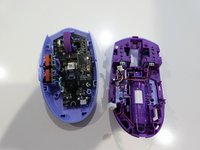
Remove the palm cover by simply sliding downwards. Remove the battery and the bluetooth usb.
-
Using a flat head screwdriver 1.5mm to not pry but to adjust the connector. By doing this it will allow you to open the inside.
-
-
-
-
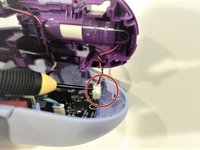
Using the flathead screwdriver 1.5mm you can undo the clip holding the wiring in place.
-
-
-
There is a metal spring that holds one side of the scroll wheel, remove the metal spring using a flathead screwdriver 1.5mm and lifting the scroll wheel.
-
-
-
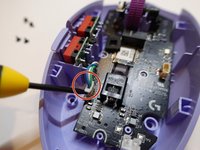
Using the Flathead screwdriver 1.5mm, disconnect the clip for the green and blue wire.
-
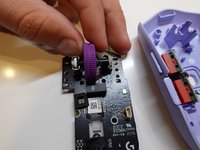
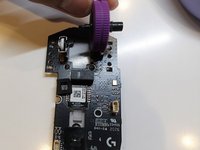
Remove the motherboard out of the casing.
-
The mouse wheel can only come out one way. Slide to the right to release mouse wheel.
-




To reassemble your device, follow these instructions in reverse order.
Отменить: Я не выполнил это руководство.
10 человек успешно провели ремонт по этому руководству.



Команда

University of North Texas, Team 1-12, Smith Spring 2022 Участник University of North Texas, Team 1-12, Smith Spring 2022
UNT-SMITH-S22S1G12
2 членов
Автор 3 руководств
