Введение
This is a guide to do a partial disassembly of the left-side of a Logitech G935. This is my daily-use headset, so I went as far as I was comfortable with knowing I could safely disassemble and reassemble without breaking tabs, glue, wires, or anything else like that.
After disassembly, reassembly is easy reversing these steps.
-
-
Remove the ear cup. It is slightly elastic and may be gently stretched off, starting at one point and gently working around the perimeter. A spudger may help in both removal, and especially re-installation.
-
-
-
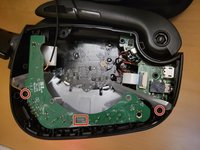
Remove the 6 Phillips #0 screws retaining the top section.
-
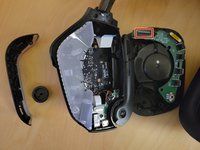
Gently pull off the section you just unscrewed. Flipping it upside-down off to the side is a good bet.
-
Note there is a thin cable soldered to both halves. Be very gentle with this, as I suspect repair will be near-impossible. (It's surface-mounted on the PCB, and sealed inside the driver.)
-
-
-
-
Remove the 2 screws holding the rear plastic facade that retains the buttons and volume wheel.
-
Detach the ribbon cable from the daughterboard.
-
-
-
Remove the ribbon cable connecting the daughterboard to the mainboard.
-
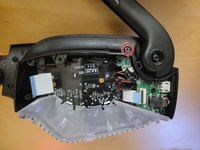
Open the microphone to expose a hidden screw
-
Remove the screw retaining the front plastic facade.
-
The microphone will now come out. Take care as it's attached to the daughterboard via a small fragile soldered cable.
-
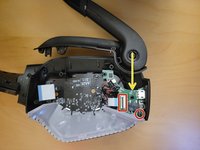
With the microphone out, remove the screw retaining the daughterboard.
-
Gently pry the daughterboard out. Prying from the curved section towards the screw (as the yellow arrow points) worked well for me.
-
Take care once the daughterboard is free, as it is still connected to the mainboard via soldered wires.
-




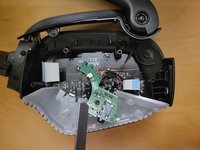
To reassemble your device, follow these instructions in reverse order.
Отменить: Я не выполнил это руководство.
17 человек успешно провели ремонт по этому руководству.


5 Комментарии к руководству
Thanks! It helped a lot. Mine was having a problem with the power on slider, I sprayed a little bit of contact cleaner and a little bit of rubbing with a soft brush, it's working like new now!
I have a issue that i can move it from left to right a bit and the left ear isnt working at times until I fiddle with it, would this solve it ?
Ones i have sound it continues but every time i put it off i will have the same issue with the power slider.
At the very least getting a good view of the daughter board and the switch may give you other ideas as to what's going on. Good chance it's just the contacts inside the switch not making good contact, but cant hurt to clean up the daughter board if it seems to be dirty or corroded (one of mine was pretty corroded, not sure what happened to that one honestly). Once you have the daughter board out, you can take the metal cover off the switch mechanism and dismantle the switch to clean the internal contacts. Idk if I'm allowed to post links so we'll see if it lets me
This video is technically for the G933, not the G935, but the process of dismantling the switch mechanism itself is identical:
https://youtu.be/9r8KK3ynSQA?si=tTVSIBbN...
Be careful not to lose any of the little metal contacts when you clean it, but it's not terribly difficult.
I'm having a similar issue - the left side hasn't worked in ages, everything looks fine, no corrosion or anything. Does anyone know how I can test if the speaker itself still works?
