Введение
This guide is to help you disassemble Logitech M331/M330 mouse and clean the mouse wheel.
Выберете то, что вам нужно
-
-
-
Flip the mouse over so the power switch is facing up.
-
Slide the battery door towards the back of the mouse to release its clips and remove it.
-
Remove the battery (if installed).
-
Remove the sticker from the battery well.
-
Use a Phillips screwdriver to remove the black screw in the battery well.
 Спросите у FixBot
-
-
-
Carefully detach the upper case and the lower case of the mouse by holding the lower case and sliding the upper case forward.
-
-
-
-
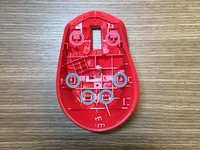
Unscrew the screw in the purple circle and unfasten the plastic pins in blue circles to remove the board from the plastic cover.
-
-
-
To disassemble the upper case of the mouse, detach the plastic pins located in the blue circles. The two pins located in purple circles will be automatically unfastened once the four blue pins are detached.
-
To disassemble the light propagator, detach the small plastic pin at the bottom of the mouse case and light propagator connection.
-
-


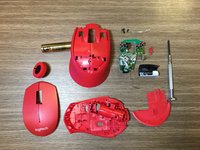
To reassemble your device, follow these instructions in reverse order.
Отменить: Я не выполнил это руководство.
24 человек успешно провели ремонт по этому руководству.

9 Комментарии к руководству
first time using ifixit
this was just what i needed thanks!
Thanks for the guide! I was able to clean the scroll wheel properly and fixed the annoying inaccurate scroll issue.
Exactly what I needed, a clear and direct guide. Thank you so much!
Finally my mouse-wheel has stopped ghost scrolling, I used to have this problem where when I scrolled down and up it would go the opposite direction, at first I thought it was a bug but turns out on my other wired logitech mouse, it worked normally.
Upon following this instruction manual (A++) I managed to put some WD40 in the mouse wheel scrolling part, from the inside (not the wheel but the thing it’s attached to) and scrolled it a couple of times, now it works normally :)
Thanks to the author!
Thanks, cleaning up my M331 and put nachi tape on right-mouse-button so it works again (after it deform slightly).
