Перейти к основному содержанию
Присоединяйся к сообществу ремонтников - Создай аккаунт

Mac Pro Late 2013 Fan Replacement

Выберете то, что вам нужно

  1. Mac Pro Late 2013 Fan Replacement, Outer Case: шаг 1, изображение 1 из 2 Mac Pro Late 2013 Fan Replacement, Outer Case: шаг 1, изображение 2 из 2
    • Slide the lock switch to the right, to the unlocked position.

    Спросите у FixBot

    Добавить комментарий

  2. Mac Pro Late 2013 Fan Replacement: шаг 2, изображение 1 из 3 Mac Pro Late 2013 Fan Replacement: шаг 2, изображение 2 из 3 Mac Pro Late 2013 Fan Replacement: шаг 2, изображение 3 из 3
    • Lift the outer case straight up off the Mac Pro.

    • It may help to push down on the center of the fan while lifting the case up.

    Спросите у FixBot

    Добавить комментарий

  3. Mac Pro Late 2013 Fan Replacement, Fan Assembly: шаг 3, изображение 1 из 3 Mac Pro Late 2013 Fan Replacement, Fan Assembly: шаг 3, изображение 2 из 3 Mac Pro Late 2013 Fan Replacement, Fan Assembly: шаг 3, изображение 3 из 3
    • Remove five 5.1 mm T10 Torx screws from around the outer perimeter of the fan assembly.

    Спросите у FixBot

    Добавить комментарий

  4. Mac Pro Late 2013 Fan Replacement: шаг 4, изображение 1 из 2 Mac Pro Late 2013 Fan Replacement: шаг 4, изображение 2 из 2
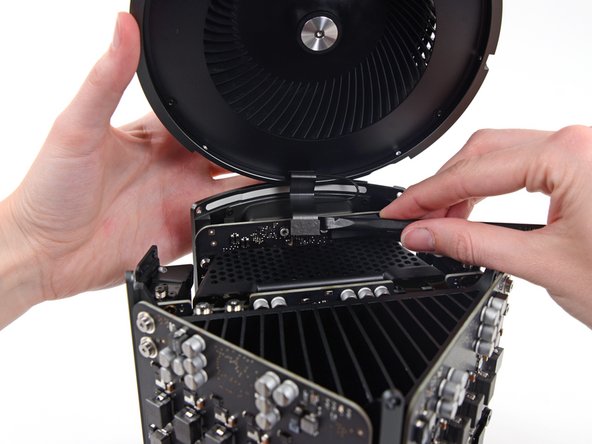
    • The fan assembly is attached to the rest of the computer by two cables on the IO board side.

    • Tilt the assembly up away from the IO board.

    • Do not try to remove the fan assembly yet, as it is still attached by two cables.

    Спросите у FixBot

    Добавить комментарий

  5. Mac Pro Late 2013 Fan Replacement: шаг 5, изображение 1 из 1
    • While supporting the fan assembly with one hand, loosen the two T8 captive screws in the fan cable bracket.

    • These screws are captive in the Mac Pro. Do not try to remove these screws from your Mac Pro.

    Спросите у FixBot

    Добавить комментарий

  6. Mac Pro Late 2013 Fan Replacement: шаг 6, изображение 1 из 1
    Инструмент, используемый на этом этапе:
    Tweezers
    $4.99
    • Use a pair of tweezers to pull the fan cable bracket away from the fan assembly.

    Спросите у FixBot

    Добавить комментарий

  7. Mac Pro Late 2013 Fan Replacement: шаг 7, изображение 1 из 2 Mac Pro Late 2013 Fan Replacement: шаг 7, изображение 2 из 2
    • Use the flat end of a spudger to disconnect the fan assembly ribbon cable from the IO board.

    Спросите у FixBot

    Добавить комментарий

  8. Mac Pro Late 2013 Fan Replacement: шаг 8, изображение 1 из 1
    • Disconnect the fan assembly antenna cable from the IO board.

    • Remove the fan assembly from the Mac Pro.

    Спросите у FixBot

    Добавить комментарий

  9. Mac Pro Late 2013 Fan Replacement, Fan Assembly Lid: шаг 9, изображение 1 из 3 Mac Pro Late 2013 Fan Replacement, Fan Assembly Lid: шаг 9, изображение 2 из 3 Mac Pro Late 2013 Fan Replacement, Fan Assembly Lid: шаг 9, изображение 3 из 3
    • Use the flat end of a spudger to pry the fan assembly lid up off the fan assembly.

    • Remove the fan assembly lid.

    Спросите у FixBot

    Добавить комментарий

  10. Mac Pro Late 2013 Fan Replacement, AirPort Board: шаг 10, изображение 1 из 1
    • Remove the three 3.7 mm T4 screws securing the metal cover to the AirPort board bay.

    Спросите у FixBot

    Добавить комментарий

  11. Mac Pro Late 2013 Fan Replacement: шаг 11, изображение 1 из 1
    • Lift and remove the metal cover from the AirPort board bay.

    Спросите у FixBot

    Добавить комментарий

  12. Mac Pro Late 2013 Fan Replacement: шаг 12, изображение 1 из 3 Mac Pro Late 2013 Fan Replacement: шаг 12, изображение 2 из 3 Mac Pro Late 2013 Fan Replacement: шаг 12, изображение 3 из 3
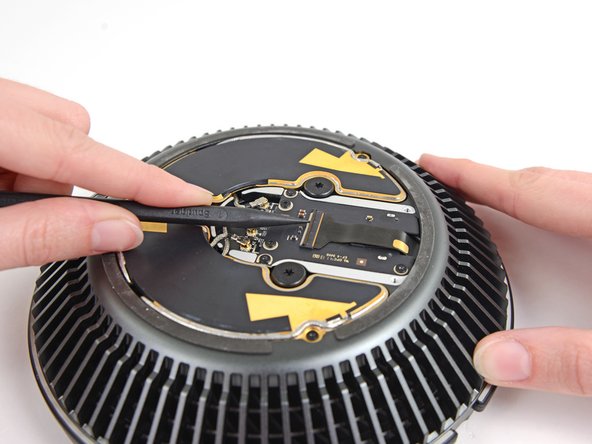
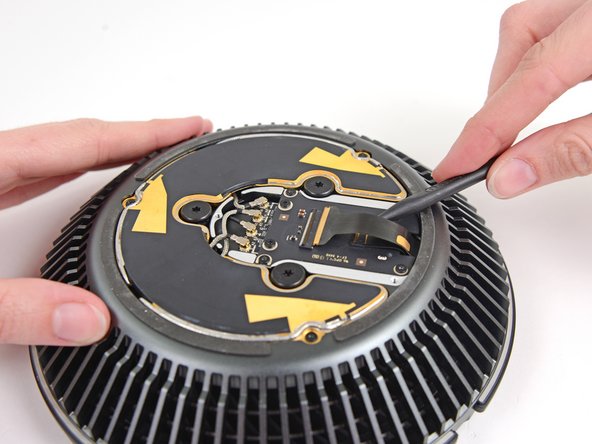
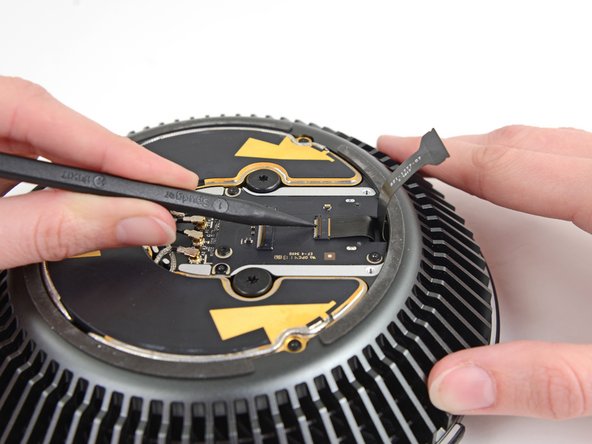
    • Use the tip of a spudger to flip the ZIF retaining tab on the fan assembly ribbon cable connector.

    • Remove the fan assembly ribbon cable from its ZIF socket.

    Спросите у FixBot

    Добавить комментарий

  13. Mac Pro Late 2013 Fan Replacement: шаг 13, изображение 1 из 3 Mac Pro Late 2013 Fan Replacement: шаг 13, изображение 2 из 3 Mac Pro Late 2013 Fan Replacement: шаг 13, изображение 3 из 3
    • Use the tip of a spudger to flip the ZIF retaining tab on the fan ribbon cable.

    • Disconnect the fan ribbon cable.

    Спросите у FixBot

    Добавить комментарий

  14. Mac Pro Late 2013 Fan Replacement, Fan: шаг 14, изображение 1 из 1
    • Remove the three 3.7 mm T4 screws securing the fan bezel to the fan assembly.

    Спросите у FixBot

    Добавить комментарий

  15. Mac Pro Late 2013 Fan Replacement: шаг 15, изображение 1 из 2 Mac Pro Late 2013 Fan Replacement: шаг 15, изображение 2 из 2
    • Remove the fan bezel.

    Спросите у FixBot

    Добавить комментарий

  16. Mac Pro Late 2013 Fan Replacement: шаг 16, изображение 1 из 1
    • Remove the following screws from the top of the fan assembly:

    • One 10.4 mm T10 screw

    • Three 3.7 mm T4 screws

    Спросите у FixBot

    Добавить комментарий

  17. Mac Pro Late 2013 Fan Replacement: шаг 17, изображение 1 из 2 Mac Pro Late 2013 Fan Replacement: шаг 17, изображение 2 из 2
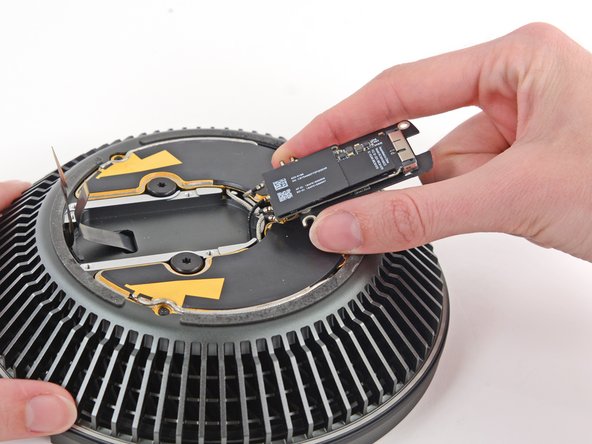
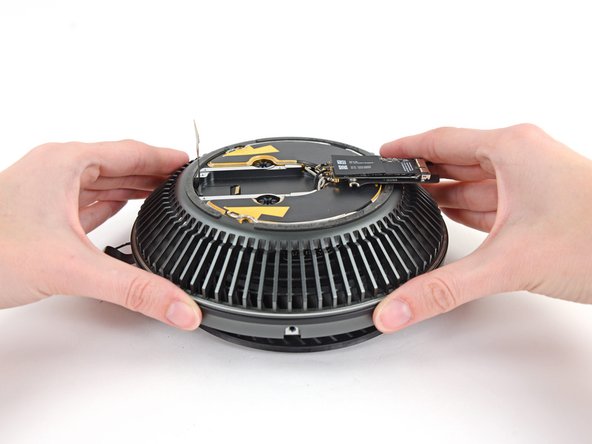
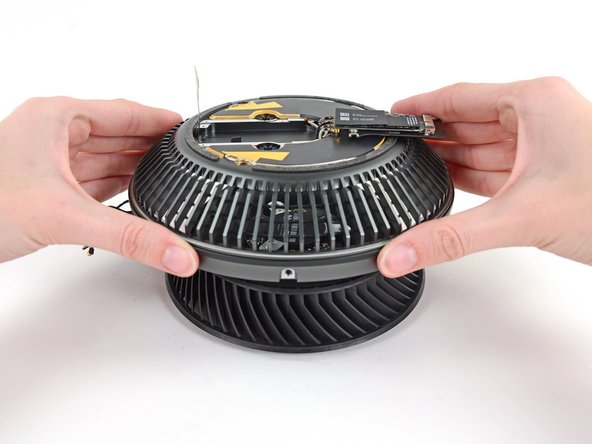
    • Flip the AirPort board over.

    Спросите у FixBot

    Добавить комментарий

  18. Mac Pro Late 2013 Fan Replacement: шаг 18, изображение 1 из 1
    • Remove the remaining two 10.4 mm T10 screws securing the fan to the fan assembly.

    Спросите у FixBot

    Добавить комментарий

  19. Mac Pro Late 2013 Fan Replacement: шаг 19, изображение 1 из 3 Mac Pro Late 2013 Fan Replacement: шаг 19, изображение 2 из 3 Mac Pro Late 2013 Fan Replacement: шаг 19, изображение 3 из 3
    • Lift the fan assembly up from the fan.

    Спросите у FixBot

    Добавить комментарий

Заключение

To reassemble your device, follow these instructions in reverse order.

Отменить: Я не выполнил это руководство.

18 человек успешно провели ремонт по этому руководству.

Andrew Optimus Goldheart

Участник с: 10/17/09

515 073 Репутация

Автор 407 руководств

Команда

iFixit Участник iFixit

Staff

122 членов

Автор 25 946 руководств

5 Комментарии к руководству

using my iFixit bit set, I'd have to say that the tiny screws for Airport card & cover, as well as fan bezel, are actually T5, not T4 - came very close to stripping the heads on two of the Airport card screws with the recommended T4 bit, but firm pressure and a steady hand with T5 bit got them out. Thanks for the guide - many careful steps to get a scrap of scotch tape out of the fan where its gentle ticks-ticka was driving us crazy thinking something far worse was going wrong.....

vbob - Ответить Поделиться

Ha! I wondered what would happen if some tiny flotsam was dropped in through the top - terrible! Thanks for the tip!

Wagon Fixin - Ответить Поделиться

Likewise, I've had a random noise in the fan at startup, and finally took the fan assembly apart to grab it. It was some even tinier screw from somewhere that had lodged in part of the fan housing. All is very, very well now!!!!

Colin Wright - Ответить Поделиться

Hey Colin, I have same fan startup nois in my MP. Can you help me and tell how to fix in few steps?

Deny - Ответить Поделиться

Using Macs Fan Control, I noticed the baseline fan speed of my “trashcan” slowly creeping up from 790 RPM (the usual) to 8 or 900 RPM. Using this guide I took the fan assembly off, and vacuumed and dusted everything with a vacuum, soft brush and canned air. It wasn’t necessary to disassemble the fan unit itself. That did the trick - fan speed is back down to 790 RPM after putting it back together.

PS - in Step 5, a Torx T8 screwdriver seemed to fit just fine for the fan cable bracket screws.

isonno - Ответить Поделиться

Добавить комментарий

Статистика просмотров:

За последние 24 часов: 8

За последние 7 дней: 46

За последние 30 дней: 207

За всё время: 32,212