Перейти к основному содержанию
Присоединяйся к сообществу ремонтников - Создай аккаунт

MacBook Pro 13" Retina Display Early 2013 Heat Sink Replacement

Выберете то, что вам нужно

  1. MacBook Pro 13" Retina Display Early 2013 Heat Sink Replacement, Lower Case: шаг 1, изображение 1 из 1
    Инструмент, используемый на этом этапе:
    Magnetic Project Mat
    $19.95
    • Remove the following ten screws securing the lower case to the upper case:

    • Two 2.3 mm P5 Pentalobe screws

    • Eight 3.0 mm P5 Pentalobe screws

    • Throughout this repair, keep track of each screw and make sure it goes back exactly where it came from to avoid damaging your device.

    Спросите у FixBot

    Добавить комментарий

  2. MacBook Pro 13" Retina Display Early 2013 Heat Sink Replacement: шаг 2, изображение 1 из 1
    • Wedge your fingers between the upper case and the lower case.

    • Gently pull the lower case away from the upper case.

    • Remove the lower case and set it aside.

    Спросите у FixBot

    Добавить комментарий

  3. MacBook Pro 13" Retina Display Early 2013 Heat Sink Replacement: шаг 3, изображение 1 из 3 MacBook Pro 13" Retina Display Early 2013 Heat Sink Replacement: шаг 3, изображение 2 из 3 MacBook Pro 13" Retina Display Early 2013 Heat Sink Replacement: шаг 3, изображение 3 из 3
    • During reassembly, gently push down the center of the lower case to reattach the two plastic clips.

    • The lower case is connected to the upper case at the center, with two plastic clips.

    Спросите у FixBot

    Добавить комментарий

  4. MacBook Pro 13" Retina Display Early 2013 Heat Sink Replacement, Battery Connector: шаг 4, изображение 1 из 1
    • Remove the plastic cover adhered to the battery contact board.

    Спросите у FixBot

    Добавить комментарий

  5. MacBook Pro 13" Retina Display Early 2013 Heat Sink Replacement: шаг 5, изображение 1 из 1
    • Remove the following screws securing the battery connector board to the logic board:

    • Two 2.8 mm T6 Torx screws

    • One 7.0 mm T6 Torx shouldered screw

    Спросите у FixBot

    Добавить комментарий

  6. MacBook Pro 13" Retina Display Early 2013 Heat Sink Replacement: шаг 6, изображение 1 из 2 MacBook Pro 13" Retina Display Early 2013 Heat Sink Replacement: шаг 6, изображение 2 из 2
    Инструмент, используемый на этом этапе:
    Tweezers
    $4.99
    • Use tweezers to remove the small plastic cover located near the bottom right of the battery connector board.

    Спросите у FixBot

    Добавить комментарий

  7. MacBook Pro 13" Retina Display Early 2013 Heat Sink Replacement: шаг 7, изображение 1 из 1
    • Remove the wide head 6.4 mm T6 Torx screw securing the battery connector to the logic board assembly.

    Спросите у FixBot

    Добавить комментарий

  8. MacBook Pro 13" Retina Display Early 2013 Heat Sink Replacement: шаг 8, изображение 1 из 2 MacBook Pro 13" Retina Display Early 2013 Heat Sink Replacement: шаг 8, изображение 2 из 2
    • Carefully lift the battery connector board up off the logic board.

    • It is recommended to bend the battery cables just slightly, to keep the board suspended up above the logic board and out of the way.

    • Do not fold the board completely over, or crease the cables, as this may damage the battery.

    Спросите у FixBot

    Добавить комментарий

  9. MacBook Pro 13" Retina Display Early 2013 Heat Sink Replacement, Battery Contact Board: шаг 9, изображение 1 из 2 MacBook Pro 13" Retina Display Early 2013 Heat Sink Replacement, Battery Contact Board: шаг 9, изображение 2 из 2
    Инструмент, используемый на этом этапе:
    Tweezers
    $4.99
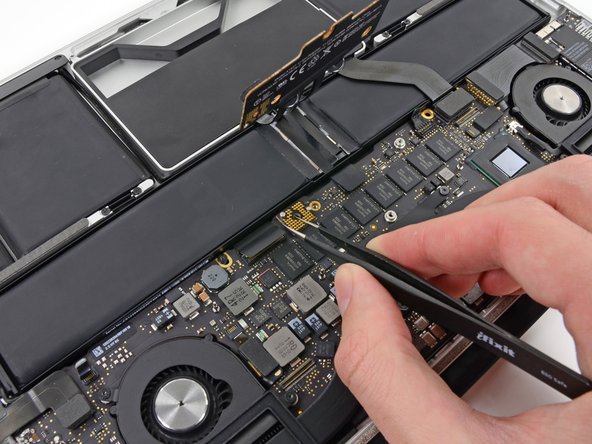
    • Grasp the Interposer with tweezers.

    • An interposer is the name for an interface that links one electrical connection to another. In this repair, it is the board connecting the battery to logic board.

    • Lift the Interposer off the logic board and remove it.

    • Removing this board will ensure that the battery remains disconnected throughout your repair, preventing your computer from accidentally powering on. It's also a good idea to take it out so it doesn't fall out unexpectedly.

    Спросите у FixBot

    Добавить комментарий

  10. MacBook Pro 13" Retina Display Early 2013 Heat Sink Replacement, Heat Sink Assembly: шаг 10, изображение 1 из 1
    • Remove the following screws securing the heat sink to the logic board assembly:

    • One 2.4 mm Phillips #00 screw

    • One 3.4 mm T5 Torx screw

    • Four 2.7 mm T5 Torx screws

    Спросите у FixBot

    Добавить комментарий

  11. MacBook Pro 13" Retina Display Early 2013 Heat Sink Replacement: шаг 11, изображение 1 из 2 MacBook Pro 13" Retina Display Early 2013 Heat Sink Replacement: шаг 11, изображение 2 из 2
    • Lift and remove the heat sink up off the logic board assembly.

    • When reinstalling the heat sink, be sure to apply a new layer of thermal paste. If you have never applied thermal paste before, we have a guide that makes it easy.

    Спросите у FixBot

    Добавить комментарий

  12. MacBook Pro 13" Retina Display Early 2013 Heat Sink Replacement, Right Fan Duct: шаг 12, изображение 1 из 2 MacBook Pro 13" Retina Display Early 2013 Heat Sink Replacement, Right Fan Duct: шаг 12, изображение 2 из 2
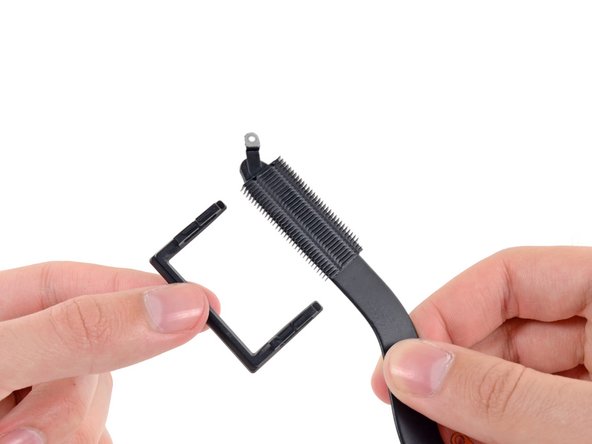
    • Carefully remove the right fan duct from the edge of the heat sink.

    Спросите у FixBot

    Добавить комментарий

  13. MacBook Pro 13" Retina Display Early 2013 Heat Sink Replacement, Left Fan Duct: шаг 13, изображение 1 из 2 MacBook Pro 13" Retina Display Early 2013 Heat Sink Replacement, Left Fan Duct: шаг 13, изображение 2 из 2
    • Carefully remove the left fan duct from the edge of the heat sink.

    Спросите у FixBot

    Добавить комментарий

  14. MacBook Pro 13" Retina Display Early 2013 Heat Sink Replacement, Heat Sink: шаг 14, изображение 1 из 1
    • Heat sink remains.

    Спросите у FixBot

    Добавить комментарий

Заключение

To reassemble your device, follow these instructions in reverse order.

Отменить: Я не выполнил это руководство.

8 человек успешно провели ремонт по этому руководству.

Sam Goldheart

Участник с: 10/18/12

477 361 Репутация

Автор 538 руководств

Команда

iFixit Участник iFixit

Staff

122 членов

Автор 25 808 руководств

0 Комментарии к руководству

Добавить комментарий

Статистика просмотров:

За последние 24 часов: 5

За последние 7 дней: 27

За последние 30 дней: 118

За всё время: 6,499