Перейти к основному содержанию

Microsoft Natural Multimedia Keyboard disassembly and cleaning

Выберете то, что вам нужно

  1. Microsoft Natural Multimedia Keyboard disassembly and cleaning, Microsoft Natural Multimedia Keyboard disassembly and cleaning: шаг 1, изображение 1 из 3 Microsoft Natural Multimedia Keyboard disassembly and cleaning, Microsoft Natural Multimedia Keyboard disassembly and cleaning: шаг 1, изображение 2 из 3 Microsoft Natural Multimedia Keyboard disassembly and cleaning, Microsoft Natural Multimedia Keyboard disassembly and cleaning: шаг 1, изображение 3 из 3
    • A guide showing how to disassemble and clean a Microsoft Natural Multimedia Keyboard.

    • You will need a spudger to remove the keys. An IC mounting tool can be helpful in replacing them.

  2. Microsoft Natural Multimedia Keyboard disassembly and cleaning: шаг 2, изображение 1 из 3 Microsoft Natural Multimedia Keyboard disassembly and cleaning: шаг 2, изображение 2 из 3 Microsoft Natural Multimedia Keyboard disassembly and cleaning: шаг 2, изображение 3 из 3
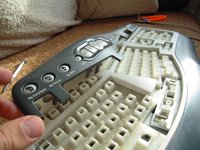
    • Use the flat end of a spudger to pop the keys off the keyboard.

  3. Microsoft Natural Multimedia Keyboard disassembly and cleaning: шаг 3, изображение 1 из 3 Microsoft Natural Multimedia Keyboard disassembly and cleaning: шаг 3, изображение 2 из 3 Microsoft Natural Multimedia Keyboard disassembly and cleaning: шаг 3, изображение 3 из 3
    • Wider keys will have a retaining bar, take note of how they come off to make reassembly easier.

    • Continue removing keys.

  4. Microsoft Natural Multimedia Keyboard disassembly and cleaning: шаг 4, изображение 1 из 3 Microsoft Natural Multimedia Keyboard disassembly and cleaning: шаг 4, изображение 2 из 3 Microsoft Natural Multimedia Keyboard disassembly and cleaning: шаг 4, изображение 3 из 3
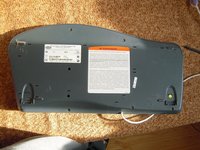
    • Remove the 10 screws from the bottom of the keyboard.

    • Remove the upper button assembly.

  5. Microsoft Natural Multimedia Keyboard disassembly and cleaning: шаг 5, изображение 1 из 3 Microsoft Natural Multimedia Keyboard disassembly and cleaning: шаг 5, изображение 2 из 3 Microsoft Natural Multimedia Keyboard disassembly and cleaning: шаг 5, изображение 3 из 3
    • Use the tip of a spudger to push the upper button assembly buttons out from the back.

  6. Microsoft Natural Multimedia Keyboard disassembly and cleaning: шаг 6, изображение 1 из 3 Microsoft Natural Multimedia Keyboard disassembly and cleaning: шаг 6, изображение 2 из 3 Microsoft Natural Multimedia Keyboard disassembly and cleaning: шаг 6, изображение 3 из 3
    • Remove the flexible keypad from the key caddy assembly.

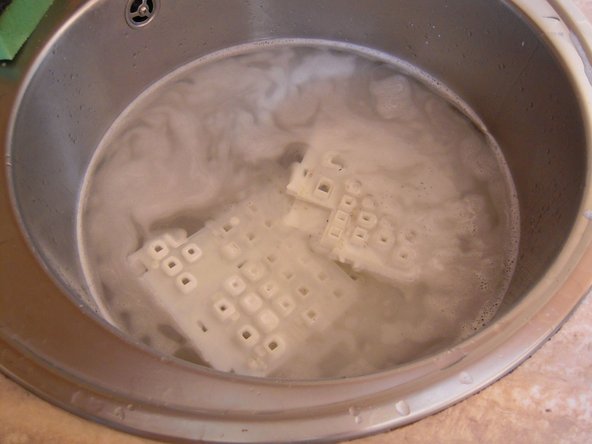
    • The key caddies can be washed in the sink.

  7. Microsoft Natural Multimedia Keyboard disassembly and cleaning: шаг 7, изображение 1 из 1
    • The keys can also be washed.

    • Remove the metal retaining clips before washing to prevent rust.

Заключение

To reassemble your device, follow these instructions in reverse order.

10 человек успешно провели ремонт по этому руководству.

asvnix

Участник с: 11/18/12

292 Репутация

1 руководство автора

3 Комментарии к руководству

Thank you so much! I had never done this before and was very confused by the retaining bar.

Des Blackoak - Ответить

I’ve had this keyboard since it was released and it just recently started having key sticking issues, so I opted to follow this guide and was pleasantly surprised at how well it worked. Thank you for this and I hope to get another 15 years out of it.

Suggestions:

1) Instead of manually cleaning, put the keys into a clear mesh bag and into the dish washer or washing machine.

2) Spray metal retainer bars with WD-40 and wipe off to help further prevent rust.

3) Let the keys and caddies sun dry for the day to ensure they do not retain any water after cleaning.

Thomas K - Ответить

Добавить комментарий

Статистика просмотров:

За последние 24 часов: 3

За последние 7 дней: 13

За последние 30 дней: 38

За всё время: 13,988