Перейти к основному содержанию
Присоединяйся к сообществу ремонтников - Создай аккаунт

Motorola Droid 2 Speaker Replacement

Просмотров: 7,6 тыс.

Просмотр статистики:

За последние 24 часа:
2
За последние 7 дней:
12
За последние 30 дней:
78
За все время:
7 566
Комментарии: 0

Никто не оставлял комментариев к этой инструкции. Будете ли Вы первым?

Перейти к комментариям инструкции
Завершено: 3

3 пользователей отметили эту инстркукцию как "завершенное". Вы будете следующим?

Избранные: 0

Никто не добавил эту инструкцию в избранное (и не подписался на нее). Будете ли Вы первым?

Необходимое время: Нет оценки
Сложность: Умеренно
Motorola Droid 2 Speaker Replacement

This guide will take you though the process of replacing a faulty or non-functioning speaker in your Motorola Droid 2.

Выберете то, что Вам нужно

Инструменты

    1. Motorola Droid 2 Speaker Replacement, Battery: шаг 1, изображение 1 из 3 Motorola Droid 2 Speaker Replacement, Battery: шаг 1, изображение 2 из 3 Motorola Droid 2 Speaker Replacement, Battery: шаг 1, изображение 3 из 3
      • Slide the battery cover toward the bottom edge of the phone.

      • Remove the battery cover from the rear of the phone.

      Спросите у FixBot

      Добавить комментарий

    2. Motorola Droid 2 Speaker Replacement: шаг 2, изображение 1 из 2 Motorola Droid 2 Speaker Replacement: шаг 2, изображение 2 из 2
      • Lift the battery out of the Droid 2 from the edge closest to the bottom of the phone.

      • Remove the battery from the Droid 2.

      Спросите у FixBot

      Добавить комментарий

    1. Motorola Droid 2 Speaker Replacement, Rear Case: шаг 3, изображение 1 из 2 Motorola Droid 2 Speaker Replacement, Rear Case: шаг 3, изображение 2 из 2
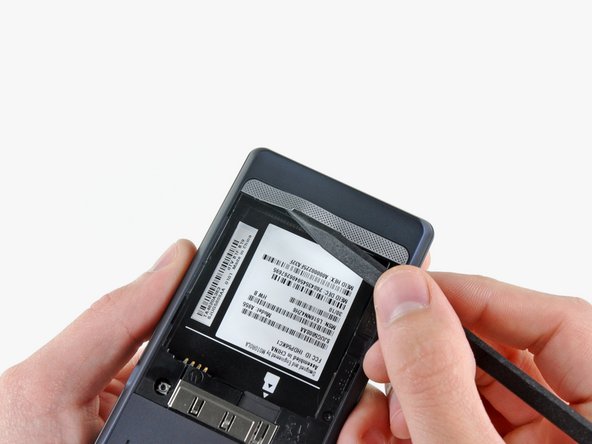
      • Using the tip of a spudger, peel up one corner of the silver ribbon below the battery compartment.

      • Peel the ribbon off the phone.

      Спросите у FixBot

      Добавить комментарий

    2. Motorola Droid 2 Speaker Replacement: шаг 4, изображение 1 из 1
      • Insert the flat end of a spudger and pry the plastic camera cover up off the phone.

      • The thin plastic cover is attached to the phone with an adhesive. Work slowly and carefully.

      Спросите у FixBot

      Добавить комментарий

    3. Motorola Droid 2 Speaker Replacement: шаг 5, изображение 1 из 1
      • Use the tip of a spudger to remove the camera bezel stuck to the rear case.

      Спросите у FixBot

      Добавить комментарий

    4. Motorola Droid 2 Speaker Replacement: шаг 6, изображение 1 из 1
      • Remove the seven 5.5 mm T5 Torx screws securing the rear case to the inner case.

      Спросите у FixBot

      Добавить комментарий

    5. Motorola Droid 2 Speaker Replacement: шаг 7, изображение 1 из 1
      • Insert the flat end of a spudger and pry downwards to release the plastic tab holding the rear case to the motherboard screw.

      Спросите у FixBot

      Добавить комментарий

    6. Motorola Droid 2 Speaker Replacement: шаг 8, изображение 1 из 1
      • Gently insert a spudger between the rear case and front case at the top of the phone, near the audio jack.

      • Carefully pry the top edge of the rear case up from the rest of the phone.

      Спросите у FixBot

      Добавить комментарий

    7. Motorola Droid 2 Speaker Replacement: шаг 9, изображение 1 из 2 Motorola Droid 2 Speaker Replacement: шаг 9, изображение 2 из 2
      • With the spudger still inserted between the rear case and front case, slide the spudger along the right edge of the device, moving toward the bottom, prying as you go.

      • Continue prying along the bottom edge of the device from right to left, freeing it from the front panel.

      Спросите у FixBot

      Добавить комментарий

    8. Motorola Droid 2 Speaker Replacement: шаг 10, изображение 1 из 2 Motorola Droid 2 Speaker Replacement: шаг 10, изображение 2 из 2
      • Continue prying the rear case from the front case along the left side, moving from bottom to top.

      • Lift the rear case up out of the phone.

      • At this point, the button covers on the side of the phone are free and may fall out if you tip the phone upside down.

      Спросите у FixBot

      Добавить комментарий

    1. Motorola Droid 2 Speaker Replacement, Speaker: шаг 11, изображение 1 из 1
      • Carefully lift the speaker/antenna assembly up and out of the phone.

      • If you are re-assembling your phone, insert any power, camera, or volume buttons that may have fallen out at this point.

      Спросите у FixBot

      Добавить комментарий

Заключение

To reassemble your device, follow these instructions in reverse order.

Отменить: Я не выполнил это руководство.

3 человек успешно провели ремонт по этому руководству.

0 Комментарии к руководству

Добавить комментарий

Статистика просмотров:

За последние 24 часов: 2

За последние 7 дней: 12

За последние 30 дней: 78

За все время: 7,566