Введение
Want to have a newer/faster network card? Follow this guide, it will show you how to replace it.
Выберете то, что вам нужно
-
-
Loosen all four screws and remove the back panel.
-
Remove the back panel with a spudger. Start out as in the second photo to prevent the plastic from breaking. Work you're way around the panel to remove it.
-
-
-
-
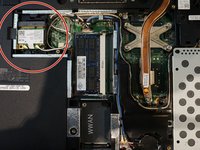
In the red circle is the network card
-
Remove the two wires (inside the green circle)
-
-
-
Place the spudger as shown in the photo. The network card will pop up. After that you can remove it and replace it with another one
-


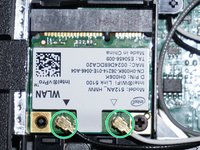

To reassemble your device, follow these instructions in reverse order. Be sure to connect the wires the same as in step 3.
Отменить: Я не выполнил это руководство.
2 человек успешно провели ремонт по этому руководству.


