Этот перевод был сделан машиной и пока не проверен человеком. Говорите на этом языке? Просмотрите его.

Замена кнопки триггера Nintendo 2DS

Fina Beauchamp и 5 другие участники
Последнее обновление 29 июл 2026 г.
Просмотров: 37 тыс.
Просмотр статистики:
- За последние 24 часа:
- 14
- За последние 7 дней:
- 86
- За последние 30 дней:
- 365
- За все время:
- 36 638
Комментарии: 23
20 комментариев к шагам, 3 комментариев к инструкции.
Перейти к комментариям инструкцииЗавершено: 23 24
23 пользователей отметили эту инстркукцию как "завершенное". Вы будете следующим?
24 пользователей отметили эту инструкцию как "завершенное". В том числе и Вы — отличная работа!
Избранные: 4 5
4 эта инструкция понравилась многим пользователям (и они подписались на нее). Вы будете следующим?
5 эта инструкция понравилось многим пользователям (и они подписались на нее), в том числе и Вам!
Введение
Перейти к шагу 1 ↓Это руководство для Nintendo 2DS поможет вам добраться до кнопок триггера, чтобы снять их для чистки или замены.
Выберете то, что Вам нужно
Инструменты

-
-
-
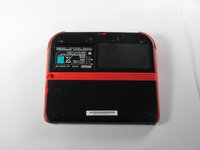
Открутите два невыпадающих винта Phillips, удерживающих верхнюю заднюю панель.
 Спросите у FixBot
-
-
-
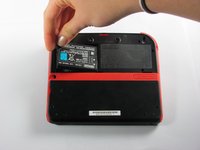
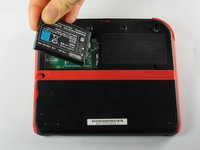
Извлеките аккумулятор из корпуса, приподняв его со стороны, ближайшей к внешнему краю.
-
-
-
-
-
Открутите десять винтов Phillips, удерживающих заднюю панель.
-
-
-
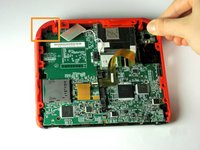
Аккуратно потяните заднюю панель строго вверх, чтобы отделить её от устройства.
-
-
-
-
Подденьте ногтем или плоским концом пластиковой лопатки (spudger) фиксатор шлейфа на материнской плате, чтобы откинуть его вверх
-
Извлеките шлейф из разъема
-
-
-
-
-
Потяните кнопку триггера от устройства, чтобы снять ее.
-
-




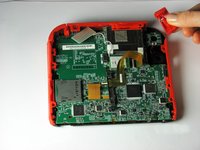
Для сборки устройства выполните эти действия в обратном порядке.
Отменить: Я не выполнил это руководство.
23 человек успешно провели ремонт по этому руководству.

Команду

Cal Poly, Team 70-1, Forte Winter 2015 Участник Cal Poly, Team 70-1, Forte Winter 2015
CPSU-FORTE-W15S70G1
4 членов
Автор 72 руководств
3 Комментарии к руководству
Nice job! My right button was jammed for at least two years. Now I can finally demolish my friends in Mariokart.
Can’t seem to get the second set of screws to budge at all.
now what????
