Введение
This guide will show you how to open up your Nvidia Shield Pro Android TV. This is a prerequisite guide needed to replacement components found inside the device.
Выберете то, что вам нужно
-
-
Flip to the back side of your Nvidia Shield Pro Android TV.
-
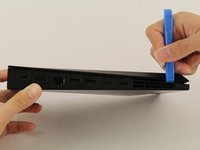
To open the bottom cover of the Nvidia Shield, start from the corner and slide your plastic opening tool across the gap.
-
If using a plastic opening tool to open the bottom cover is difficult, try using a metal spudger.
-
-


Заключение
To reassemble your device, follow these instructions in reverse order.



Команда

Cal Poly, Team S18-G2, White Winter 2020 Участник Cal Poly, Team S18-G2, White Winter 2020
CPSU-WHITE-W20S18G2
4 членов
Автор 14 руководств
