Введение
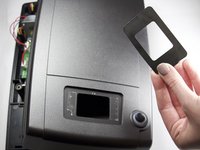
This guide will show you have to remove the viewing screen from the front of the scanner if the screen breaks, or is no longer transparent.
Выберете то, что вам нужно
-
-
To start, open the device by removing the 5, 5mm x 9mm screws, with a J1 screwdriver.
-
-
-
-
Push the screen away from the scanner from the inside with light force until it is no longer attached.
-
Replace with a new screen.
-


Заключение
To reassemble your device, follow these instructions in reverse order.


Команда

Texas Tech, Team S46-G2, Bennett Spring 2017 Участник Texas Tech, Team S46-G2, Bennett Spring 2017
TTU-BENNETT-S17S46G2
3 членов
Автор 10 руководств
