Перейти к основному содержанию
Присоединяйся к сообществу ремонтников - Создай аккаунт

Выберете то, что вам нужно

Эта разборка - неруководство по ремонту. Чтобы отремонтировать PlayStation 3, воспользуйтесь нашим сервисным руководством.

  1. PlayStation 3 Teardown, PlayStation 3 Teardown: шаг 1, изображение 1 из 3 PlayStation 3 Teardown, PlayStation 3 Teardown: шаг 1, изображение 2 из 3 PlayStation 3 Teardown, PlayStation 3 Teardown: шаг 1, изображение 3 из 3
    • There she is, one of the two original PS3 models available at launch (60GB).

    • It's got PS2/PS1 backwards compatibility and a multi-card reader. The current PS3 Slim doesn't have the card reader. The other launch model lacked the card reader and WiFi (20GB).

    Спросите у FixBot
  2. PlayStation 3 Teardown: шаг 2, изображение 1 из 2 PlayStation 3 Teardown: шаг 2, изображение 2 из 2
    • Let's get started!

    • Remove the hard drive access cover from the bottom of the PS3.

    Спросите у FixBot
  3. PlayStation 3 Teardown: шаг 3, изображение 1 из 1
    • Use the Phillips screwdriver #1 to remove the blue screw.

    Спросите у FixBot
  4. PlayStation 3 Teardown: шаг 4, изображение 1 из 3 PlayStation 3 Teardown: шаг 4, изображение 2 из 3 PlayStation 3 Teardown: шаг 4, изображение 3 из 3
    • Lift up the metal lever.

    • Slide the hard drive towards the front of the case.

    • Pull it straight up and out of the unit.

    • This is all you need to do to access the PS3's hard drive.

    Спросите у FixBot
  5. PlayStation 3 Teardown: шаг 5, изображение 1 из 3 PlayStation 3 Teardown: шаг 5, изображение 2 из 3 PlayStation 3 Teardown: шаг 5, изображение 3 из 3
    • Remove the warranty sticker.

    • Obviously this voids your warranty. You have been warned.

    • Use your fingers and pry up and remove the foot underneath the sticker.

    Спросите у FixBot
  6. PlayStation 3 Teardown: шаг 6, изображение 1 из 2 PlayStation 3 Teardown: шаг 6, изображение 2 из 2
    • Use the Torx Screwdriver (T8 or T10) to remove the torx screw from the space behind the rubber foot.

    • This screw has a security bit but most are able to remove it successfully with a normal Torx driver.

    Спросите у FixBot
  7. PlayStation 3 Teardown: шаг 7, изображение 1 из 3 PlayStation 3 Teardown: шаг 7, изображение 2 из 3 PlayStation 3 Teardown: шаг 7, изображение 3 из 3
    • Place PlayStation face up such that "PlayStation 3" is oriented so you can read it.

    • Place your palm on the PlayStation 3 logo and slide the plastic front cover towards you and off of the outer plastic shell. Set it aside.

    Спросите у FixBot
  8. PlayStation 3 Teardown: шаг 8, изображение 1 из 3 PlayStation 3 Teardown: шаг 8, изображение 2 из 3 PlayStation 3 Teardown: шаг 8, изображение 3 из 3
    • Remove the metal receiver that held the torx screw you just removed.

    Спросите у FixBot
  9. PlayStation 3 Teardown: шаг 9, изображение 1 из 1
    • Remove the 9 screws from the outer plastic shell using a #2 Philips driver.

    • 6 large screws

    • 1 medium screw

    • 2 small screws

    Спросите у FixBot
  10. PlayStation 3 Teardown: шаг 10, изображение 1 из 3 PlayStation 3 Teardown: шаг 10, изображение 2 из 3 PlayStation 3 Teardown: шаг 10, изображение 3 из 3
    • READ THIS ENTIRE STEP AND THE NEXT ONE BEFORE PROCEEDING. Locate the two locking tabs on the back of the PS3. Push them in simultaneously and lift the outer plastic shell off of the main board but BE CAREFUL as there is a ribbon cable connecting the shell to other hardware.

    • Ribbon cables are very fragile. Take care when removing or inserting ribbon cables.

    Спросите у FixBot
  11. PlayStation 3 Teardown: шаг 11, изображение 1 из 3 PlayStation 3 Teardown: шаг 11, изображение 2 из 3 PlayStation 3 Teardown: шаг 11, изображение 3 из 3
    • Disconnect the ribbon cable and set the shell aside.

    • If you want to remove the plastic card reader, locate its two locking plastic tabs that hold the card reader to the shell, spread them, and lift the card reader off of the shell.

    Спросите у FixBot
  12. PlayStation 3 Teardown: шаг 12, изображение 1 из 3 PlayStation 3 Teardown: шаг 12, изображение 2 из 3 PlayStation 3 Teardown: шаг 12, изображение 3 из 3
    • To remove the plastic card reader, locate its two locking plastic tabs that hold the card reader to the shell, spread them, and lift the card reader off of the shell.

    Спросите у FixBot
  13. PlayStation 3 Teardown: шаг 13, изображение 1 из 3 PlayStation 3 Teardown: шаг 13, изображение 2 из 3 PlayStation 3 Teardown: шаг 13, изображение 3 из 3
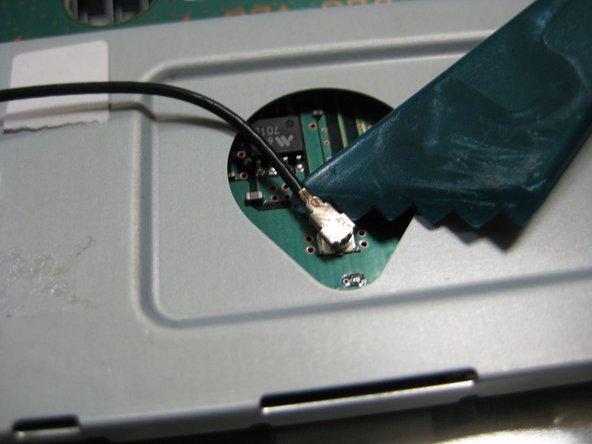
    • Working on the main unit, lift up on and disconnect the black RF wire from the wireless assembly using a spudger.

    Спросите у FixBot
  14. PlayStation 3 Teardown: шаг 14, изображение 1 из 2 PlayStation 3 Teardown: шаг 14, изображение 2 из 2
    • Remove the flat ribbon cable from the wireless assembly.

    Спросите у FixBot
  15. PlayStation 3 Teardown: шаг 15, изображение 1 из 1
    • Remove the four Philips #2 screws from the top of the wireless assembly.

    Спросите у FixBot
  16. PlayStation 3 Teardown: шаг 16, изображение 1 из 3 PlayStation 3 Teardown: шаг 16, изображение 2 из 3 PlayStation 3 Teardown: шаг 16, изображение 3 из 3
    • Lift the wireless assembly off the main board and set it aside.

    • Disconnect the ribbon cable from the main board and place it with the wireless assembly.

    Спросите у FixBot
  17. PlayStation 3 Teardown: шаг 17, изображение 1 из 3 PlayStation 3 Teardown: шаг 17, изображение 2 из 3 PlayStation 3 Teardown: шаг 17, изображение 3 из 3
    • Locate the other wireless assembly which the black RF wire is connected to.

    • Remove the one Philips #2 screw retaining it to the main board and lift off the assembly and set it aside.

    Спросите у FixBot
  18. PlayStation 3 Teardown: шаг 18, изображение 1 из 2 PlayStation 3 Teardown: шаг 18, изображение 2 из 2
    • Remove the cables that attach the power supply to the main board.

    • Remove the AC connector from the power supply.

    Спросите у FixBot
  19. PlayStation 3 Teardown: шаг 19, изображение 1 из 3 PlayStation 3 Teardown: шаг 19, изображение 2 из 3 PlayStation 3 Teardown: шаг 19, изображение 3 из 3
    • Remove the 5 screws using a Philips #2 from the power supply, and lift the power supply straight up and off of the main body. Set it aside.

    • There are 2 power pins connecting the motherboard to the power supply as you remove it.

    Спросите у FixBot
  20. PlayStation 3 Teardown: шаг 20, изображение 1 из 2 PlayStation 3 Teardown: шаг 20, изображение 2 из 2
    • The screws holding the blu-ray drive to the main board have already been removed in a previous step.

    • Unplug the power connector (gray) on the side of the player.

    Спросите у FixBot
  21. PlayStation 3 Teardown: шаг 21, изображение 1 из 2 PlayStation 3 Teardown: шаг 21, изображение 2 из 2
    • READ THIS ENTIRE STEP BEFORE PROCEEDING. Lift the player up slowly to expose the folded ribbon cable beneath it.

    • Remove that ribbon cable from the main board and set the drive/cable aside.

    Спросите у FixBot
  22. PlayStation 3 Teardown: шаг 22, изображение 1 из 2 PlayStation 3 Teardown: шаг 22, изображение 2 из 2
    • Remove the ribbon cable attaching the on/off and eject switch circuit board to the main board.

    Спросите у FixBot
  23. PlayStation 3 Teardown: шаг 23, изображение 1 из 3 PlayStation 3 Teardown: шаг 23, изображение 2 из 3 PlayStation 3 Teardown: шаг 23, изображение 3 из 3
    • Remove the 4 Philips #2 screws retaining the circuit board to the case.

    • Remove the circuit board from the case.

    • These screws are medium length, different from most of the other Phillips #2 screws.

    Спросите у FixBot
  24. PlayStation 3 Teardown: шаг 24, изображение 1 из 2 PlayStation 3 Teardown: шаг 24, изображение 2 из 2
    • Remove the 9 screws from the main body.

    • 5 Medium Philips #2 Screws

    • 2 Small Philips #1 Screws

    • 1 Ground Philips Screw with Washer

    • 1 Bolt Philips Screw (under AC cord)

    Спросите у FixBot
  25. PlayStation 3 Teardown: шаг 25, изображение 1 из 2 PlayStation 3 Teardown: шаг 25, изображение 2 из 2
    • Grab the main board at the locations shown in the picture and lift the main board off of the back casing.

    • Set aside the black shell.

    Спросите у FixBot
  26. PlayStation 3 Teardown: шаг 26, изображение 1 из 3 PlayStation 3 Teardown: шаг 26, изображение 2 из 3 PlayStation 3 Teardown: шаг 26, изображение 3 из 3
    • On the main body, locate the 5 plastic locking tabs holding the rear plastic I/O shield to the main body.

    • Pry the tabs away from the body and lift the rear shield away.

    Спросите у FixBot
  27. PlayStation 3 Teardown: шаг 27, изображение 1 из 3 PlayStation 3 Teardown: шаг 27, изображение 2 из 3 PlayStation 3 Teardown: шаг 27, изображение 3 из 3
    • Remove the fan power connector.

    Спросите у FixBot
  28. PlayStation 3 Teardown: шаг 28, изображение 1 из 3 PlayStation 3 Teardown: шаг 28, изображение 2 из 3 PlayStation 3 Teardown: шаг 28, изображение 3 из 3
    • Remove the 3 Philips #2 screws holding the fan to the main body.

    • These are extra small screws

    • Lift the fan straight up and out of the body.

    • Check out the size of this thing.

    Спросите у FixBot
  29. PlayStation 3 Teardown: шаг 29, изображение 1 из 3 PlayStation 3 Teardown: шаг 29, изображение 2 из 3 PlayStation 3 Teardown: шаг 29, изображение 3 из 3
    • On the top of the mainboard, EVENLY remove the four large Philips #2 screws holding the heat sink.

    • Removing them evenly reduces strain on the GPU and CPU.

    • Remove the plates and the screws from the main board.

    Спросите у FixBot
  30. PlayStation 3 Teardown: шаг 30, изображение 1 из 3 PlayStation 3 Teardown: шаг 30, изображение 2 из 3 PlayStation 3 Teardown: шаг 30, изображение 3 из 3
    • Flip the main board over.

    • Lift (or pry with fingers) the heat sink straight off of the mainboard and processors.

    • Force will be required as the thermal paste "glues" the heat sink to the processor.

    • Note: If new thermal paste is readily available, clean the old paste off well and apply new thermal paste at the time of reassembly. If new thermal paste is not available or you are cheap, do not disturb the "old" thermal paste.

    Спросите у FixBot
  31. PlayStation 3 Teardown: шаг 31, изображение 1 из 2 PlayStation 3 Teardown: шаг 31, изображение 2 из 2
    • Remove the 2 Phillips #0 screws from the hard drive enclosure.

    Спросите у FixBot
  32. PlayStation 3 Teardown: шаг 32, изображение 1 из 2 PlayStation 3 Teardown: шаг 32, изображение 2 из 2
    • To expose the mainboard, remove the watch battery from the mainboard.

    Спросите у FixBot
  33. PlayStation 3 Teardown: шаг 33, изображение 1 из 3 PlayStation 3 Teardown: шаг 33, изображение 2 из 3 PlayStation 3 Teardown: шаг 33, изображение 3 из 3
    • Using spudger, carefully pry the metal shielding away from and off of the top of motherboard.

    Спросите у FixBot
  34. PlayStation 3 Teardown: шаг 34, изображение 1 из 3 PlayStation 3 Teardown: шаг 34, изображение 2 из 3 PlayStation 3 Teardown: шаг 34, изображение 3 из 3
    • Turn the motherboard over and remove the metal shielding on the opposite side. Pry with a spudger or with your fingers.

    Спросите у FixBot
  35. PlayStation 3 Teardown: шаг 35, изображение 1 из 2 PlayStation 3 Teardown: шаг 35, изображение 2 из 2
    • Check out all the chips with heatspreaders on this thing.

    • There's the Emotion Engine chip and Graphics Synthesis chip that allows the sweet backwards compatibility.

    • IBM Cell processor... This CPU has 9 cores, 10 threads and it runs @ 3.2GHz .

    Спросите у FixBot
  36. PlayStation 3 Teardown: шаг 36, изображение 1 из 3 PlayStation 3 Teardown: шаг 36, изображение 2 из 3 PlayStation 3 Teardown: шаг 36, изображение 3 из 3
    • More Chips!

    • IBM Cell CPU

    • Nvidia RSX GPU

    Спросите у FixBot
  37. PlayStation 3 Teardown: шаг 37, изображение 1 из 2 PlayStation 3 Teardown: шаг 37, изображение 2 из 2
    • Consider your PS3 disassembled.

    Спросите у FixBot

Mint137

Участник с: 10/23/09

4 021 Репутация

1 руководство автора

15 Комментарии к руководству

ii got a broken ps3 from my step dad, it turns on but theres no picture. I've taken it apart 3 times now and couldnt figure out how to get it fully apart. I've put everything back together and it does the same thing. So i didnt mess it up and more than it was. lol. From what i was told it was on top of a tv and a dog caught the cord and pulled it down. It slammed down on the back of the system and hasnt been able to show video and sound. Like i've said, i've tryed to mess with it but i know nothing about this stuff. Any ideas as to what could be broken? The port itself is cracked, but i've tryed HDMI and that doesnt work either. Any advice is helpful. Thank you.

shujinflik - Ответить Поделиться

lol couple years later, no all u have to do is switch out the fan inside your ps3 :) it happen to mine or buy a new ps3 and switch hard drives :)

Mikegart victoria - Ответить Поделиться

I love the way you post a warning as to how fragile the ribbon cable is and then say, "remove ribbon cable" without any detail as to how to release it. Thanks. Now my PS3 is trash.

sonofjay817 - Ответить Поделиться

Instructions not clear enough. Stuck my finger in a light socket.

10/10, would electrocute self again.

Randy Laird - Ответить Поделиться

watch ifixit's video on youtube, it helps a lot, these pictures help out more after you see the video...

David Stevens - Ответить Поделиться

Добавить комментарий

Статистика просмотров:

За последние 24 часов: 25

За последние 7 дней: 246

За последние 30 дней: 1,383

За всё время: 582,399