Перейти к основному содержанию
Присоединяйся к сообществу ремонтников - Создай аккаунт

Razer Blade Stealth 2017 Audio and USB-A Port Replacement

Просмотров: 2,2 тыс.

Просмотр статистики:

За последние 24 часа:
1
За последние 7 дней:
8
За последние 30 дней:
43
За все время:
2 244
Комментарии: 7

7 комментариев к шагам.

Завершено: 1

1 пользователь отметил эту инструкцию как "завершенное". Вы будете следующим?

Избранные: 0

Никто не добавил эту инструкцию в избранное (и не подписался на нее). Будете ли Вы первым?

Необходимое время: 15 минут
Сложность: Умеренно
Razer Blade Stealth 2017 Audio and USB-A Port Replacement

This guide outlines how to replace the audio and USB-A port module in the Razer Blade Stealth 2017. The audio may be faint or not work. This module is found on the left-hand side of the laptop and often has issues regarding loose ports and external device communication. Some tools are required for this replacement.

Выберете то, что Вам нужно

Инструменты

    1. Razer Blade Stealth 2017 Audio and USB-A Port Replacement, Battery: шаг 1, изображение 1 из 2 Razer Blade Stealth 2017 Audio and USB-A Port Replacement, Battery: шаг 1, изображение 2 из 2
      • Before you begin, be sure to turn off your laptop and discharge the battery down to 25%.

      • Use a Torx T5 screwdriver to remove the eight, 3mm screws on the bottom cover of the laptop.

      • Whenever you remove screws from the device, remember to save and label them.

      Спросите у FixBot

      Добавить комментарий

    2. Razer Blade Stealth 2017 Audio and USB-A Port Replacement: шаг 2, изображение 1 из 1
      • Remove the bottom cover of the laptop by sliding it away from the hinge.

      • Do not force the cover up!

      Спросите у FixBot

      Добавить комментарий

    3. Razer Blade Stealth 2017 Audio and USB-A Port Replacement: шаг 3, изображение 1 из 2 Razer Blade Stealth 2017 Audio and USB-A Port Replacement: шаг 3, изображение 2 из 2
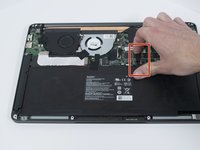
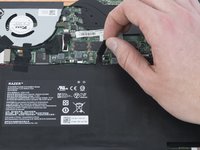
      • Use your fingernail to pry up and disconnect the battery from the motherboard.

      Спросите у FixBot

      Добавить комментарий

    4. Razer Blade Stealth 2017 Audio and USB-A Port Replacement: шаг 4, изображение 1 из 1
      • Use a Phillips #00 screwdriver to remove the six, 5mm screws securing the battery.

      Спросите у FixBot

      Добавить комментарий

    5. Razer Blade Stealth 2017 Audio and USB-A Port Replacement: шаг 5, изображение 1 из 2 Razer Blade Stealth 2017 Audio and USB-A Port Replacement: шаг 5, изображение 2 из 2
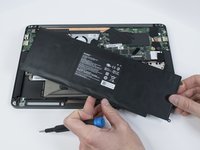
      • Remove any tape attached to the battery.

      • Use the plastic spudger to pry out the battery.

      Спросите у FixBot

      Добавить комментарий

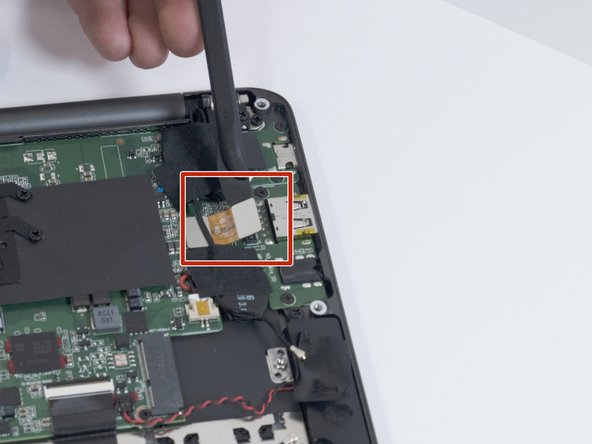
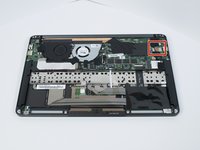
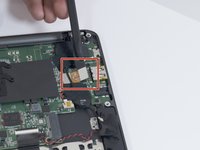
    1. Razer Blade Stealth 2017 Audio and USB-A Port Replacement, Audio and USB-A Port: шаг 6, изображение 1 из 2 Razer Blade Stealth 2017 Audio and USB-A Port Replacement, Audio and USB-A Port: шаг 6, изображение 2 из 2
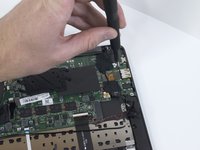
      • Use a plastic spudger to lift up the module connector.

      Спросите у FixBot

      Добавить комментарий

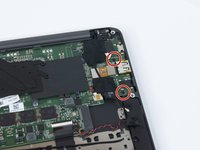
    2. Razer Blade Stealth 2017 Audio and USB-A Port Replacement: шаг 7, изображение 1 из 2 Razer Blade Stealth 2017 Audio and USB-A Port Replacement: шаг 7, изображение 2 из 2
      • Use a Phillips #00 screwdriver to remove the two, 3mm screws from the USB-A and audio port module.

      Спросите у FixBot

      Добавить комментарий

    3. Razer Blade Stealth 2017 Audio and USB-A Port Replacement: шаг 8, изображение 1 из 1
      • Use a plastic spudger to remove the USB-A and audio port module from the chassis.

      Спросите у FixBot

      Добавить комментарий

Заключение

To reassemble your device, follow these instructions in reverse order.

Отменить: Я не выполнил это руководство.

Еще один человек закончил это руководство.

Автор

с

Helene Willits

Участник с: 10/10/19

782 Репутация

Автор 6 руководств

Команду

Cal Poly, Team S11-G3, Regan Fall 2019 Участник Cal Poly, Team S11-G3, Regan Fall 2019

CPSU-REGAN-F19S11G3

4 членов

Автор 84 руководств

0 Комментарии к руководству

Добавить комментарий

Статистика просмотров:

За последние 24 часов: 1

За последние 7 дней: 8

За последние 30 дней: 43

За все время: 2,244