Введение
This guide will show you how to disassemble the entire controller to access all of the control boards.
I had to replace my bumper switch (SW54 & SW55) with Omron B3F-3120
Выберете то, что вам нужно
-
-
Use a plastic pry tool to remove the grip plate from each side
-
The plate will release away from the back, not to the side
-
-
-
Cut the sticker covering the center screw and remove it (PH #1)
-
Remove two screws from each grip (PH #1)
-
Use a plastic pry tool to remove rear plate from the controller
-
The three remaining screws on the back plate are PH #1
-
-
-
-
Remove the M1 & M2 bumpers with two PH #1 screws (red)
-
Unplug the four rumble motors (green)
-
Unscrew the board from the controller with two PH #2 screws (blue)
-
Carefully flip the board until you can get to the ribbon cable
-
Flip the gray clip up to release the ribbon cable
-
-
-
Remove the two PH #00 screws to remove the trigger brackets
-
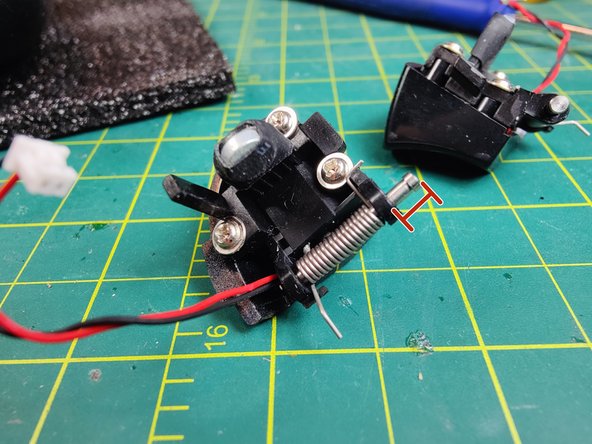
Slide the trigger pin out just enough to remove it, leave the spring attached
-
The three remaining screws on each trigger are PH #1
-
-
-
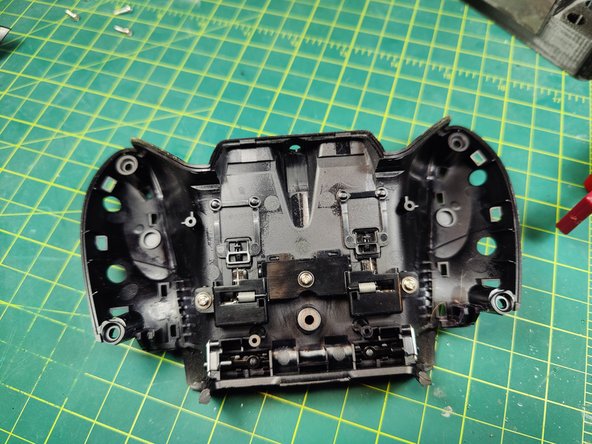
Remove the bumper assembly from the controller
-
The bumpers detach with two PH #1 screws
-






To reassemble your device, follow these instructions in reverse order.
Отменить: Я не выполнил это руководство.
2 человек успешно провели ремонт по этому руководству.


3 Комментарии к руководству
I have done everything, but how do i remove the thumbstick plastic, it would be very great if you can guide me
I didn't remove my thumbsticks. They are likely glued on. You could try to pry them off or use heat but you are on your own for that.
Drew -
You can´t change the thumbsticks, they are stuck and impossible to remove. I broke one of them trying to get it out. It's okay because I want to replace them with magnetic ones and I'm looking at how to do it and compatible modules.
