
Removing the Apple Cinema Display M8149 Display Hinge

Последнее обновление 13 мар 2017 г.
Просмотров: 9,2 тыс.
Просмотр статистики:
- За последние 24 часа:
- 2
- За последние 7 дней:
- 22
- За последние 30 дней:
- 108
- За все время:
- 9 218
Комментарии: 1
1 комментарий к инструкции.
Перейти к комментариям инструкцииЗавершено: 4 5
4 пользователей отметили эту инстркукцию как "завершенное". Вы будете следующим?
5 пользователей отметили эту инструкцию как "завершенное". В том числе и Вы — отличная работа!
Избранные: 5 6
5 эта инструкция понравилась многим пользователям (и они подписались на нее). Вы будете следующим?
6 эта инструкция понравилось многим пользователям (и они подписались на нее), в том числе и Вам!
Введение
Перейти к шагу 1 ↓This guide will explain how to remove the display hinge. The tools required for this section are the spudger and the PH 2 screwdriver.
Выберете то, что Вам нужно
Инструменты

-
-
-
Flip the Cinema Display so it is on its face and the feet are pointed away from you.
-
Using the PH 2 screwdriver, unscrew the three feet screws (9.52 x 4.43 mm).
-
Remove the back foot from the hinge mount by gently pulling it upwards.
 Спросите у FixBot
-
-
-
Remove the back plate screws (5.25 x 4.43 mm) using the PH 2 screw driver.
-
Lift the back plate off of the display.
-
Completely remove the back plate and set it aside.
-
-
-
-
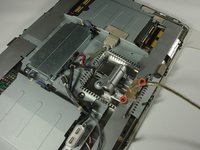
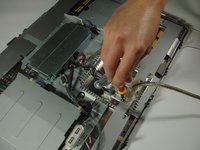
Remove the Apple Display Connector plate screws (9.52 x 3.43 mm) with the PH 2 screwdriver.
-
Once the two screws have been removed, move the cord out of the way.
-
-
-
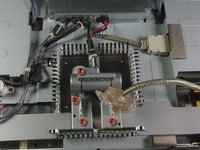
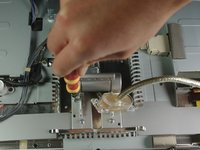
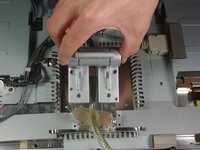
Remove the hinge plate screws (5.52 x 3.43 mm) with the PH 2 screw driver.
-
Then lift out the hinge mount.
-
-




To reassemble your device, follow these instructions in reverse order.
Отменить: Я не выполнил это руководство.
4 человек успешно провели ремонт по этому руководству.

Команду

Cal Poly, Team 10-41, Forte Spring 2011 Участник Cal Poly, Team 10-41, Forte Spring 2011
CPSU-FORTE-S11S10G41
5 членов
Автор 72 руководств
1 Комментарий к руководству
in 2023 where can I get a replacement stand?
