Перейти к основному содержанию

Repairing Nintendo DS Lite Volume Switch

Выберете то, что вам нужно

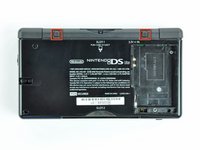
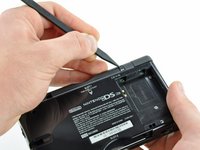
  1. Repairing Nintendo DS Lite Volume Switch, Battery: шаг 1, изображение 1 из 2 Repairing Nintendo DS Lite Volume Switch, Battery: шаг 1, изображение 2 из 2
    • Unscrew the Phillips screw securing the battery cover to the lower case.

    • The screw remains captive to the battery cover.

    • Pry the battery cover upward with a spudger or fingernail, and lift out of the lower case.

  2. Repairing Nintendo DS Lite Volume Switch: шаг 2, изображение 1 из 1
    • Wedge the edge of a spudger in between the side of the battery and the lower case housing and pry upward to dislodge the battery.

    • Remove the battery from the DS Lite.

  3. Repairing Nintendo DS Lite Volume Switch, Lower Case: шаг 3, изображение 1 из 2 Repairing Nintendo DS Lite Volume Switch, Lower Case: шаг 3, изображение 2 из 2
    • Use the tip of a spudger to pry both rubber feet off the DS Lite.

  4. Repairing Nintendo DS Lite Volume Switch: шаг 4, изображение 1 из 1
    • Remove the following screws securing the lower case to the body of the DS Lite:

    • Two 4.3 mm gold Phillips screws

    • One 3.9 mm black Tri-point screw

    • One 3.3 mm silver Phillips screw

    • Three 5.5 mm silver Tri-point screws

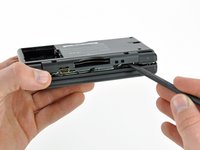
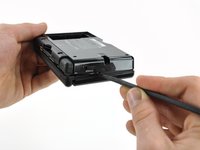
  5. Repairing Nintendo DS Lite Volume Switch: шаг 5, изображение 1 из 3 Repairing Nintendo DS Lite Volume Switch: шаг 5, изображение 2 из 3 Repairing Nintendo DS Lite Volume Switch: шаг 5, изображение 3 из 3
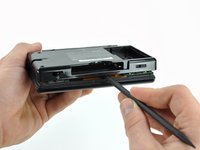
    • Remove the cover from the Game Pak slot before continuing.

    • Insert the edge of a spudger in between the lower and upper case near the top right corner of the DS Lite.

    • Carefully run the spudger along the right edge of the DS Lite, creating an opening in the process.

    • Continue running the spudger along the backside of the DS Lite until the majority of the lower case has been separated from the upper case.

  6. Repairing Nintendo DS Lite Volume Switch: шаг 6, изображение 1 из 1
    • Lift the lower case away from the rest of the DS Lite.

    • Pull carefully. Some units are sealed with adhesive, and pulling too hard can damage the power switch.

    • When re-assembling, make sure that power switch and volume sliders are properly aligned with the switches on the motherboard.

  7. Repairing Nintendo DS Lite Volume Switch, Volume Switch: шаг 7, изображение 1 из 1
    Инструмент, используемый на этом этапе:
    Tweezers
    $4.99
    • Carefully use a pair of tweezers to remove the volume switch.

Финишная прямая

5 человек успешно провели ремонт по этому руководству.

Philip

Участник с: 01/20/10

597 Репутация

Автор 2 руководств

Команда

Cal Poly, Team 16-30, Maness Winter 2010 Участник Cal Poly, Team 16-30, Maness Winter 2010

CPSU-MANESS-W10S16G30

4 членов

Автор 29 руководств

0 Комментарии к руководству

Добавить комментарий

Статистика просмотров:

За последние 24 часов: 1

За последние 7 дней: 17

За последние 30 дней: 97

За всё время: 12,221