Перейти к основному содержанию
Присоединяйся к сообществу ремонтников - Создай аккаунт

Replacing Sega Dreamcast Power Block (Power Supply)

Просмотров: 19 тыс.

Просмотр статистики:

За последние 24 часа:
2
За последние 7 дней:
30
За последние 30 дней:
145
За все время:
18 517
Комментарии: 4

1 комментариев на шаге, 3 комментариев к инструкции.

Перейти к комментариям инструкции
Завершено: 8

8 пользователей отметили эту инстркукцию как "завершенное". Вы будете следующим?

Избранные: 6

6 эта инструкция понравилась многим пользователям (и они подписались на нее). Вы будете следующим?

Необходимое время: 7 - 15 минут
Сложность: Умеренно
Replacing Sega Dreamcast Power Block (Power Supply)

A guide to remove power block from the Sega Dreamcast.

Выберете то, что Вам нужно

Инструменты

    1. Replacing Sega Dreamcast Power Block (Power Supply), Expansion Bay: шаг 1, изображение 1 из 2 Replacing Sega Dreamcast Power Block (Power Supply), Expansion Bay: шаг 1, изображение 2 из 2
      • Verify that the console is disconnected from the AC outlet before you begin.

      • Flip the console over on its back.

      • Take note of your model number, in case replacement parts are needed.

      Спросите у FixBot

      Добавить комментарий

    2. Replacing Sega Dreamcast Power Block (Power Supply): шаг 2, изображение 1 из 3 Replacing Sega Dreamcast Power Block (Power Supply): шаг 2, изображение 2 из 3 Replacing Sega Dreamcast Power Block (Power Supply): шаг 2, изображение 3 из 3
      • Remove the expansion bay by applying pressure to the small clip on the expansion bay while prying it away from the console.

      Спросите у FixBot

      Добавить комментарий

    1. Replacing Sega Dreamcast Power Block (Power Supply), Top Cover: шаг 3, изображение 1 из 1
      • Locate and remove all four black 12mm Phillips #02 screws from the underside of the console.

      • Note: Remove the expansion bay to locate the fourth screw

      Спросите у FixBot

      Добавить комментарий

    2. Replacing Sega Dreamcast Power Block (Power Supply): шаг 4, изображение 1 из 1
      • Internal components can be loose. Be careful that they do not fall out when removing the cover.

      • Turn the console right side up.

      • Remove the top cover by gently lifting the upper portion of the console.

      Спросите у FixBot

      Добавить комментарий

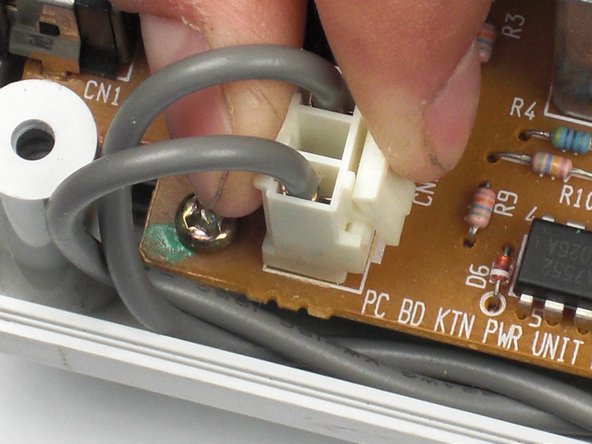
    1. Replacing Sega Dreamcast Power Block (Power Supply), Power Block (Power Supply): шаг 5, изображение 1 из 2 Replacing Sega Dreamcast Power Block (Power Supply), Power Block (Power Supply): шаг 5, изображение 2 из 2
      • Verify that the console is disconnected from the AC outlet before you begin. If you have just powered off the system, give the capacitors a few minutes to discharge before you begin working.

      • Remove the white female pin header by clamping the clip and pulling it up gently from the power board.

      Спросите у FixBot

      Добавить комментарий

    2. Replacing Sega Dreamcast Power Block (Power Supply): шаг 6, изображение 1 из 1
      • Remove the two 10mm Philips #02 screws that are fastened to the power block.

      Спросите у FixBot

      Добавить комментарий

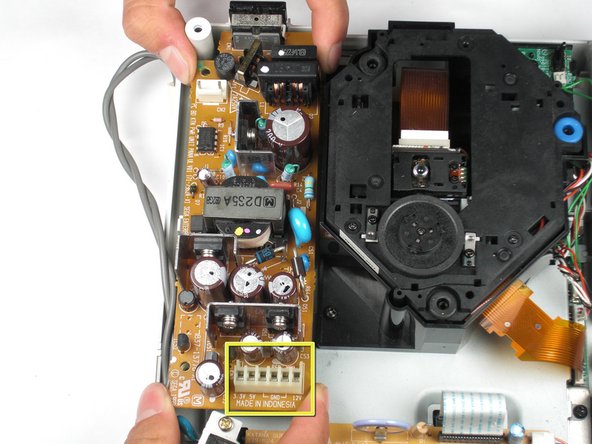
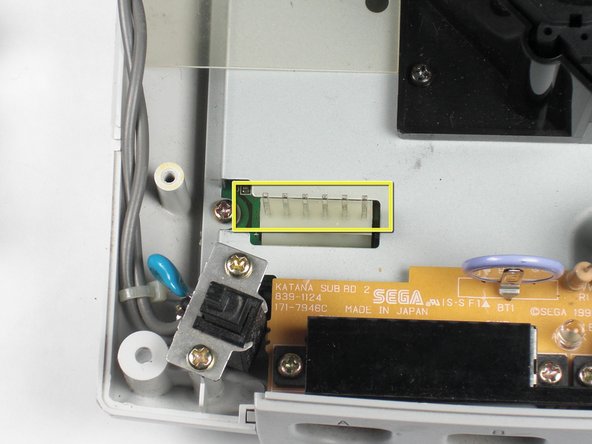
    3. Replacing Sega Dreamcast Power Block (Power Supply): шаг 7, изображение 1 из 2 Replacing Sega Dreamcast Power Block (Power Supply): шаг 7, изображение 2 из 2
      • Do not bend the male pin header between the mounted head when you remove the power supply from the chassis.

      • Remove the power board by using both hands to gently lift the power board away from the console.

      Спросите у FixBot

      Добавить комментарий

    4. Replacing Sega Dreamcast Power Block (Power Supply): шаг 8, изображение 1 из 1
      • Remove the clear plastic film that is tucked between the power supply and the chassis.

      Спросите у FixBot

      Добавить комментарий

Заключение

To reassemble your device, follow these instructions in reverse order.

Отменить: Я не выполнил это руководство.

8 человек успешно провели ремонт по этому руководству.

wkwong

Участник с: 11/14/09

557 Репутация

Автор 4 руководств

Команду

Cal Poly, Team 5-1, Regan Fall 2009 Участник Cal Poly, Team 5-1, Regan Fall 2009

CPSU-REGAN-F09S5G1

5 членов

Автор 108 руководств

3 Комментарии к руководству

All symptoms of dead PSU can be occuring, if by accident flat ribbon cable between motherboard and controller board is disconnected. Check that cable if both ends is firmly plugged.

lauraiss lv - Ответить Поделиться

Hello There!

i turn on my dreamcast, No video, GD don´t spin, but the orange led barely shine, this happened many years ago (2003) , i just bought another DC in those days because i was in a hurry to end Grandia 2, and now i still have the damaged console in my room and im wondering if it is possible to fix it ...thanks!

Mardito Online - Ответить Поделиться

Very good and Panico

Mikesin - Ответить Поделиться

Добавить комментарий

Статистика просмотров:

За последние 24 часов: 2

За последние 7 дней: 30

За последние 30 дней: 145

За все время: 18,517