Перейти к основному содержанию

Retroid Pocket 3 Motherboard Replacement

Выберете то, что вам нужно

  1. Retroid Pocket 3 Motherboard Replacement, Battery: шаг 1, изображение 1 из 1
    • Unplug any cables connected to the Retroid Pocket 3+.

    • Ensure your device has a charge of 5% or less as a charged battery can be dangerous if punctured.

  2. Retroid Pocket 3 Motherboard Replacement: шаг 2, изображение 1 из 3 Retroid Pocket 3 Motherboard Replacement: шаг 2, изображение 2 из 3 Retroid Pocket 3 Motherboard Replacement: шаг 2, изображение 3 из 3
    • Remove the four 6 mm screws from the backplate of the device with a T5 Torx screwdriver.

    • Use a plastic opening tool or spudger to gently pry apart the backplate from the device.

  3. Retroid Pocket 3 Motherboard Replacement: шаг 3, изображение 1 из 2 Retroid Pocket 3 Motherboard Replacement: шаг 3, изображение 2 из 2
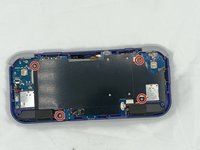
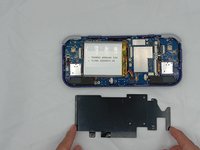
    • Remove the four 4.5 mm screws with a Phillips #00 screwdriver.

    • Lift off the metal plate.

  4. Retroid Pocket 3 Motherboard Replacement: шаг 4, изображение 1 из 3 Retroid Pocket 3 Motherboard Replacement: шаг 4, изображение 2 из 3 Retroid Pocket 3 Motherboard Replacement: шаг 4, изображение 3 из 3
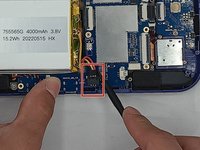
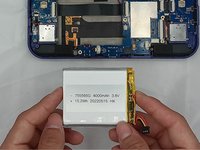
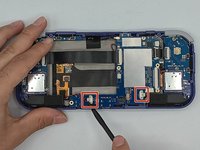
    • Use a plastic opening tool or spudger to unclip the battery connector.

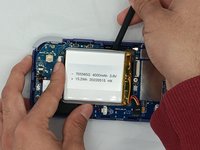
    • Carefully lift the battery from the case.

    • The battery has double-sided tape at the bottom. Gently push a spudger or opening tool underneath the battery to help free it from the adhesive. Do not bend or puncture the battery.

    • Lift and remove the battery.

  5. Retroid Pocket 3 Motherboard Replacement, Motherboard: шаг 5, изображение 1 из 1
    • Remove the three 4.5 mm screws with a Phillips #00 screwdriver on the main board.

  6. Retroid Pocket 3 Motherboard Replacement: шаг 6, изображение 1 из 1
    • Using a spudger, put the tip under the aerial connecter and rotate upwards to unclip the plug.

  7. Retroid Pocket 3 Motherboard Replacement: шаг 7, изображение 1 из 1
    • Unclip and remove the one ribbon cable on the left.

  8. Retroid Pocket 3 Motherboard Replacement: шаг 8, изображение 1 из 1
    • Use a spudger to unclip and remove the two ribbon cables on the right side.

  9. Retroid Pocket 3 Motherboard Replacement: шаг 9, изображение 1 из 2 Retroid Pocket 3 Motherboard Replacement: шаг 9, изображение 2 из 2
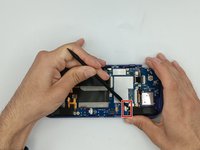
    • Use a spudger to disconnect the two speaker cables on the bottom of the board.

  10. Retroid Pocket 3 Motherboard Replacement: шаг 10, изображение 1 из 3 Retroid Pocket 3 Motherboard Replacement: шаг 10, изображение 2 из 3 Retroid Pocket 3 Motherboard Replacement: шаг 10, изображение 3 из 3
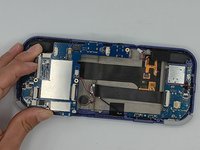
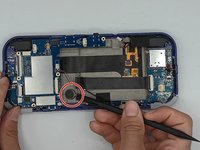
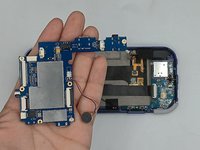
    • Start lifting the board to give you access to the vibration motor on the metal case.

    • Use a spudger to carefully pry the motor free; it is bound with double-sided tape.

    • Carefully lift the board out of the device.

Заключение

To reassemble your device, follow these instructions in reverse order.

Willem Pretorius

Участник с: 02/08/24

183 Репутация

1 руководство автора

Команда

University of North Texas, Team 4-7, Harold Spring 2024 Участник University of North Texas, Team 4-7, Harold Spring 2024

UNT-HAROLD-S24S4G7

4 членов

Автор 6 руководств

0 Комментарии к руководству

Добавить комментарий

Статистика просмотров:

За последние 24 часов: 4

За последние 7 дней: 28

За последние 30 дней: 74

За всё время: 808