Перейти к основному содержанию
Присоединяйся к сообществу ремонтников - Создай аккаунт

Samsung Blackjack Motherboard Replacement

Просмотров: 947

Просмотр статистики:

За последние 24 часа:
0
За последние 7 дней:
4
За последние 30 дней:
31
За все время:
947
Комментарии: 0

Никто не оставлял комментариев к этой инструкции. Будете ли Вы первым?

Перейти к комментариям инструкции
Завершено: 0

Никто не отмечал эту инструкцию как "завершенное". Будете ли Вы первым?

Избранные: 0

Никто не добавил эту инструкцию в избранное (и не подписался на нее). Будете ли Вы первым?

Необходимое время: 15 минут
Сложность: Умеренно
Samsung Blackjack Motherboard Replacement

Use this guide to replace the motherboard.

Выберете то, что Вам нужно

Инструменты

    1. Samsung Blackjack Motherboard Replacement, Back Phone Casing: шаг 1, изображение 1 из 2 Samsung Blackjack Motherboard Replacement, Back Phone Casing: шаг 1, изображение 2 из 2
      • Use the spudger to remove the rubber stoppers from the top of the cover.

      • Use the Phillips 00 screw driver to remove the screws from each of the four corners and the two on sides (six total).

      Спросите у FixBot

      Добавить комментарий

    2. Samsung Blackjack Motherboard Replacement: шаг 2, изображение 1 из 3 Samsung Blackjack Motherboard Replacement: шаг 2, изображение 2 из 3 Samsung Blackjack Motherboard Replacement: шаг 2, изображение 3 из 3
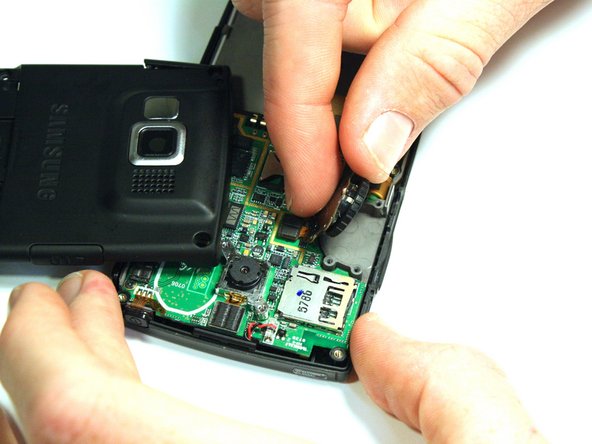
      • Use the spudger to loosen and separate the front and back covers.

      • Pick up the back cover once loosened.

      • The front and back covers will be attached to each other by a gold wire.

      • Remove the gold wire connecting the back cover to the motherboard to completely separate the covers.

      Спросите у FixBot

      Добавить комментарий

    1. Samsung Blackjack Motherboard Replacement, Volume/Scroll Wheel: шаг 3, изображение 1 из 2 Samsung Blackjack Motherboard Replacement, Volume/Scroll Wheel: шаг 3, изображение 2 из 2
      • Use the screwdriver to unscrew the four screws that hold the scroll wheel in place.

      • Use your fingers to remove the scroll wheel and the metal plate that it is attached to.

      Спросите у FixBot

      Добавить комментарий

    2. Samsung Blackjack Motherboard Replacement: шаг 4, изображение 1 из 2 Samsung Blackjack Motherboard Replacement: шаг 4, изображение 2 из 2
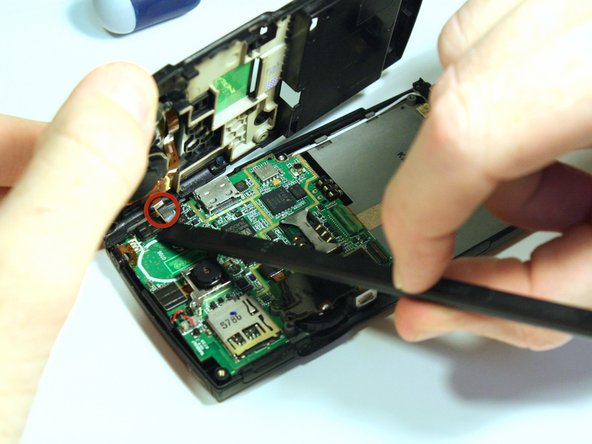
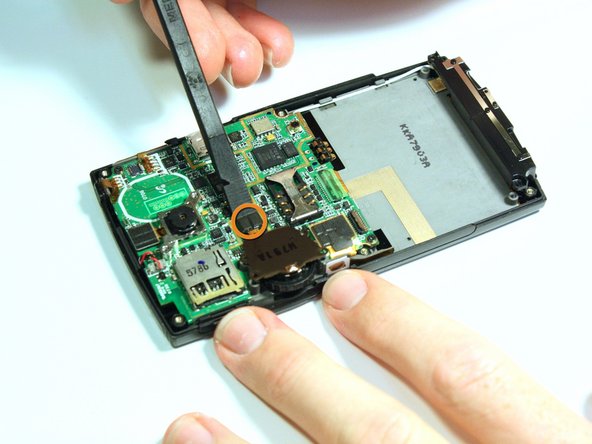
      • Use the spudger to unsnap the gold wire connection that connects the back casing to the logic board.

      • Use the spudger to unsnap the gold wire connection that connects the scroll wheel assembly to the logic board.

      Спросите у FixBot

      Добавить комментарий

    1. Samsung Blackjack Motherboard Replacement, Motherboard: шаг 5, изображение 1 из 2 Samsung Blackjack Motherboard Replacement, Motherboard: шаг 5, изображение 2 из 2
      • Use the spudger to unsnap the black rectangular connection from the motherboard.

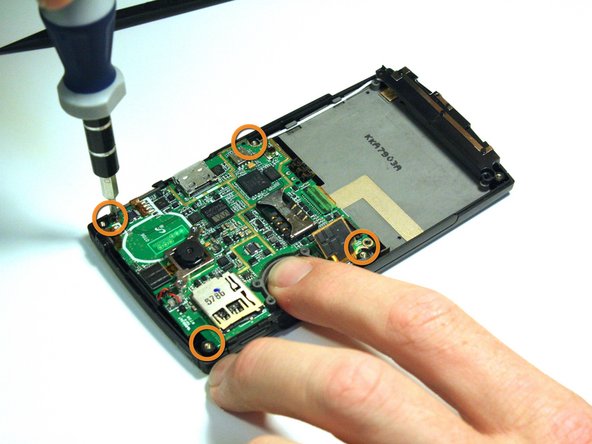
      • Use the Phillips 00 screwdriver to remove all of the screws that hold the motherboard in place.

      Спросите у FixBot

      Добавить комментарий

    2. Samsung Blackjack Motherboard Replacement: шаг 6, изображение 1 из 2 Samsung Blackjack Motherboard Replacement: шаг 6, изображение 2 из 2
      Инструмент, используемый на этом этапе:
      Tweezers
      $4.99
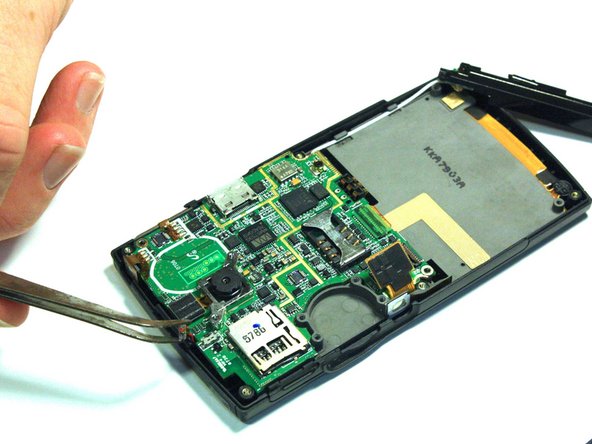
      • Use the tweezers to unsnap the connection between the motherboard and the speaker. The speaker is attached to the front casing.

      Спросите у FixBot

      Добавить комментарий

    3. Samsung Blackjack Motherboard Replacement: шаг 7, изображение 1 из 2 Samsung Blackjack Motherboard Replacement: шаг 7, изображение 2 из 2
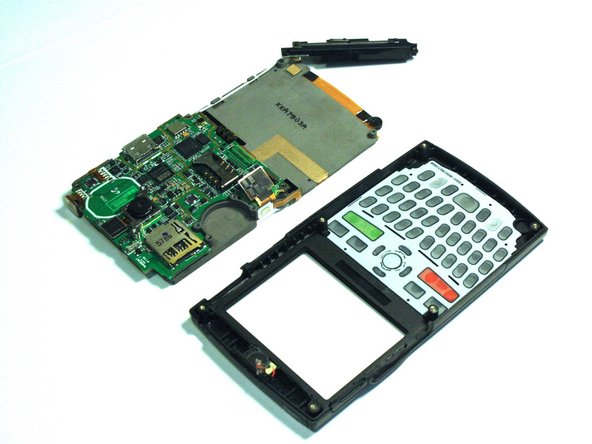
      • Once all of the connections have been snapped off of the motherboard, the motherboard can be removed.

      • Lift up on the motherboard and it will come free of the front casing.

      Спросите у FixBot

      Добавить комментарий

Заключение

To reassemble your device, follow these instructions in reverse order.

Отменить: Я не выполнил это руководство.

Kristin Manna

Участник с: 10/22/12

29 Репутация

Автор 10 руководств

Команду

Clemson, Team 14-4, Benson Fall 2012 Участник Clemson, Team 14-4, Benson Fall 2012

CLEM-BENSON-F12S14G4

3 членов

Автор 144 руководств

0 Комментарии к руководству

Добавить комментарий

Статистика просмотров:

За последние 24 часов: 0

За последние 7 дней: 4

За последние 30 дней: 31

За все время: 947