
Samsung Blast Keyboard Replacement

Последнее обновление 20 мар 2018 г.
Просмотров: 748
Просмотр статистики:
- За последние 24 часа:
- 1
- За последние 7 дней:
- 4
- За последние 30 дней:
- 33
- За все время:
- 748
Комментарии: 0
Никто не оставлял комментариев к этой инструкции. Будете ли Вы первым?
Перейти к комментариям инструкцииЗавершено: 0 1
Никто не отмечал эту инструкцию как "завершенное". Будете ли Вы первым?
1 пользователь отметил эту инструкцию как "завершенное". Это Вы — отличная работа!
Избранные: 0 1
Никто не добавил эту инструкцию в избранное (и не подписался на нее). Будете ли Вы первым?
1 человек поставил лайк на эту инструкцию (и подписался на нее) — и это Вы!
Нужны более качественные фото
Более качественные фотографии улучшат это руководство. Помогайте, делая снимки, редактируя или загружая новые!
Нужно больше изображений
Еще несколько изображений сделают процедуры, описанные в этом руководстве, предельно ясными.
Отсутствуют необходимые руководства
В этом руководстве не хватает информации о том, как начать процесс. Сделай необходимое руководство!
Запчасти и средства модернизации
Шаги в этом руководстве следует разделить и объединить в серию обязательных руководств.
Выберете то, что Вам нужно
Запчасти
Инструменты


-
-
-
Your phone should look like this before disassembly.
 Спросите у FixBot
-
-
-
Remove the battery cover by sliding the back panel up. This will expose the battery.
-
-
-
Lift up the top portion of the battery and pull it out.
-
Next, slide the sim card out of its socket and set it aside.
-
-
-
-
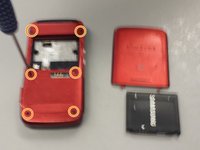
Use a Phillips #00 Screwdriver to unscrew the six small screws that secure the back of the case.
-
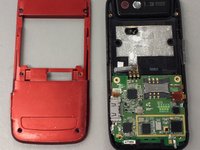
Remove the case by prying around the edges.
-
-
-
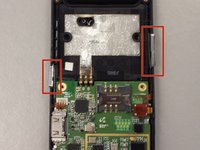
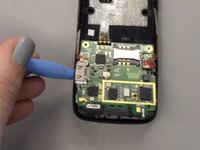
Use a prying tool to detach the motherboard from main body.
-
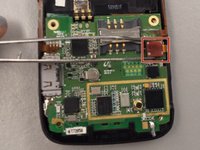
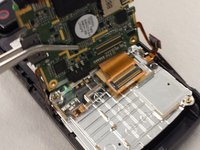
Carefully detach the motherboard from the two connectors.
-
-
-
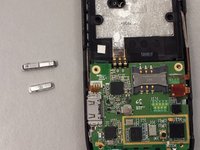
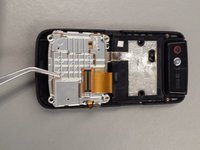
Slide the keyboard straight up to free it from its alignment pins.
-
-








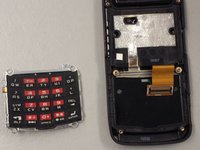
To reassemble your device, follow these instructions in reverse order.

Команду

Ohio State, Team 1-5, Buehl Spring 2014 Участник Ohio State, Team 1-5, Buehl Spring 2014
OSU-BUEHL-S14S1G5
4 членов
Автор 24 руководств
