Перейти к основному содержанию
Присоединяйся к сообществу ремонтников - Создай аккаунт

Samsung Galaxy Note 8.0 Headphone Jack Replacement

Выберете то, что вам нужно

  1. Samsung Galaxy Note 8.0 Headphone Jack Replacement, Back Cover: шаг 1, изображение 1 из 1
    • Remove the Samsung S-Pen stylus.

    • Remove the micro SD storage card.

  2. Samsung Galaxy Note 8.0 Headphone Jack Replacement: шаг 2, изображение 1 из 1
    • Using the plastic opening tool, start where the S-pen was located and carefully pry up the corner.

  3. Samsung Galaxy Note 8.0 Headphone Jack Replacement: шаг 3, изображение 1 из 1
    • Work your way around the entire device by carefully prying and sliding the plastic opening tool.

    • There are clips approximately 2cm apart. As you are removing the back cover you should hear the clips being dislocated from the tablet.

  4. Samsung Galaxy Note 8.0 Headphone Jack Replacement, Battery: шаг 4, изображение 1 из 2 Samsung Galaxy Note 8.0 Headphone Jack Replacement, Battery: шаг 4, изображение 2 из 2
    • Remove the 8 Phillips#00 3-mm screws holding the battery in place.

  5. Samsung Galaxy Note 8.0 Headphone Jack Replacement: шаг 5, изображение 1 из 1
    • Lift the top left corner of the battery up by the black tab.

  6. Samsung Galaxy Note 8.0 Headphone Jack Replacement: шаг 6, изображение 1 из 1
    • Gently grasp and lift up the white connector located at the bottom right corner of the battery. It is connected to the battery by two blue and two red wires.

    • Do not yank the connector by the wires. If it does not disconnect easily, slide a plastic opening tool between the white connector and the board to lift the connector away from the board.

  7. Samsung Galaxy Note 8.0 Headphone Jack Replacement, Headphone Jack: шаг 7, изображение 1 из 2 Samsung Galaxy Note 8.0 Headphone Jack Replacement, Headphone Jack: шаг 7, изображение 2 из 2
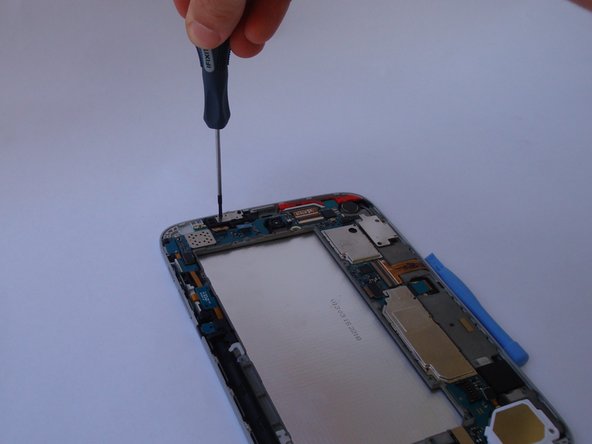
    • Remove the two 4.5-mm black phillips head screws using a #00Phillips screwdriver.

  8. Samsung Galaxy Note 8.0 Headphone Jack Replacement: шаг 8, изображение 1 из 2 Samsung Galaxy Note 8.0 Headphone Jack Replacement: шаг 8, изображение 2 из 2
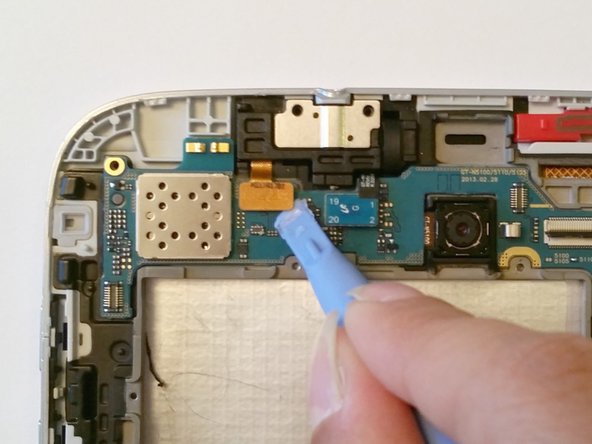
    • Gently pry up the teal connector.

    • Do not yank the connector. If it does not disconnect easily use a plastic opening tool between the connector and the board to lift the connector away from the board.

  9. Samsung Galaxy Note 8.0 Headphone Jack Replacement: шаг 9, изображение 1 из 2 Samsung Galaxy Note 8.0 Headphone Jack Replacement: шаг 9, изображение 2 из 2
    • Gently pry up the gold connector.

    • Do not yank the connector. If it does not disconnect easily use a plastic opening tool between the connector and the board to lift the connector away from the board.

  10. Samsung Galaxy Note 8.0 Headphone Jack Replacement: шаг 10, изображение 1 из 1
    • Remove the headphone jack from it's housing.

    • If difficult, use a plastic opening tool to pry up.

Заключение

To reassemble your device, follow these instructions in reverse order.

6 человек успешно провели ремонт по этому руководству.

Joel

Участник с: 09/23/14

1 878 Репутация

Автор 6 руководств

Команда

USF Tampa, Team 12-2, Blackwell Fall 2014 Участник USF Tampa, Team 12-2, Blackwell Fall 2014

USFT-BLACKWELL-F14S12G2

4 членов

Автор 16 руководств

3 Комментарии к руководству

Lightning struck while my son was on his tablet... no more headset audio? Replaced recommend parts still no audio. Plays fine without earbuds??? Insurance claim? What else could be the issue? Motherboard?

Shasta - Ответить Поделиться

what are these connectors on the left side of headphone jack which are connected to the backside plate?

sanco - Ответить Поделиться

this did not help getting the broken headphone jack out of my Samsung note 8

joshua- collins - Ответить Поделиться

Добавить комментарий

Статистика просмотров:

За последние 24 часов: 0

За последние 7 дней: 9

За последние 30 дней: 49

За всё время: 7,400