
Samsung Galaxy S4 Mini Speaker Replacement

Последнее обновление 5 окт 2016 г.
Просмотров: 15 тыс.
Просмотр статистики:
- За последние 24 часа:
- 2
- За последние 7 дней:
- 13
- За последние 30 дней:
- 82
- За все время:
- 14 822
Комментарии: 5
2 комментариев к шагам, 3 комментариев к инструкции.
Перейти к комментариям инструкцииЗавершено: 32 33
32 пользователей отметили эту инстркукцию как "завершенное". Вы будете следующим?
33 пользователей отметили эту инструкцию как "завершенное". В том числе и Вы — отличная работа!
Избранные: 9 10
9 эта инструкция понравилась многим пользователям (и они подписались на нее). Вы будете следующим?
10 эта инструкция понравилось многим пользователям (и они подписались на нее), в том числе и Вам!
Введение
Перейти к шагу 1 ↓If the device exhibits trouble playing sounds during calls, notifications, or the use of applications, it might be a good idea to replace the loud speaker on the rear of the phone.
Выберете то, что Вам нужно
Запчасти


Инструменты


-
-
-
Remove the back cover of the cell phone using a plastic opening tool.
-
-
-
-
-
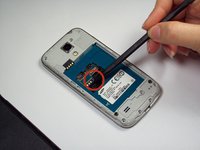
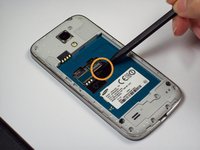
Remove Sim Card using a tweezer or fingers
-
Remove Memory Card using a tweezer or fingers
-
-
-
In the back, there are 10 screws with a , which have to be removed with a small Phillips screwdriver tool.
-
-
-
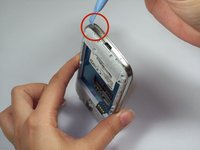
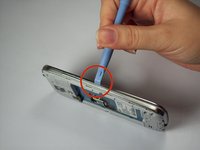
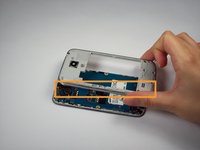
Then, use the plastic opening tool around the cellphone to open the plastic gray cover
-
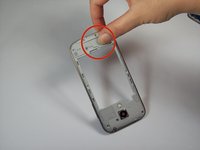
Exert the gray cover from the plate and screen would come out easily.
-
-
-
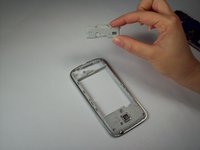
Exert some pressure on the gray cover to separate the loud speaker from the plate.
-
-

 Спросите у FixBot







To reassemble your device, follow these instructions in reverse order.
Отменить: Я не выполнил это руководство.
32 человек успешно провели ремонт по этому руководству.

Команду

USF Tampa, Team 9-2, Blackwell Fall 2014 Участник USF Tampa, Team 9-2, Blackwell Fall 2014
USFT-BLACKWELL-F14S9G2
5 членов
Автор 60 руководств
3 Комментарии к руководству
my phone has sound!!!!!! thank you for the tech advice
loud & clear Thanks
perfect. thankyou
