Перейти к основному содержанию
Присоединяйся к сообществу ремонтников - Создай аккаунт

Sony Alpha NEX-6 Control Wheel Replacement

Просмотров: 6,3 тыс.

Просмотр статистики:

За последние 24 часа:
1
За последние 7 дней:
40
За последние 30 дней:
139
За все время:
6 265
Комментарии: 0

Никто не оставлял комментариев к этой инструкции. Будете ли Вы первым?

Перейти к комментариям инструкции
Завершено: 5

5 пользователей отметили эту инстркукцию как "завершенное". Вы будете следующим?

Избранные: 0

Никто не добавил эту инструкцию в избранное (и не подписался на нее). Будете ли Вы первым?

Необходимое время: 15 - 20 минут
Сложность: Умеренно
Sony Alpha NEX-6 Control Wheel Replacement

This guide will illustrate how to dis-assemble the back camera case to gain access the control wheel assembly. Then it will show how to replace the control wheel and adjacent soft keys.

Выберете то, что Вам нужно

Инструменты

    1. Sony Alpha NEX-6 Control Wheel Replacement, Battery: шаг 1, изображение 1 из 1
      • Prior to operating on this device, be sure the camera is turned OFF. With power, the camera can be a dangerous device to work with.

      • Turn the camera off by switching the power knob "OFF" text to the white selector dot.

      Спросите у FixBot

      Добавить комментарий

    2. Sony Alpha NEX-6 Control Wheel Replacement: шаг 2, изображение 1 из 1
      • Flip the camera upside-down and carefully place it on a flat surface.

      • With the lens facing outward, locate the battery compartment - indicated by a grooved latch.

      • Push the latch to the right to unlock the battery compartment. The door should flip upward.

      Спросите у FixBot

      Добавить комментарий

    3. Sony Alpha NEX-6 Control Wheel Replacement: шаг 3, изображение 1 из 1
      • With the compartment open, locate a blue tab shown with spudger

      • Press the tab to the side (to the left, or toward the camera wall). This will eject the camera battery.

      Спросите у FixBot

      Добавить комментарий

    1. Sony Alpha NEX-6 Control Wheel Replacement, Battery compartment screws: шаг 4, изображение 1 из 1
      • Remove the two 3.5mm Phillips #00 screws that hold the back case - located inside the battery compartment.

      Спросите у FixBot

      Добавить комментарий

    2. Sony Alpha NEX-6 Control Wheel Replacement, Bottom screws: шаг 5, изображение 1 из 1
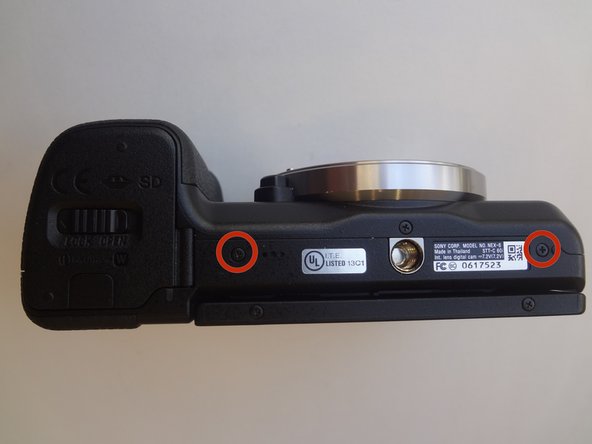
      • Remove the two 3.5mm Phillips #00 screws that hold the back case - located on the bottom of the camera.

      Спросите у FixBot

      Добавить комментарий

    3. Sony Alpha NEX-6 Control Wheel Replacement, Side screws: шаг 6, изображение 1 из 1
      • Remove the 3.5 mm Phillips #00 screw on the side of camera - located between the charging and HDMI ports.

      • Remove the 4.0 mm Phillips #00 screw on the side of the camera - located next to the WiFi sign.

      Спросите у FixBot

      Добавить комментарий

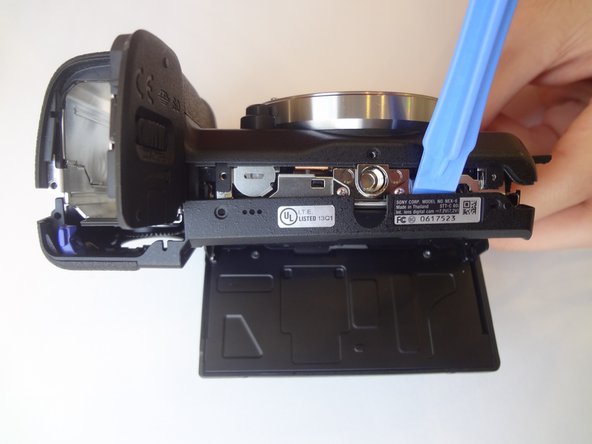
    4. Sony Alpha NEX-6 Control Wheel Replacement, Dis-attaching procedure: шаг 7, изображение 1 из 2 Sony Alpha NEX-6 Control Wheel Replacement, Dis-attaching procedure: шаг 7, изображение 2 из 2
      • Starting with the battery compartment gently begin to separate the back case front the camera.

      • Using a plastic opening tool, separate the bottom of the back case from the camera. Then proceed by separating the sides.

      • Gently lift the back case away from the camera an slide it down to completely remove the back case.

      Спросите у FixBot

      Добавить комментарий

    1. Sony Alpha NEX-6 Control Wheel Replacement, Control Wheel: шаг 8, изображение 1 из 2 Sony Alpha NEX-6 Control Wheel Replacement, Control Wheel: шаг 8, изображение 2 из 2
      • Pry out the ribbon cable by carefully pushing on its side tabs with a spudger.

      Спросите у FixBot

      Добавить комментарий

    2. Sony Alpha NEX-6 Control Wheel Replacement, Control wheel romoval: шаг 9, изображение 1 из 2 Sony Alpha NEX-6 Control Wheel Replacement, Control wheel romoval: шаг 9, изображение 2 из 2
      Инструмент, используемый на этом этапе:
      Tweezers
      $4.99
      • Using a spudger, lift the metal locking tab located at the top right corner of control wheel assembly.

      • Using tweezers, carefully slide the assembly up to release it.

      Спросите у FixBot

      Добавить комментарий

Заключение

To reassemble your device, follow these instructions in reverse order.

Отменить: Я не выполнил это руководство.

5 человек успешно провели ремонт по этому руководству.

Clayton Dale

Участник с: 01/20/15

1 067 Репутация

Автор 7 руководств

Команду

USF Tampa, Team 11-2, Blackwell Winter 2015 Участник USF Tampa, Team 11-2, Blackwell Winter 2015

USFT-BLACKWELL-W15S11G2

4 членов

Автор 84 руководств

0 Комментарии к руководству

Добавить комментарий

Статистика просмотров:

За последние 24 часов: 1

За последние 7 дней: 40

За последние 30 дней: 139

За все время: 6,265