Перейти к основному содержанию

Varmilo MA87M Love Birds Switch Replacement

Выберете то, что вам нужно

  1. Varmilo MA87M Love Birds Switch Replacement, Switch: шаг 1, изображение 1 из 3 Varmilo MA87M Love Birds Switch Replacement, Switch: шаг 1, изображение 2 из 3 Varmilo MA87M Love Birds Switch Replacement, Switch: шаг 1, изображение 3 из 3
    • Take the key removal tool and push down on the key until the tool clicks into place.

    • Pull up with the tool to remove the keycaps.

    • When the keycaps are removed they can be cleaned at this time.

    • Make sure the keyboard is disconnected from the computer or the computer is turned off during this process.

  2. Varmilo MA87M Love Birds Switch Replacement: шаг 2, изображение 1 из 2 Varmilo MA87M Love Birds Switch Replacement: шаг 2, изображение 2 из 2
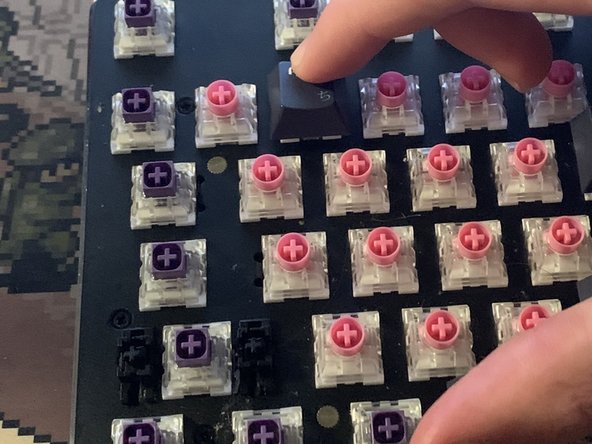
    • Remove the switches from the keyboard by aligning the keyboard remover along the groves at the bottom of the switch.

    • Use caution; if you damage a switch, you will need to replace it.

  3. Varmilo MA87M Love Birds Switch Replacement: шаг 3, изображение 1 из 1
    • Insert the new switch into the empty slot where the old switch was and push down on the new switch.

  4. Varmilo MA87M Love Birds Switch Replacement: шаг 4, изображение 1 из 2 Varmilo MA87M Love Birds Switch Replacement: шаг 4, изображение 2 из 2
    • When the new switch is inserted, the keycap can be slotted on and pushed easily back into place.

Заключение

To reassemble your device, follow these instructions in reverse order.

Josue Vargas Sena

Участник с: 10/25/23

235 Репутация

Автор 2 руководств

Команда

Team Jansport Участник Team Jansport

Community

1 член

Автор 3 руководств

0 Комментарии к руководству

Добавить комментарий

Статистика просмотров:

За последние 24 часов: 0

За последние 7 дней: 7

За последние 30 дней: 46

За всё время: 501