Перейти к основному содержанию

Этот перевод может не содержать последние обновления исходного руководства. Помогите обновить перевод или просмотреть исходное руководство.

Why! NH57ADS Keyboard Disassembly

Выберете то, что вам нужно

  1. Why! NH57ADS Keyboard Disassembly, Battery: шаг 1, изображение 1 из 3 Why! NH57ADS Keyboard Disassembly, Battery: шаг 1, изображение 2 из 3 Why! NH57ADS Keyboard Disassembly, Battery: шаг 1, изображение 3 из 3
    • Remove the two screws holding the battery in place.

    • Slip your finger into the finger hole provided at the top of the battery and lift to remove it.

  2. Why! NH57ADS Keyboard Disassembly, Bottom Cover: шаг 2, изображение 1 из 3 Why! NH57ADS Keyboard Disassembly, Bottom Cover: шаг 2, изображение 2 из 3 Why! NH57ADS Keyboard Disassembly, Bottom Cover: шаг 2, изображение 3 из 3
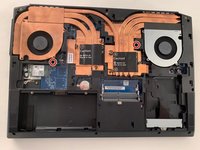
    • Remove the five Phillips screws securing the bottom to the case.

    • Slide the cover up slightly to release the catches holding it in place. This is the view on the right. The mark on the cover should now line up with the second mark on the case of the computer.

  3. Why! NH57ADS Keyboard Disassembly, Removing the Bottom Cover: шаг 3, изображение 1 из 3 Why! NH57ADS Keyboard Disassembly, Removing the Bottom Cover: шаг 3, изображение 2 из 3 Why! NH57ADS Keyboard Disassembly, Removing the Bottom Cover: шаг 3, изображение 3 из 3
    • This is the view on the left before and after sliding the cover. The mark on the cover should now line up with the second mark on the case of the computer.

    • Lift the bottom cover to remove it.

  4. Why! NH57ADS Keyboard Disassembly, Keyboard: шаг 4, изображение 1 из 3 Why! NH57ADS Keyboard Disassembly, Keyboard: шаг 4, изображение 2 из 3 Why! NH57ADS Keyboard Disassembly, Keyboard: шаг 4, изображение 3 из 3
    • Remove the two Phillips screws with the keypad symbol next to them.

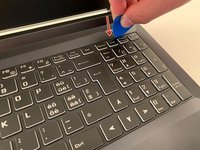
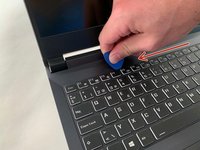
    • Insert an iFixit opening pick into the upper slot of the keyboard and slide it to the end.

  5. Why! NH57ADS Keyboard Disassembly, Remove the Keyboard: шаг 5, изображение 1 из 3 Why! NH57ADS Keyboard Disassembly, Remove the Keyboard: шаг 5, изображение 2 из 3 Why! NH57ADS Keyboard Disassembly, Remove the Keyboard: шаг 5, изображение 3 из 3
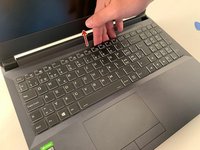
    • Carefully lift the keyboard.

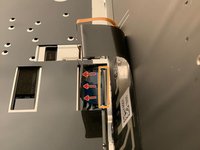
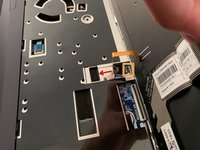
    • Gently flip up the retaining latch on the black keyboard cable and slide it out of the connector.

    • Repeat with the (orange) backlight cable.

Заключение

To reassemble your device, follow the instructions in reverse order.

Особая благодарность этим переводчикам:

fr en

71%

Эти переводчики помогают нам починить мир! Хотите внести свой вклад?
Начните переводить ›

Felice Suglia

Участник с: 06/15/13

33 538 Репутация

Автор 283 руководств

0 Комментарии к руководству

Добавить комментарий

Статистика просмотров:

За последние 24 часов: 2

За последние 7 дней: 2

За последние 30 дней: 13

За всё время: 260