Перейти к основному содержанию
Присоединяйся к сообществу ремонтников - Создай аккаунт

Xbox 360 Wireless Controller D-pad Replacement

Просмотров: 44 тыс.

Просмотр статистики:

За последние 24 часа:
12
За последние 7 дней:
53
За последние 30 дней:
230
За все время:
44 298
Комментарии: 12

12 комментариев к шагам.

Завершено: 23

23 пользователей отметили эту инстркукцию как "завершенное". Вы будете следующим?

Избранные: 28

28 эта инструкция понравилась многим пользователям (и они подписались на нее). Вы будете следующим?

Необходимое время: Нет оценки
Сложность: Умеренно
Xbox 360 Wireless Controller D-pad Replacement

Give your games some direction. Replace the D-pad on your Xbox 360 wireless controller.

Выберете то, что Вам нужно

Запчасти

Инструменты

    1. Xbox 360 Wireless Controller D-pad Replacement, Battery: шаг 1, изображение 1 из 2 Xbox 360 Wireless Controller D-pad Replacement, Battery: шаг 1, изображение 2 из 2
      • Depress the battery release button on the top of the controller.

      • Remove the battery holder from the controller.

      • The standard option for Xbox 360 Wireless Controllers Battery Packs is AA batteries. A rechargeable battery is also available, but both battery options are removed from the controller in the same way.

      Спросите у FixBot

      Добавить комментарий

    1. Xbox 360 Wireless Controller D-pad Replacement, Rear Case: шаг 2, изображение 1 из 1
      Инструмент, используемый на этом этапе:
      Tweezers
      $4.99
      • Use a pair of tweezers to peel the barcode sticker from the battery compartment.

      Спросите у FixBot

      Добавить комментарий

    2. Xbox 360 Wireless Controller D-pad Replacement: шаг 3, изображение 1 из 1
      • Remove the seven 9.3 mm T8 Security Torx screws securing the rear case to the front case.

      Спросите у FixBot

      Добавить комментарий

    3. Xbox 360 Wireless Controller D-pad Replacement: шаг 4, изображение 1 из 2 Xbox 360 Wireless Controller D-pad Replacement: шаг 4, изображение 2 из 2
      Инструмент, используемый на этом этапе:
      Spudger
      $2.99
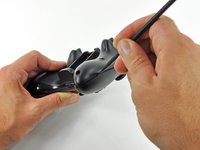
      • Insert a Spudger between the front and rear cases along the left edge of the controller.

      • Rotate the spudger toward the front of the controller, prying the two cases apart.

      Спросите у FixBot

      Добавить комментарий

    4. Xbox 360 Wireless Controller D-pad Replacement: шаг 5, изображение 1 из 2 Xbox 360 Wireless Controller D-pad Replacement: шаг 5, изображение 2 из 2
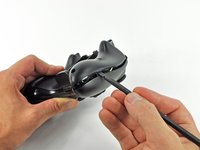
      • Insert a spudger between the front and rear cases, near the headphone jack.

      • Rotate the spudger toward the front of the controller to pry the two cases apart.

      Спросите у FixBot

      Добавить комментарий

    5. Xbox 360 Wireless Controller D-pad Replacement: шаг 6, изображение 1 из 2 Xbox 360 Wireless Controller D-pad Replacement: шаг 6, изображение 2 из 2
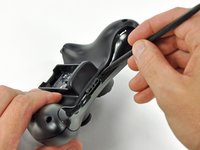
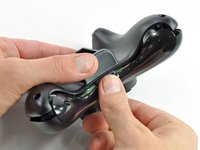
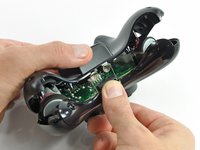
      • Grasp the controller by the battery compartment and the headphone jack.

      • Lift the battery compartment away from the headphone jack, separating the rear case from the front case and logic board.

      • The battery contact springs are held in place by slots in the battery housing in the rear case. Be sure to realign them properly during reassembly.

      Спросите у FixBot

      Добавить комментарий

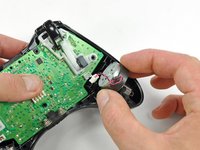
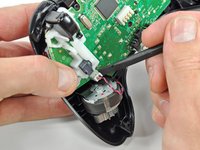
    1. Xbox 360 Wireless Controller D-pad Replacement, Vibration Motors: шаг 7, изображение 1 из 2 Xbox 360 Wireless Controller D-pad Replacement, Vibration Motors: шаг 7, изображение 2 из 2
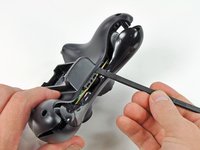
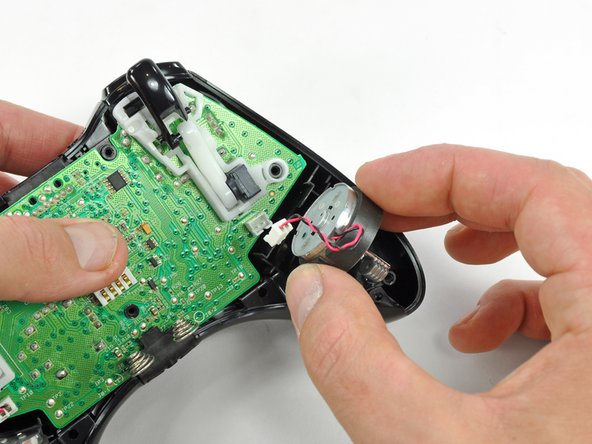
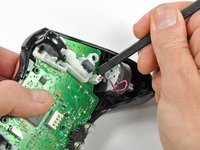
      • Use the flat end of a spudger to remove the vibration motor cable, moving it upward from its socket on the logic board.

      • Lift the vibration motor out of the front case.

      Спросите у FixBot

      Добавить комментарий

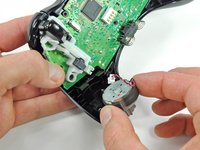
    2. Xbox 360 Wireless Controller D-pad Replacement: шаг 8, изображение 1 из 2 Xbox 360 Wireless Controller D-pad Replacement: шаг 8, изображение 2 из 2
      • Remove the vibration motor from the other side of the controller using the same method previously described.

      • The left motor has significantly more counterweight than the right motor.

      Спросите у FixBot

      Добавить комментарий

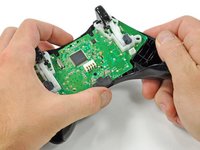
    1. Xbox 360 Wireless Controller D-pad Replacement, Logic Board: шаг 9, изображение 1 из 2 Xbox 360 Wireless Controller D-pad Replacement, Logic Board: шаг 9, изображение 2 из 2
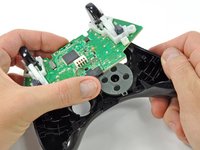
      • Lifting from the headphone jack and power plug, remove the logic board from the front case.

      Спросите у FixBot

      Добавить комментарий

    1. Xbox 360 Wireless Controller D-pad Replacement, D-pad: шаг 10, изображение 1 из 1
      • Remove the rubber pad from the back of the D-pad.

      Спросите у FixBot

      Добавить комментарий

    2. Xbox 360 Wireless Controller D-pad Replacement: шаг 11, изображение 1 из 1
      • Remove the two 7.0 mm silver Phillips screws from the back of the D-pad.

      Спросите у FixBot

      Добавить комментарий

    3. Xbox 360 Wireless Controller D-pad Replacement: шаг 12, изображение 1 из 2 Xbox 360 Wireless Controller D-pad Replacement: шаг 12, изображение 2 из 2
      Инструмент, используемый на этом этапе:
      Tweezers
      $4.99
      • The D-pad is secured to its backing by two diagonal clips, shown in red.

      • Use a pair of tweezers and squeeze the clips together to release the D-pad from its backing.

      Спросите у FixBot

      Добавить комментарий

    4. Xbox 360 Wireless Controller D-pad Replacement: шаг 13, изображение 1 из 1
      • Lift the D-pad backing out of its compartment on the front case.

      • The D-pad remains below the front case.

      • The D-pad will fall once its backing is removed. Be sure to support it as you remove the backing.

      • The backing is slotted in its compartment to ensure that it will always be aligned properly.

      Спросите у FixBot

      Добавить комментарий

Заключение

To reassemble your device, follow these instructions in reverse order.

Отменить: Я не выполнил это руководство.

23 человек успешно провели ремонт по этому руководству.

Brett Hartt

Участник с: 04/12/10

132 585 Репутация

Автор 144 руководств

Команду

iFixit Участник iFixit

Staff

121 членов

Автор 72 907 руководств

0 Комментарии к руководству

Добавить комментарий

Статистика просмотров:

За последние 24 часов: 12

За последние 7 дней: 53

За последние 30 дней: 230

За все время: 44,298