Перейти к основному содержанию
Присоединяйся к сообществу ремонтников - Создай аккаунт

Xiaomi Mi Pad Battery Replacement

Выберете то, что вам нужно

  1. Xiaomi Mi Pad Battery Replacement, Rear Case Assembly: шаг 1, изображение 1 из 1
    • Remove the micro SD card slot from the left side of the device using either the metal pin included with the device or a SIM card eject tool.

    Спросите у FixBot

    Добавить комментарий

  2. Xiaomi Mi Pad Battery Replacement: шаг 2, изображение 1 из 2 Xiaomi Mi Pad Battery Replacement: шаг 2, изображение 2 из 2
    • Use a plastic opening tool and/or opening pick to gently pry the back panel away from the device. Work your way around the device, slowly increasing the gap.

    • The back panel has small clips and light adhesive that easily releases from the device.

    Спросите у FixBot

    Добавить комментарий

  3. Xiaomi Mi Pad Battery Replacement, Battery: шаг 3, изображение 1 из 2 Xiaomi Mi Pad Battery Replacement, Battery: шаг 3, изображение 2 из 2
    • Remove the twelve 3.0 mm Phillips #000 screws on the upper cover of the device.

    Спросите у FixBot

    Добавить комментарий

  4. Xiaomi Mi Pad Battery Replacement: шаг 4, изображение 1 из 1
    • Remove the upper cover from the device.

    Спросите у FixBot

    Добавить комментарий

  5. Xiaomi Mi Pad Battery Replacement: шаг 5, изображение 1 из 2 Xiaomi Mi Pad Battery Replacement: шаг 5, изображение 2 из 2
    • Use a plastic opening tool to disconnect the three ribbon cable connectors.

    • If you're only going to replace the battery, you should only need to disconnect the smallest ribbon cable that connects the battery to the motherboard.

    Спросите у FixBot

    Добавить комментарий

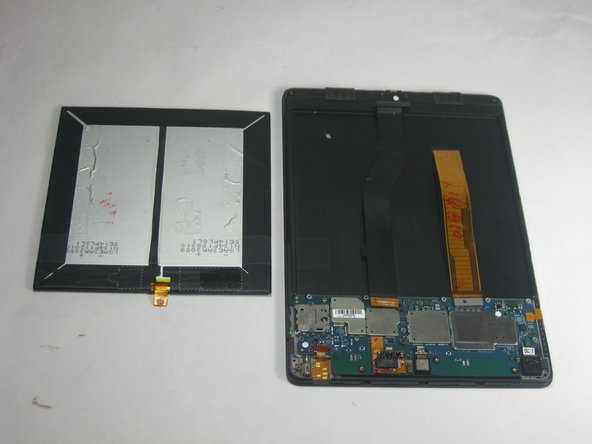
  6. Xiaomi Mi Pad Battery Replacement: шаг 6, изображение 1 из 1
    • Carefully pry around the perimeter of the battery with a plastic opening tool to loosen the adhesive securing the battery to the device.

    • Be gentle when removing the battery, as lithium-ion batteries should not be bent or punctured.

    Спросите у FixBot

    Добавить комментарий

  7. Xiaomi Mi Pad Battery Replacement: шаг 7, изображение 1 из 3 Xiaomi Mi Pad Battery Replacement: шаг 7, изображение 2 из 3 Xiaomi Mi Pad Battery Replacement: шаг 7, изображение 3 из 3
    • If you disconnected all three connectors, the charging port ribbon cable may have a small amount of adhesive securing it to the battery. Gently pry the cable free of the battery and lift the battery up and out of the device.

    Спросите у FixBot

    Добавить комментарий

Заключение

To reassemble your device, follow these instructions in reverse order.

Отменить: Я не выполнил это руководство.

19 человек успешно провели ремонт по этому руководству.

Jessica

Участник с: 09/03/15

746 Репутация

1 руководство автора

Команда

USF Tampa, Team 12-5, Blackwell Fall 2015 Участник USF Tampa, Team 12-5, Blackwell Fall 2015

USFT-BLACKWELL-F15S12G5

3 членов

Автор 14 руководств

12 Комментарии к руководству

Hi

Great Tutorial, but where can i buy a replacement Battery?

THANKS

Marcel - Ответить Поделиться

Go to Leamington road and you will get it

affan - Ответить Поделиться

Go to Leamington road mumbai

affan - Ответить Поделиться

Where to purchase the Mi Paf battery?

Dino Bay - Ответить Поделиться

Please please make a video for it. I need it desperately.

Man Mohan Shukla - Ответить Поделиться

Добавить комментарий

Статистика просмотров:

За последние 24 часов: 5

За последние 7 дней: 31

За последние 30 дней: 213

За всё время: 29,313