Перейти к основному содержанию

iMac 2019 Display Separation

Абсолютно необходимое руководство
Это руководство только для предварительной подготовки! Этот гайд является частью другой процедуры и не предназначен для самостоятельного использования.

Выберете то, что вам нужно

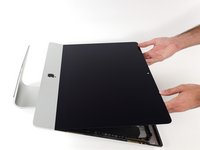
  1. iMac 2019 Display Separation, Separate the display: шаг 1, изображение 1 из 2 iMac 2019 Display Separation, Separate the display: шаг 1, изображение 2 из 2
    • Lift the display up to a near-vertical position.

    • At this point there is still a strip of adhesive along the bottom of the display that will hold the display to the frame like a hinge. You can loosen this adhesive by working the display up and down a few times.

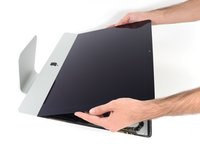
  2. iMac 2019 Display Separation: шаг 2, изображение 1 из 3 iMac 2019 Display Separation: шаг 2, изображение 2 из 3 iMac 2019 Display Separation: шаг 2, изображение 3 из 3
    Инструмент, используемый на этом этапе:
    Plastic Cards
    $2.99
    • If necessary, a plastic card can be used to cut any remaining sections of the bottom adhesive strip.

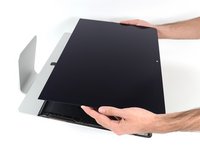
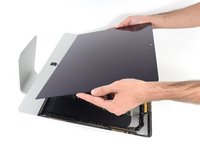
  3. iMac 2019 Display Separation: шаг 3, изображение 1 из 3 iMac 2019 Display Separation: шаг 3, изображение 2 из 3 iMac 2019 Display Separation: шаг 3, изображение 3 из 3
    • Lift the display up from the frame and remove it from the iMac.

    • It may be necessary to slowly lift from one side to peel against the remaining adhesive.

    • Be very careful handling the display—it's big, heavy, and made of glass.

    • After the adhesive is cut, it cannot be used to re-seal the display in place. Follow this guide to replace the adhesive strips that secure the display to the rear enclosure.

Заключение

To reassemble your device, follow these instructions in reverse order.

Adam O'Camb

Участник с: 04/11/15

217 938 Репутация

Автор 416 руководств

0 Комментарии к руководству

Добавить комментарий

Статистика просмотров:

За последние 24 часов: 0

За последние 7 дней: 1

За последние 30 дней: 7

За всё время: 268