Перейти к основному содержанию
Присоединяйся к сообществу ремонтников - Создай аккаунт

iMac Intel 27" EMC 2429 RAM Replacement

Просмотров: 89 тыс.

Просмотр статистики:

За последние 24 часа:
7
За последние 7 дней:
45
За последние 30 дней:
205
За все время:
88 581
Комментарии: 28

13 комментариев к шагам, 15 комментариев к инструкции.

Перейти к комментариям инструкции
Завершено: 93

93 пользователей отметили эту инстркукцию как "завершенное". Вы будете следующим?

Избранные: 58

58 эта инструкция понравилась многим пользователям (и они подписались на нее). Вы будете следующим?

Необходимое время: 5 - 10 минут
Сложность: Легко
Предлагаемое руководство

Эта инструкция была специально выделена сотрудниками iFixit.

iMac Intel 27" EMC 2429 RAM Replacement

This guide will help you replace the RAM.

Выберете то, что Вам нужно

Ремонтный комплект

Этот комплект содержит все детали и инструменты, используемые в инструкции.

Запчасти

Инструменты

    1. iMac Intel 27" EMC 2429 RAM Replacement, Access Door: шаг 1, изображение 1 из 2 iMac Intel 27" EMC 2429 RAM Replacement, Access Door: шаг 1, изображение 2 из 2
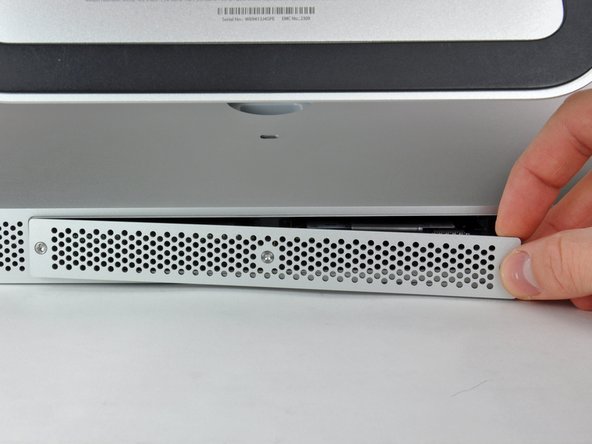
      • Loosen the three Phillips screws securing the access door to the bottom edge of your iMac.

      • These screws will remain captive in the access door.

      • Remove the access door from your iMac.

      • During reassembly, fasten the access door loosely and align it with the pocket cut into the outer case of the iMac before fully tightening the screws.

      Спросите у FixBot

      Добавить комментарий

    1. iMac Intel 27" EMC 2429 RAM Replacement, RAM: шаг 2, изображение 1 из 1
      • Use your fingers or the tip of a spudger to slide the black plastic RAM tray pull tab out of the RAM slot.

      Спросите у FixBot

      Добавить комментарий

    2. iMac Intel 27" EMC 2429 RAM Replacement: шаг 3, изображение 1 из 2 iMac Intel 27" EMC 2429 RAM Replacement: шаг 3, изображение 2 из 2
      • Pull the black plastic tab away from the iMac to eject the RAM chip from its socket.

      • The RAM modules are firmly seated and may require a fair amount of force to remove.

      • Use your fingers to slide the RAM chip out of its socket.

      • If necessary, repeat this process for the other RAM module(s).

      Спросите у FixBot

      Добавить комментарий

Заключение

To reassemble your device, follow these instructions in reverse order.

Отменить: Я не выполнил это руководство.

93 человек успешно провели ремонт по этому руководству.

Phillip Takahashi

Участник с: 08/22/11

88 111 Репутация

Автор 87 руководств

15 Комментарии к руководству

My iMac 21.5-inch Mid 2011 has EMC 2428, but still directions turned out to be the same.

I replaced the memory in my MacBook Pro, and used the old cards (2x2GB) to fill out the 2 empty slots that apple left empty, doubled the memory of 2 machines for the price of one ^_^

Mabel - Ответить Поделиться

So confused. I have an end 2429 and I ordered some memory hut its says notebook memory, do these machines use the same type of ram?

Kosta Kritikos - Ответить Поделиться

Thanks ifixit team, I did it. It is really piece of cake! Thanks again!

prelude0214 - Ответить Поделиться

What's the real max capacity for the RAM?

Angel Pimienta - Ответить Поделиться

16 Gb (4 x 4 Gb) DDR3 1333 MHz

Aleksei Marinichev - Ответить Поделиться

Добавить комментарий

Статистика просмотров:

За последние 24 часов: 7

За последние 7 дней: 45

За последние 30 дней: 205

За все время: 88,581