Перейти к основному содержанию
Присоединяйся к сообществу ремонтников - Создай аккаунт

the Nokia 6230b Camera Replacement

Выберете то, что вам нужно

  1. the Nokia 6230b Camera Replacement, Back Cover: шаг 1, изображение 1 из 1
    • Press down the button on the back panel.

    Спросите у FixBot

    Добавить комментарий

  2. the Nokia 6230b Camera Replacement: шаг 2, изображение 1 из 2 the Nokia 6230b Camera Replacement: шаг 2, изображение 2 из 2
    • Push the back cover upwards.

    Спросите у FixBot

    Добавить комментарий

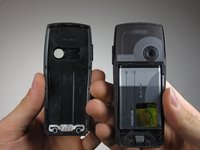
  3. the Nokia 6230b Camera Replacement: шаг 3, изображение 1 из 2 the Nokia 6230b Camera Replacement: шаг 3, изображение 2 из 2
    • Remove the back cover from the phone.

    Спросите у FixBot

    Добавить комментарий

  4. the Nokia 6230b Camera Replacement, Front Cover: шаг 4, изображение 1 из 1
    • Press the silver button on the top of the phone.

    Спросите у FixBot

    Добавить комментарий

  5. the Nokia 6230b Camera Replacement: шаг 5, изображение 1 из 1
    • Slide your thumbnail down the case seam to separate the rest of the case.

    Спросите у FixBot

    Добавить комментарий

  6. the Nokia 6230b Camera Replacement: шаг 6, изображение 1 из 1
    • Gently remove the case.

    • Careful! Do not bend the plastic tabs.

    Спросите у FixBot

    Добавить комментарий

  7. the Nokia 6230b Camera Replacement, Motherboard: шаг 7, изображение 1 из 2 the Nokia 6230b Camera Replacement, Motherboard: шаг 7, изображение 2 из 2
    • Using a T6 Torx Screwdriver, unscrew and remove the six screws shown in the picture.

    Спросите у FixBot

    Добавить комментарий

  8. the Nokia 6230b Camera Replacement: шаг 8, изображение 1 из 2 the Nokia 6230b Camera Replacement: шаг 8, изображение 2 из 2
    • Remove the panel that covers the motherboard.

    • If replacing the speaker, stop at this step and skip forward to the first step of the speaker guide.

    Спросите у FixBot

    Добавить комментарий

  9. the Nokia 6230b Camera Replacement: шаг 9, изображение 1 из 1
    • Remove the LCD screen frame.

    Спросите у FixBot

    Добавить комментарий

  10. the Nokia 6230b Camera Replacement: шаг 10, изображение 1 из 1
    • Remove the motherboard.

    Спросите у FixBot

    Добавить комментарий

  11. the Nokia 6230b Camera Replacement, Camera: шаг 11, изображение 1 из 1
    • Locate the camera on the circuit board.

    Спросите у FixBot

    Добавить комментарий

  12. the Nokia 6230b Camera Replacement: шаг 12, изображение 1 из 1
    • Place the circuit board on a firm, static free surface (no cloth/carpet).

    • NOTE: The circled alignment notch points to the left.

    Спросите у FixBot

    Добавить комментарий

  13. the Nokia 6230b Camera Replacement: шаг 13, изображение 1 из 1
    • Pull the left holding tabs to the left.

    Спросите у FixBot

    Добавить комментарий

  14. the Nokia 6230b Camera Replacement: шаг 14, изображение 1 из 1
    • Lift out the left side of the camera.

    Спросите у FixBot

    Добавить комментарий

  15. the Nokia 6230b Camera Replacement: шаг 15, изображение 1 из 1
    • Pull the right holding tabs to the right.

    Спросите у FixBot

    Добавить комментарий

  16. the Nokia 6230b Camera Replacement: шаг 16, изображение 1 из 1
    • Pull camera off of board.

    Спросите у FixBot

    Добавить комментарий

Заключение

To reassemble your device, follow these instructions in reverse order.

Отменить: Я не выполнил это руководство.

2 человек успешно провели ремонт по этому руководству.

Job Jao

Участник с: 10/08/10

37 Репутация

Автор 2 руководств

Команда

Cal Poly, Team 3-27, Regan Fall 2010 Участник Cal Poly, Team 3-27, Regan Fall 2010

CPSU-REGAN-F10S3G27

4 членов

Автор 17 руководств

0 Комментарии к руководству

Добавить комментарий

Статистика просмотров:

За последние 24 часов: 0

За последние 7 дней: 7

За последние 30 дней: 41

За всё время: 2,209