Перейти к основному содержанию

why! N131WU/BU/ZU RAM Replacement

Выберете то, что вам нужно

  1. why! N131WU/BU/ZU RAM Replacement, Remove the Screws: шаг 1, изображение 1 из 1
    • Remove the case screws (red) and the keyboard screws (green).

    • Be sure not to lose these screws. You will need them to reassemble your laptop.

  2. why! N131WU/BU/ZU RAM Replacement, Remove the Keyboard: шаг 2, изображение 1 из 3 why! N131WU/BU/ZU RAM Replacement, Remove the Keyboard: шаг 2, изображение 2 из 3 why! N131WU/BU/ZU RAM Replacement, Remove the Keyboard: шаг 2, изображение 3 из 3
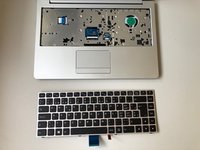
    • Using the hole provided under the case (see picture), push the keyboard out using a thin screwdriver or some other solid object.

    • Hold onto the keyboard as you push the keyboard so as not to damage the two cables still attached.

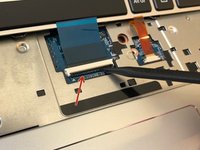
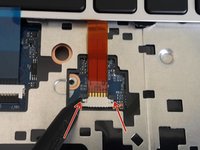
  3. why! N131WU/BU/ZU RAM Replacement, Remove Keyboard Connections: шаг 3, изображение 1 из 3 why! N131WU/BU/ZU RAM Replacement, Remove Keyboard Connections: шаг 3, изображение 2 из 3 why! N131WU/BU/ZU RAM Replacement, Remove Keyboard Connections: шаг 3, изображение 3 из 3
    • (Blue Cable) Push up on the thin black portion on the connector and gently pull out the blue ribbon cable until it comes out.

    • (Orange Cable) Remove the orange cable by sliding the gray part of the connector towards the screen, then gently pull on the ribbon cable.

  4. why! N131WU/BU/ZU RAM Replacement, Remove the upper screws: шаг 4, изображение 1 из 2 why! N131WU/BU/ZU RAM Replacement, Remove the upper screws: шаг 4, изображение 2 из 2
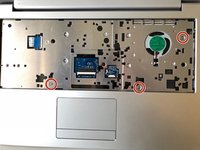
    • Unscrew the three screws that were under the keyboard. Be sure to hold onto these.

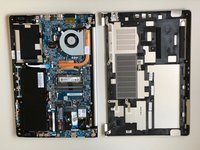
    • After these are removed, you can now remove the lower part of the case from the rest of the computer.

  5. why! N131WU/BU/ZU RAM Replacement, RAM (Memory): шаг 5, изображение 1 из 3 why! N131WU/BU/ZU RAM Replacement, RAM (Memory): шаг 5, изображение 2 из 3 why! N131WU/BU/ZU RAM Replacement, RAM (Memory): шаг 5, изображение 3 из 3
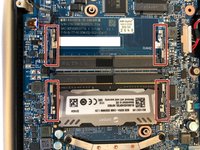
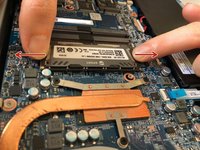
    • Gently pull outwards on the clips to free the RAM stick.

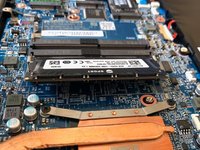
    • Remove the RAM Stick from its slot.

Заключение

To reassemble your device, follow the instructions in reverse order.

Особая благодарность этим переводчикам:

fr en

100%

Эти переводчики помогают нам починить мир! Хотите внести свой вклад?
Начните переводить ›

Felice Suglia

Участник с: 06/15/13

33 538 Репутация

Автор 283 руководств

0 Комментарии к руководству

Добавить комментарий

Статистика просмотров:

За последние 24 часов: 0

За последние 7 дней: 2

За последние 30 дней: 3

За всё время: 533