Перейти к основному содержанию

why! W650SZ Hard Drive Replacement

Выберете то, что вам нужно

  1. why! W650SZ Hard Drive Replacement, Battery: шаг 1, изображение 1 из 3 why! W650SZ Hard Drive Replacement, Battery: шаг 1, изображение 2 из 3 why! W650SZ Hard Drive Replacement, Battery: шаг 1, изображение 3 из 3
    • Slide the latch on the right to the unlocked position.

    • Slide the latch on the left to the unlocked position.

    • Remove the battery pack from the slot.

  2. why! W650SZ Hard Drive Replacement, why! W650SZ Bottom Cover Replacement: шаг 2, изображение 1 из 3 why! W650SZ Hard Drive Replacement, why! W650SZ Bottom Cover Replacement: шаг 2, изображение 2 из 3 why! W650SZ Hard Drive Replacement, why! W650SZ Bottom Cover Replacement: шаг 2, изображение 3 из 3
    • With your #0 Philips screwdriver remove the 2 screws from the bottom panel.

    • Now you can remove the bottom cover.

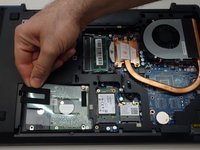
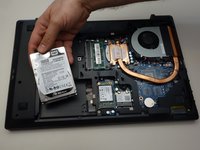
  3. why! W650SZ Hard Drive Replacement, Hard Drive: шаг 3, изображение 1 из 2 why! W650SZ Hard Drive Replacement, Hard Drive: шаг 3, изображение 2 из 2
    • Lift out the plastic tab (including the rubber part that holds the HDD in its slot).

    • Slide the drive to the left to disengage the connector then lift to remove the HDD from its SATA3 port.

Заключение

To reassemble your device, follow these instructions in reverse order.

Особая благодарность этим переводчикам:

fr en

100%

Jerry Wheeler помогает нам починить мир! Хотите внести свой вклад?
Начните переводить ›

Felice Suglia

Участник с: 06/15/13

33 538 Репутация

Автор 283 руководств

0 Комментарии к руководству

Добавить комментарий

Статистика просмотров:

За последние 24 часов: 0

За последние 7 дней: 1

За последние 30 дней: 4

За всё время: 205