Перейти к основному содержанию

Выберете то, что вам нужно

Эта разборка - неруководство по ремонту. Чтобы отремонтировать CANDY CON Wireless Controller, воспользуйтесь нашим сервисным руководством.

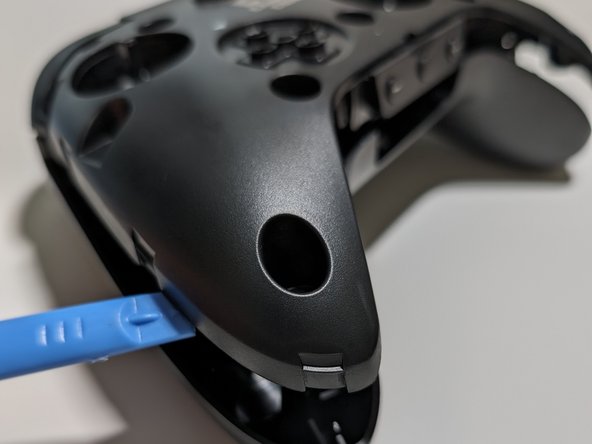
  1. CANDY CON Wireless Controller Teardown, Remove the faceplate: шаг 1, изображение 1 из 2 CANDY CON Wireless Controller Teardown, Remove the faceplate: шаг 1, изображение 2 из 2
    • Locate the indentation on the bottom of the controller

    • Pull the faceplate off using a fingernail or spudger

  2. CANDY CON Wireless Controller Teardown, Remove Joysticks and D-pad: шаг 2, изображение 1 из 2 CANDY CON Wireless Controller Teardown, Remove Joysticks and D-pad: шаг 2, изображение 2 из 2
    • Remove both joysticks and the D-pad by carefully pulling up

  3. CANDY CON Wireless Controller Teardown, Begin opening the base controller: шаг 3, изображение 1 из 3 CANDY CON Wireless Controller Teardown, Begin opening the base controller: шаг 3, изображение 2 из 3 CANDY CON Wireless Controller Teardown, Begin opening the base controller: шаг 3, изображение 3 из 3
    • Remove 8 Phillips screws with a Philips #1 screwdriver

    • Pry open the two main pieces by pulling up on the edges of the controller

  4. CANDY CON Wireless Controller Teardown, Finish opening the base controller: шаг 4, изображение 1 из 2 CANDY CON Wireless Controller Teardown, Finish opening the base controller: шаг 4, изображение 2 из 2
    • Separate the controller by flipping it on its face and then prying up near the bottom buttons

  5. CANDY CON Wireless Controller Teardown, Unplug the battery: шаг 5, изображение 1 из 1
    • Unplug the battery using a spudger tool

  6. CANDY CON Wireless Controller Teardown, Unscrew the mainboard: шаг 6, изображение 1 из 1
    • Unscrew the 2 Phillips #1 screws securing the mainboard to the controller housing

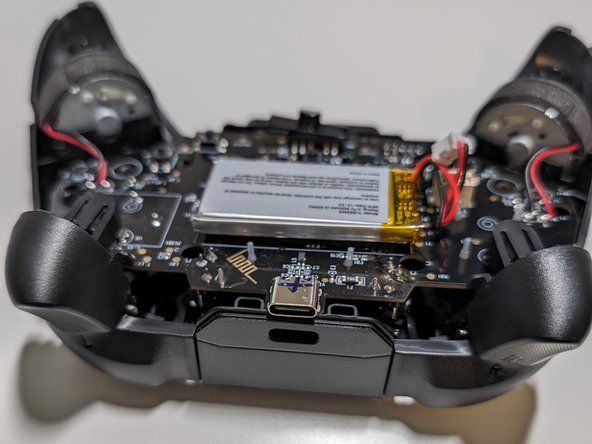
  7. CANDY CON Wireless Controller Teardown, Remove the mainboard and haptic motors: шаг 7, изображение 1 из 3 CANDY CON Wireless Controller Teardown, Remove the mainboard and haptic motors: шаг 7, изображение 2 из 3 CANDY CON Wireless Controller Teardown, Remove the mainboard and haptic motors: шаг 7, изображение 3 из 3
    • Carefully remove the mainboard and attached haptic motors by pulling it up from the bottom and then top

    • Be careful removing the haptic motors to ensure the wires do not break

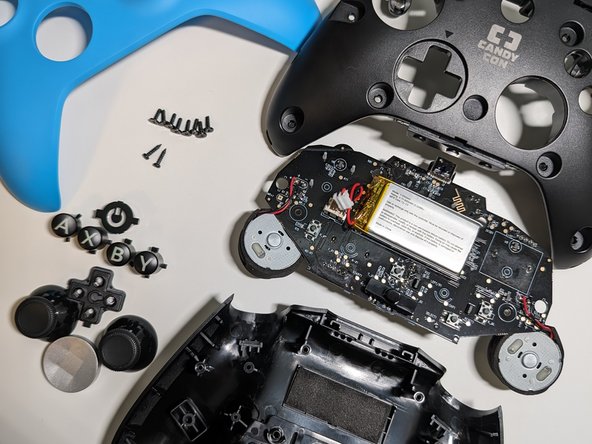
  8. CANDY CON Wireless Controller Teardown, Teardown Complete!: шаг 8, изображение 1 из 2 CANDY CON Wireless Controller Teardown, Teardown Complete!: шаг 8, изображение 2 из 2
    • All buttons are keyed so they can only go in the exact spot they belong

  9. CANDY CON Wireless Controller Teardown, Reassembly tips: шаг 9, изображение 1 из 3 CANDY CON Wireless Controller Teardown, Reassembly tips: шаг 9, изображение 2 из 3 CANDY CON Wireless Controller Teardown, Reassembly tips: шаг 9, изображение 3 из 3
    • Follow the teardown guide in reverse to reassemble the controller

    • When reassembling the controller align the bottom buttons first and then work on the charging port side

    • Test all the buttons before or right after screwing in the mainboard

    • The D-pad has an arrow on the top that should point up (towards the arrow on the base controller)

Roger

Участник с: 04/23/24

229 Репутация

1 руководство автора

0 Комментарии к руководству

Добавить комментарий

Статистика просмотров:

За последние 24 часов: 3

За последние 7 дней: 6

За последние 30 дней: 39

За всё время: 909